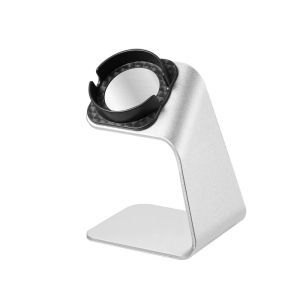
Aluminum Alloy Charging Bracket Stand Holder Station Dock For Huawei GT2 GT3 PRO Watch 3 PRO Charger Cable For Wireless Charge

Introduction to the Aluminum Alloy Charging Bracket Stand
The Aluminum Alloy Charging Bracket Stand Holder Station Dock is a must-have accessory for any Huawei GT2, GT3 PRO, and Watch 3 PRO owner. This high-quality charger cable holder provides a sleek and stylish way to charge your watch wirelessly while keeping your workspace organized and clutter-free. In this article, we will explore the features, benefits, and usage of this innovative charging solution.
Overview of the Charger & Its Features
The Aluminum Alloy Charging Bracket Stand is made from premium aluminum alloy, ensuring durability and longevity. It supports wireless charging for Huawei GT2, GT3 PRO, and Watch 3 PRO watches, allowing you to charge your device quickly and efficiently. The compact design makes it easy to place on your desk, nightstand, or any other flat surface.
Comparison with Other Charging Solutions
Compared to traditional charging docks, the Aluminum Alloy Charging Bracket Stand offers several advantages. Firstly, its sleek design makes it an attractive addition to any workspace, while its compact size ensures it doesn't take up valuable desk space. Additionally, the wireless charging feature eliminates the need for messy cables, providing a cleaner and more organized environment.
How to Use the Aluminum Alloy Charging Bracket Stand
Using the Aluminum Alloy Charging Bracket Stand is simple and straightforward. Follow these steps to get started:
- Place the stand on a flat surface, such as a desk or nightstand.
- Align your Huawei watch with the charging area on the stand.
- Press the watch gently onto the charging area to initiate wireless charging.
- Monitor the charging progress through your watch's display.
Troubleshooting Common Issues
If you experience any issues with the Aluminum Alloy Charging Bracket Stand, here are some troubleshooting tips:
- Ensure the watch is properly aligned with the charging area.
- Check that the stand is placed on a flat surface.
- Make sure there are no obstructions between the watch and the charging area.
- Verify that your Huawei watch supports wireless charging.
Benefits of Using the Aluminum Alloy Charging Bracket Stand
Using the Aluminum Alloy Charging Bracket Stand offers several benefits, including:
- Enhanced aesthetics and organization: The sleek design and compact size make it an attractive addition to any workspace, while its wireless charging feature eliminates messy cables.
- Increased efficiency and convenience: The stand allows you to charge your Huawei watch quickly and efficiently, without the need for cables or adapters.
Enhanced Aesthetics & Organization
The Aluminum Alloy Charging Bracket Stand is designed to enhance the aesthetics of your workspace. Its sleek and compact design makes it an attractive addition to any desk or nightstand, while its wireless charging feature eliminates messy cables and keeps your workspace clutter-free.
Increased Efficiency & Convenience
The stand provides increased efficiency and convenience by allowing you to charge your Huawei watch quickly and efficiently. The wireless charging feature eliminates the need for cables or adapters, making it easier to charge your device on-the-go.
Conclusion: Why Choose the Aluminum Alloy Charging Bracket Stand?
The Aluminum Alloy Charging Bracket Stand is an excellent choice for any Huawei GT2, GT3 PRO, and Watch 3 PRO owner. Its sleek design, compact size, and wireless charging feature make it an attractive addition to any workspace, while its increased efficiency and convenience provide a better charging experience. With its durable construction and support for multiple Huawei watch models, the Aluminum Alloy Charging Bracket Stand is a must-have accessory for any tech-savvy individual.

ToKerNew
You May Also Like

Smartifact MXQ TV98 ATV Pro: A Comprehensive Guide\\n\\n Overview of Smartifact MXQ TV98 ATV Pro\\n\\nThe Smartifact MXQ TV98 ATV Pro is an ultra HD 8K smart TV box that supports 2.4G/5G dual WiFi and runs on Android 14.0. This powerful media player comes equipped with 8+128GB storage, making it perfect for streaming high-quality content and storing media files. It features an infrared learning remote control and supports DLNA, AirPlay, and Miracast TV receivers.\\n\\n Key Features\\n\\n- Ultra HD 8K Smart TV Box\\n- 8+128GB Storage\\n- 2.4G/5G Dual WiFi Support\\n- Android 14.0 Media Player\\n- Infrared Learning Remote Control\\n- DLNA, AirPlay, and Miracast TV Receivers\\n\\n Hardware Specifications\\n\\nThe Smartifact MXQ TV98 ATV Pro comes with a quad-core Allwinner H313 processor, providing excellent performance for streaming high-quality content and running multiple applications simultaneously. It has 8GB RAM and 128GB internal storage, allowing users to store large amounts of media files and install numerous applications.\\n\\n Supported Protocols\\n\\nThe Smartifact MXQ TV98 ATV Pro supports various protocols, including DLNA, AirPlay, and Miracast, enabling seamless streaming from devices like smartphones, tablets, and laptops. It also supports dual WiFi connectivity, allowing users to connect to both 2.4GHz and 5GHz bands for optimal network performance.\\n\\n Setting Up Your Smartifact MXQ TV98 ATV Pro\\n\\n Connecting HDMI Cable\\n\\nTo connect your Smartifact MXQ TV98 ATV Pro to your TV, simply plug one end of the HDMI cable into the smart TV box and the other end into your TV's HDMI port. Power on your TV and select the appropriate input source to begin using your new smart TV box.\\n\\n Configuring Dual WiFi\\n\\nConfiguring dual WiFi on your Smartifact MXQ TV98 ATV Pro is straightforward. Open the settings menu, navigate to the Wi-Fi section, and select your preferred network. Choose between 2.4GHz and 5GHz bands depending on your network setup and desired performance.\\n\\n Infrared Learning Remote Control\\n\\nThe Smartifact MXQ TV98 ATV Pro comes with an infrared learning remote control, allowing you to program it to work with your existing devices. To learn a new device, press and hold the \"Learn\" button on the remote control until the LED light turns red. Then press the button on the device you want to learn, and the remote control will automatically program itself.\\n\\n Using Smartifact MXQ TV98 ATV Pro\\n\\n Navigating the User Interface\\n\\nThe Smartifact MXQ TV98 ATV Pro features a user-friendly interface that allows you to easily navigate through various menus and settings. You can access the home screen, installed applications, and settings menu using the remote control.\\n\\n Streaming Content\\n\\nWith the Smartifact MXQ TV98 ATV Pro, you can stream high-quality content from popular streaming services like Netflix, Hulu, and Amazon Prime Video. Simply download the app from the Google Play Store and log in to your account to start streaming.\\n\\n Media Player Functionality\\n\\nThe Smartifact MXQ TV98 ATV Pro serves as a powerful media player, allowing you to play various media files stored on your device or connected external storage. It supports a wide range of file formats, including MP4, MKV, AVI, and more.\\n\\n Troubleshooting Common Issues\\n\\n Connectivity Problems\\n\\nIf you're experiencing connectivity issues with your Smartifact MXQ TV98 ATV Pro, check the following:\\n\\n- Ensure that your TV and smart TV box are connected via HDMI cable.\\n- Verify that your Wi-Fi network is functioning correctly.\\n- Restart your router and try reconnecting to the network.\\n\\n Remote Control Malfunctions\\n\\nIf your remote control isn't working properly, try the following:\\n\\n- Replace the batteries.\\n- Check if the remote control is paired with the smart TV box.\\n- Reset the remote control by pressing and holding the \"Menu\" and \"OK\" buttons simultaneously for 10 seconds.\\n\\n System Updates & Maintenance\\n\\nTo keep your Smartifact MXQ TV98 ATV Pro running smoothly, regularly check for system updates and perform maintenance tasks such as clearing cache and deleting unused applications.\\n\"\n}

29mm Blue Pilot Style Diving Watch Dial and Hand Sets With C3 Green Luminous Fit NH35 Movement Replacement Watch Parts Accessory

Protective Case for Apple Watch Series 8 41mm 45mm Shell Plating Soft Rubber Protector Case For i watch 7 Protective Cover Frame
![[COD] CHYIN 4.5 inch 115mm universal audio speaker stereo woofer repair surround foam edge](https://img.lazcdn.com/g/p/6ef766ae662747668c64edce1d3c8652.jpg_300x300q80.jpg)
[COD] CHYIN 4.5 inch 115mm universal audio speaker stereo woofer repair surround foam edge

Charging Stand for One Series 2 Game Controller with Type-C Cable Charging Holder Portable

For Airtag Ultra Thin Card Case Flexible For Apple Airtag Card Holder Lightweight Wallet Card Case Cover Protective Case

Universal 1/4 Inches Male To Male Flexible Screw Adapters Rod For DSLR Action Cameras Light Stands Phone Mounts

Efficient Gamepad Dock For NS2 Two Controllers With Adjustable Colorful Lights And Stable Nonslip Base

Colorful Bling Crystal Rainbow Mobile Phone Lanyard Bag Pendant Wheel Shape Flashing Design Purple Pink Green Mobile Chain

BAVIN PC1121 10000mAh 30W PD Fast Charging Powerbank w/ Built-in 60cm Retractable Type-C / iPh Cable

VIVO V40 Lite Phone Case: A Stylish & Protective Addition