Soldering Microscope Camera: G1000 Electronic Microscope
Soldering Microscope Camera: G1000 Electronic Microscope
Introduction to the G1000 Electronic Microscope
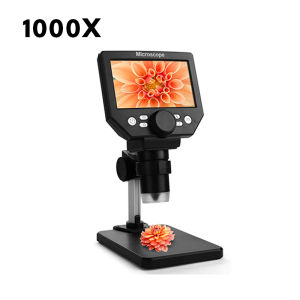
The G1000 Electronic Microscope is a powerful digital microscope designed specifically for soldering, PCB inspection, phone repair, and other scenarios requiring precise magnification. This versatile and portable device is perfect for professionals and hobbyists alike, offering high-quality images and videos, an easy-to-use interface, and a wide range of applications.
Key Features & Benefits
The G1000 Electronic Microscope boasts several features that make it stand out from other microscopes on the market:
-
4.3-inch HD LCD Display: This high-definition display allows for clear and convenient observation of images, whether you're taking photos, videos, or performing image analysis and testing.
-
Continuous Zoom (1-1000X): The lens supports continuous zoom from 1X to 1000X, adapting to various scenarios and applications.
-
Rotatable Bracket: The microscope comes with a rotatable bracket, allowing you to adjust the viewing angle to meet your specific needs.
-
Real-Time Viewing on PC: Connect the microscope to a computer via USB cable and view objects on the PC display, enabling multiple people to observe at the same time.
-
Easy-to-Use Interface & Software: The electronic display has the characteristics of easy use, plug-and-play, high definition, and high brightness.
Comparison with Other Microscopes
Compared to other microscopes, the G1000 Electronic Microscope offers several advantages:
-
Higher Magnification: The G1000 supports continuous zoom up to 1000X, providing greater magnification compared to many other microscopes.
-
Portability: The G1000 is lightweight and portable, making it easy to transport and use in various settings.
-
Real-Time Viewing: The ability to view objects on a PC display via USB connection is a unique feature that sets the G1000 apart from other microscopes.
How to Use the G1000 Electronic Microscope
Using the G1000 Electronic Microscope is simple and straightforward. Follow these steps to get started:
Setting Up the Microscope
-
Place the microscope on a stable surface.
-
Adjust the rotatable bracket to the desired viewing angle.
-
Connect the USB cable to your computer if you want to view objects on the PC display.
Adjusting Zoom & Focus
-
Turn the zoom knob to adjust the magnification level.
-
Use the focus knob to bring the object into sharp focus.
Capturing Images & Videos
-
Press the shutter button to capture images or start recording videos.
-
Use the software interface to save images and videos to your computer.
Applications of the G1000 Electronic Microscope
The G1000 Electronic Microscope is a versatile device with numerous applications, including:
PCB Inspection & Repair
The G1000's high magnification and clear display make it ideal for inspecting and repairing PCBs. With its continuous zoom feature, you can easily identify and fix issues on even the smallest components.
Phone Repair & Maintenance
The G1000 is perfect for phone repair and maintenance tasks, such as replacing screen glass, fixing camera modules, and repairing internal components. Its high-resolution images and videos help ensure precise work.
Other Uses & Scenarios
In addition to soldering, PCB inspection, and phone repair, the G1000 Electronic Microscope can be used for various other applications, including:
-
Jewelry Inspection: Inspect and analyze jewelry components for quality control purposes.
-
Microelectronics: Examine microelectronic devices and components for research and development purposes.
-
Education: Use the microscope in educational settings to teach students about microscopy and related subjects.
Advantages of the G1000 Electronic Microscope
The G1000 Electronic Microscope offers several advantages over other microscopes:
High-Quality Images & Videos
The G1000's 4.3-inch HD LCD display provides high-resolution images and videos, allowing you to observe objects in great detail.
Easy-to-Use Interface & Software
The electronic display has the characteristics of easy use, plug-and-play, high definition, and high brightness, making it simple to operate.
Versatile & Portable Design
The G1000 is lightweight and portable, making it easy to transport and use in various settings. Its continuous zoom feature and rotatable bracket allow for flexible viewing angles and magnification levels.

anditool3.ph
Review

You May Also Like

10pcs Metallic Latex Balloons: High-End Wedding Party Decorations
![[COD] Undis Cartoon Bean Bear Plush Toy Lovely Bear Stuffed Doll Keychain Pendant Plush Doll Couple Bag Charms Children Gift](https://img.lazcdn.com/g/p/f171873c7d873ed7a9d3ab099ae649a1.jpg_300x300q80.jpg)
[COD] Undis Cartoon Bean Bear Plush Toy Lovely Bear Stuffed Doll Keychain Pendant Plush Doll Couple Bag Charms Children Gift

Japanese Anime Demon Slayer Kamado Nezuko Cosplay Wig For Women Black-brown Long Curly Hair Tanjirou Sister Wavy Wig Hair Free Bow Ribbon

POPMART CRYBABY SHINY SHINY New Release Dustproof Protective Cover Card Holder Collectible Toy Blind Box Authentic Packaging

4 in 1 Kids 3D Wooden Animal Puzzle Early Educational Toys Cognitive Game Toys For Kids Boys Girls

2025 Mcdonalds Happy Meal Pokemon Dragon Discovery Cards TCG M24EN

Fidget Decompression Keyboard Key Toy For Adults Antistress Toys Boys Girls Anti Stress Finger Keyboard Games Keychain
Makery【Ready in Stock】 Capybara Plush Doll Star Squeak Toy Cartoon Star Keychain Pendant Soft Siamese Cat Stuffed Doll 1Pc
Rainbow Stacking Ring Tower Stapelring Kids Montessoris Toys Teaching Aids Wood Baby Toys Gift Stack

Unleashing Your Creativity: Faceless Man & ToyStory Cosplay Costumes

Kids Music Telephone Toy: A Multi-purpose Educational Tool