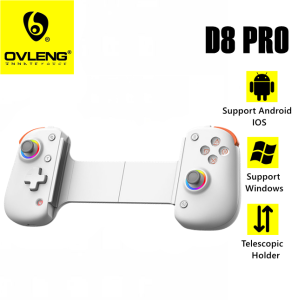
D8 Pro Stretchable Wireless RGB Joystick: A Comprehensive Guide
D8 Pro Stretchable Wireless RGB Joystick: A Comprehensive Guide
Introduction
The D8 Pro Stretchable Wireless RGB Joystick is a versatile gaming controller designed for Android, iOS, and PC users. With its Type-C interface, dual vibration functions, and turbo capabilities, this joystick offers an immersive gaming experience. In this comprehensive guide, we will explore the key features, setup process, usage, customization options, and troubleshooting tips for the D8 Pro.
What is D8 Pro Stretchable Wireless RGB Joystick?
The D8 Pro Stretchable Wireless RGB Joystick is a compact, stretchable, and wireless gaming controller that connects to your device via Bluetooth. It comes equipped with a Type-C interface, allowing easy charging and data transfer. The joystick supports dual vibration and turbo functions, enhancing your gaming experience by providing realistic haptic feedback and customizable button mapping.
Key Features & Specifications
- Stretchable Design: The D8 Pro joystick can be stretched to fit various hand sizes and gaming styles.
- Wireless Connectivity: Connect to your Android, iOS, or PC device using Bluetooth.
- Type-C Interface: Charge the joystick and transfer data using a Type-C cable.
- Dual Vibration: Experience realistic haptic feedback with dual vibration motors.
- Turbo Function: Customize button mapping and enable turbo mode for quick-fire actions.
- RGB Lighting: Personalize your gaming experience with customizable RGB lighting.
Setup & Installation
Unboxing & Components
When you unbox the D8 Pro Stretchable Wireless RGB Joystick, you'll find the following components:
- 1 x D8 Pro Wireless Gaming Controller
- 1 x Type-C Cable
- 1 x User Manual
Connecting to Android/IOS/PC
To connect the D8 Pro joystick to your device, follow these steps:
- Power on the joystick by pressing the power button.
- Enable Bluetooth on your device.
- Search for available devices and select the D8 Pro joystick from the list.
- Follow any additional prompts to complete the connection process.
Configuring Turbo & Dual Vibration Functions
Once connected, you can configure the turbo and dual vibration functions through the settings menu on your device. Refer to the user manual for specific instructions on how to customize these features.
Usage & Customization
How to Use Dual Vibration & Turbo Functions
To use the dual vibration and turbo functions, follow these steps:
- Enter the settings menu on your device.
- Locate the joystick settings and select the desired function.
- Adjust the sensitivity and intensity levels according to your preferences.
- Save your changes and exit the settings menu.
Customizing RGB Lighting
Personalize your gaming experience by customizing the RGB lighting on the D8 Pro joystick. To do this, follow these steps:
- Enter the settings menu on your device.
- Navigate to the RGB lighting settings.
- Choose your preferred color scheme and lighting effects.
- Save your changes and exit the settings menu.
Pairing with Multiple Devices
The D8 Pro joystick allows you to pair with multiple devices simultaneously. To switch between devices, simply disconnect from one device and reconnect to another. Refer to the user manual for more information on pairing with multiple devices.
Troubleshooting & FAQs
Common Issues & Solutions
- Joystick Not Connecting: Ensure Bluetooth is enabled on your device and try restarting both the joystick and your device.
- Poor Battery Life: Charge the joystick fully before use and avoid overcharging.
- RGB Lighting Not Working: Check if the RGB lighting feature is enabled in the settings menu.
Frequently Asked Questions
Q: Is the D8 Pro compatible with all Android and iOS devices? A: Yes, the D8 Pro is compatible with most Android and iOS devices that support Bluetooth connectivity.
Q: Can I use the D8 Pro with my PC? A: Yes, the D8 Pro can be used with PCs running Windows 7 or later operating systems.
Q: Does the D8 Pro come with a warranty? A: Yes, the D8 Pro comes with a limited warranty. Refer to the user manual for details.

Ovleng Philippines
Review

You May Also Like
Dark Pattern Chiffon Chinese Ancient Style Jacquard Hanfu Fabric Nepenthes Burnt Flower Horse-Face Skirt Pleated Skirt Robe Cloak Fabric
IROK Carotmas Mercury68 Magnetic Switch Keyboard Wired E-sports Mechanical Keyboard 8000Hz RT0.004mm Low Delay PC Gamer Gifts
EB-BN985ABY 4500mAh Replacement Battery For Samsung Galaxy Note 20 Ultra Note20 Ultra Phone Batteries+Tools
![[COD] AqToCna Ship within 24 hours Original Smart Remote Control For WANBO Projector Adaptive T1 T2 RMAX T3 X1 Projectors](https://img.lazcdn.com/g/p/d17176c2822ea40390eb7eaec8edbb68.jpg_300x300q80.jpg)
[COD] AqToCna Ship within 24 hours Original Smart Remote Control For WANBO Projector Adaptive T1 T2 RMAX T3 X1 Projectors
Torras Small Ice Block New 45W Compatible with Apple 17 Charger Cable iPhone 17 pro Max Charging Head 16 Phone Data Cable 40 Fast Charge Air Set 15
Portable Handheld Turbo Fan 100 Wind Speeds Adjustable Mini Personal Fan Electric Rechargeable Cooling Fans Summer Supplies
MCDODO Fast Charge 100W Data Cable for Apple iPhone 15 Xiaomi Lenovo Laptop Carplay Vehicle Dual Type-C Flash Charge with Light
For Google Pixel Watch 3 band 45mm Sport Silicone strap Smartwatch Accessories wrist Bracelet Belt Pixel Watch 3 45 mm
Sporter 1Pc Coffee Maker Silicone Brew Head Gasket Seal Ring E61 Silicone Group Gasket 8.5mm Group Head Kit For Coffee Machines
Honor Magic8 pro Silicone Phone Case with Lens Protection Full Cover Anti-Fingerprint Creative Design Suitable for Men And Women
LPO Laptop Battery AS16A8K AS16A5K Compatible with Acer E5 774G 75DQ E5 774G 78JN E5 774G 78NA E5 575G Series