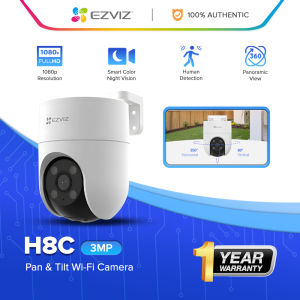
EZVIZ H8C 4MP Outdoor Pan/Tilt Wi-Fi Camera: Smart Night Vision & 360° Coverage

EZVIZ H8C 4MP Outdoor Pan/Tilt Wi-Fi Camera: Smart Night Vision & 360° Coverage

Key Features of the EZVIZ H8C

Elegant Design & Reliable Wi-Fi Connection

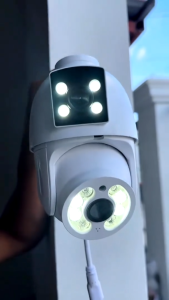
The EZVIZ H8C is a sleek, compact outdoor security camera that seamlessly integrates into your home's exterior design. The camera is equipped with high-performance built-in dual antennas, ensuring stable and strong connections to your Wi-Fi network. The H8C's reliable Wi-Fi connection allows for uninterrupted monitoring and access to live video feeds from anywhere in the world.

High-Quality 360° Pan/Tilt Vision

With its motorized pan/tilt mechanism, the EZVIZ H8C captures every corner of your property, eliminating blind spots in monitoring. The camera delivers sharp images in 1080p resolution, providing clear visuals for both broad scenes and fine details. The H8C's 60-degree vision ensures that there are no gray areas, making it the perfect choice for comprehensive coverage.

Two-Way Audio Communication

The EZVIZ H8C allows you to communicate with visitors, delivery personnel, or guests using two-way audio functionality. With just your smartphone, you can hear and speak to anyone near the camera, even when you're away from home. This feature provides added convenience and security for your family and property.

Installation & Setup Guide

Connecting to Wi-Fi Network

Setting up the EZVIZ H8C is simple and straightforward. First, connect the camera to your Wi-Fi network using the EZVIZ app. The app will guide you through the setup process, ensuring that your camera is properly connected and ready to use.

Positioning the Camera

Positioning the H8C correctly is essential for optimal coverage. Place the camera under the eaves or on an exterior wall, ensuring that it has a clear view of the area you want to monitor. The motorized pan/tilt mechanism allows for flexible positioning, maximizing coverage and minimizing blind spots.

Setting Up Motion Detection & Alerts

Customize motion detection settings to suit your needs. Set the sensitivity level and schedule alerts to notify you when the camera detects movement. The EZVIZ app allows you to receive real-time notifications, ensuring that you're always aware of activity around your property.

Enhancing Security with EZVIZ H8C

Maximizing Coverage with Smart Panning

The H8C's smart panning feature allows for efficient coverage of large areas. The camera automatically adjusts its angle to capture the entire scene, ensuring that no detail is missed. This feature is particularly useful for monitoring large yards, driveways, or entrances.

Recording & Storing Video Footage

Record and store video footage directly to the cloud or an SD card, depending on your preference. The EZVIZ app allows you to easily access and manage your recorded footage, providing a convenient way to review past events.

Sharing Access with Family Members

Share access to the EZVIZ H8C with family members or trusted individuals using the EZVIZ app. This feature enables multiple users to monitor and control the camera, enhancing overall security and peace of mind.

Durability & Reliability

Weatherproof Design

Designed for everyday use, the EZVIZ H8C is built to withstand harsh weather conditions. The camera's weatherproof enclosure ensures long-lasting performance, even in extreme temperatures and heavy rain.

Long-Lasting Performance

The H8C is designed to provide simple, long-lasting protection for every family. Its durable construction and reliable performance make it a valuable addition to any home security system.

One-Year Warranty

Enjoy peace of mind with the EZVIZ H8C's one-year warranty. If any issues arise during the first year of ownership, EZVIZ will repair or replace the camera at no cost to you.

EZVIZ Certified Store
EZVIZ Certified Store

Seller ratings 99%

You May Also Like

A21DjI Safe Quadcopter Drone with 4K Dual Camera Obstacle Avoidance and 360° Wrap-on Protection
00:59

A21DjI Safe Quadcopter Drone with 4K Dual Camera Obstacle Avoidance and 360° Wrap-on Protection

YIZHAN 130X 150X 180X Zoom C-Mount Lens Magnification Adjustable 25mm For Electron Video Microscope Accessories Monocular Camera
00:27

YIZHAN 130X 150X 180X Zoom C-Mount Lens Magnification Adjustable 25mm For Electron Video Microscope Accessories Monocular Camera

RunCam Scope Cam 2: A Comprehensive Guide to the 4K Airsoft Camera
00:07

RunCam Scope Cam 2: A Comprehensive Guide to the 4K Airsoft Camera

Disposable Film Camera 8-36 Shots Optional of Fun Single Use Once Take Pictures Tool ECN2 Color
00:20

Disposable Film Camera 8-36 Shots Optional of Fun Single Use Once Take Pictures Tool ECN2 Color

V380 PRO 3MP CCTV Camera wifi connect 360 Camera Connect to Cellphone wide angle 1080P night vision indoor
00:46

V380 PRO 3MP CCTV Camera wifi connect 360 Camera Connect to Cellphone wide angle 1080P night vision indoor

Coolshotnew mirrorless camera 48 million high SLR digital camera self-timer WiFi
00:45

Coolshotnew mirrorless camera 48 million high SLR digital camera self-timer WiFi

ENDURA RCA Jack to RCA Jack for CCTV pack of 10pcs
00:10

ENDURA RCA Jack to RCA Jack for CCTV pack of 10pcs

Binocular Telescope 80X80 High Power Waterproof Outdoor Telescope on Hand High-Definition Night Vision Optics Outdoor
00:36

Binocular Telescope 80X80 High Power Waterproof Outdoor Telescope on Hand High-Definition Night Vision Optics Outdoor

Ultra HD 4K Action Camera: Wide Angle Helmet Video Recording & Portable Wifi Sports Camera
00:59

Ultra HD 4K Action Camera: Wide Angle Helmet Video Recording & Portable Wifi Sports Camera

X2 Children Mini Digital Camera Can Take Pictures Video Small Slr Toys
00:35

X2 Children Mini Digital Camera Can Take Pictures Video Small Slr Toys

SVBONY SV165 30mm f/4 Compact Ultra-Mini Guide Scope for SV305 ZWO Auto Guiding Cameras
00:50

SVBONY SV165 30mm f/4 Compact Ultra-Mini Guide Scope for SV305 ZWO Auto Guiding Cameras

CCD Music Touch Screen Digital D6 Camera with 640000 Pixels HD Night Vision\\n\\n Introduction to CCD Music Touch Screen Digital D6 Camera\\n\\nThe CCD Music Touch Screen Digital D6 Camera is a cutting-edge surveillance device designed for both indoor and outdoor use. This camera offers an impressive 640000 pixels HD resolution, providing crystal-clear images and videos. It features a touch screen interface, making it easy to navigate and operate. The D6 Camera is equipped with advanced night vision capabilities, ensuring you can monitor your surroundings even in low-light conditions.\\n\\n Overview of D6 Camera Specifications\\n\\nThe CCD Music Touch Screen Digital D6 Camera boasts an impressive set of features that make it stand out from other security cameras on the market. Here are some of its key specifications:\\n\\n- **Resolution**: 640000 pixels HD\\n- **Night Vision**: Up to 30 meters\\n- **Audio**: Two-way audio communication\\n- **Storage**: MicroSD card slot (up to 128GB)\\n- **Connectivity**: Wi-Fi, Ethernet\\n- **Power Supply**: DC 12V\\n\\n Key Features: Night Vision & High Resolution\\n\\nThe CCD Music Touch Screen Digital D6 Camera offers two standout features that make it ideal for home and business security needs:\\n\\n- **Night Vision**: The camera's night vision capabilities allow it to capture clear images and videos even in low-light conditions. With a range of up to 30 meters, you can monitor your surroundings at night without any issues.\\n- **High Resolution**: The D6 Camera features a resolution of 640000 pixels HD, providing crystal-clear images and videos. This high-resolution capability ensures that you can easily identify individuals and objects in your footage.\\n\\n How to Maximize the Benefits of Your CCD Music Digital Camera\\n\\nTo get the most out of your CCD Music Touch Screen Digital D6 Camera, here are some tips and tricks:\\n\\n Setting Up Your Night Vision Touch Screen Camera\\n\\nSetting up your night vision touch screen camera is easy and straightforward. Follow these steps to get started:\\n\\n1. Connect the camera to a power source using the provided DC 12V adapter.\\n2. Connect the camera to your Wi-Fi network using the touch screen interface.\\n3. Set up the camera's settings, such as motion detection, audio, and storage.\\n4. Position the camera in a strategic location to ensure optimal coverage of your monitored area.\\n\\n Exploring the Advanced Features of HD Night Vision\\n\\nThe CCD Music Touch Screen Digital D6 Camera offers a range of advanced features that enhance its night vision capabilities. Here are some of the features you can explore:\\n\\n- **Motion Detection**: The camera can detect motion and trigger alerts, allowing you to stay informed about any activity in your monitored area.\\n- **Two-Way Audio Communication**: The camera allows for two-way audio communication, enabling you to communicate with individuals in your monitored area.\\n- **MicroSD Card Slot**: The camera has a MicroSD card slot, allowing you to store footage directly on the camera.\\n\\n Troubleshooting Common Issues with CCD Music Digital Camera\\n\\nWhile the CCD Music Touch Screen Digital D6 Camera is designed to be reliable and user-friendly, there may be instances where you encounter issues. Here are some common problems and their solutions:\\n\\n Addressing Pixel Quality Concerns\\n\\nIf you notice pixelation or blurriness in your footage, try adjusting the camera's settings to improve the image quality. You can also try cleaning the camera lens to remove any dust or debris that may be affecting the image quality.\\n\\n Enhancing Night Vision Performance\\n\\nIf you're experiencing issues with the camera's night vision performance, try adjusting the camera's settings to optimize its performance. You can also try positioning the camera in a different location to improve its coverage of your monitored area.\\n\\nBy following these tips and tricks, you can maximize the benefits of your CCD Music Touch Screen Digital D6 Camera and ensure that it provides reliable security for your home or business.\n}
00:59

CCD Music Touch Screen Digital D6 Camera with 640000 Pixels HD Night Vision\\n\\n Introduction to CCD Music Touch Screen Digital D6 Camera\\n\\nThe CCD Music Touch Screen Digital D6 Camera is a cutting-edge surveillance device designed for both indoor and outdoor use. This camera offers an impressive 640000 pixels HD resolution, providing crystal-clear images and videos. It features a touch screen interface, making it easy to navigate and operate. The D6 Camera is equipped with advanced night vision capabilities, ensuring you can monitor your surroundings even in low-light conditions.\\n\\n Overview of D6 Camera Specifications\\n\\nThe CCD Music Touch Screen Digital D6 Camera boasts an impressive set of features that make it stand out from other security cameras on the market. Here are some of its key specifications:\\n\\n- **Resolution**: 640000 pixels HD\\n- **Night Vision**: Up to 30 meters\\n- **Audio**: Two-way audio communication\\n- **Storage**: MicroSD card slot (up to 128GB)\\n- **Connectivity**: Wi-Fi, Ethernet\\n- **Power Supply**: DC 12V\\n\\n Key Features: Night Vision & High Resolution\\n\\nThe CCD Music Touch Screen Digital D6 Camera offers two standout features that make it ideal for home and business security needs:\\n\\n- **Night Vision**: The camera's night vision capabilities allow it to capture clear images and videos even in low-light conditions. With a range of up to 30 meters, you can monitor your surroundings at night without any issues.\\n- **High Resolution**: The D6 Camera features a resolution of 640000 pixels HD, providing crystal-clear images and videos. This high-resolution capability ensures that you can easily identify individuals and objects in your footage.\\n\\n How to Maximize the Benefits of Your CCD Music Digital Camera\\n\\nTo get the most out of your CCD Music Touch Screen Digital D6 Camera, here are some tips and tricks:\\n\\n Setting Up Your Night Vision Touch Screen Camera\\n\\nSetting up your night vision touch screen camera is easy and straightforward. Follow these steps to get started:\\n\\n1. Connect the camera to a power source using the provided DC 12V adapter.\\n2. Connect the camera to your Wi-Fi network using the touch screen interface.\\n3. Set up the camera's settings, such as motion detection, audio, and storage.\\n4. Position the camera in a strategic location to ensure optimal coverage of your monitored area.\\n\\n Exploring the Advanced Features of HD Night Vision\\n\\nThe CCD Music Touch Screen Digital D6 Camera offers a range of advanced features that enhance its night vision capabilities. Here are some of the features you can explore:\\n\\n- **Motion Detection**: The camera can detect motion and trigger alerts, allowing you to stay informed about any activity in your monitored area.\\n- **Two-Way Audio Communication**: The camera allows for two-way audio communication, enabling you to communicate with individuals in your monitored area.\\n- **MicroSD Card Slot**: The camera has a MicroSD card slot, allowing you to store footage directly on the camera.\\n\\n Troubleshooting Common Issues with CCD Music Digital Camera\\n\\nWhile the CCD Music Touch Screen Digital D6 Camera is designed to be reliable and user-friendly, there may be instances where you encounter issues. Here are some common problems and their solutions:\\n\\n Addressing Pixel Quality Concerns\\n\\nIf you notice pixelation or blurriness in your footage, try adjusting the camera's settings to improve the image quality. You can also try cleaning the camera lens to remove any dust or debris that may be affecting the image quality.\\n\\n Enhancing Night Vision Performance\\n\\nIf you're experiencing issues with the camera's night vision performance, try adjusting the camera's settings to optimize its performance. You can also try positioning the camera in a different location to improve its coverage of your monitored area.\\n\\nBy following these tips and tricks, you can maximize the benefits of your CCD Music Touch Screen Digital D6 Camera and ensure that it provides reliable security for your home or business.\n}