WAINLUX Z3 10W Laser Engraving Machine: DIY Customization of Leaves & High-Speed Engraving
WAINLUX Z3 10W Laser Engraving Machine: DIY Customization of Leaves & High-Speed Engraving
Introduction to WAINLUX Z3 10W Laser Engraving Machine
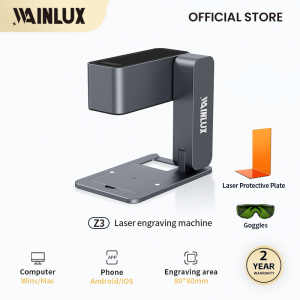
The WAINLUX Z3 10W laser engraving machine is a versatile and efficient tool designed for DIY enthusiasts and professionals alike. With its compact size (22 * 13 * 22cm), lightweight design (1.9KG), and powerful 10W laser output, this high-speed laser engraving machine offers unparalleled performance in wood, plastic, painted-metal, and stainless steel engraving applications.
Key Features & Specifications
- Power: 10W
- Product weight: 1.9KG
- Product size: 22 * 13 * 22cm
- Material: ABS+aluminum
- Engraving area: 80x80mm
- Support system: Windows/Android/IOS/MAC OS
- Supported formats: JPEG/JPG/PNG/BMP
- Operating voltage: 110V~240V
Compatibility & Supported Formats
The WAINLUX Z3 is compatible with multiple operating systems, including Windows, Android, iOS, and MAC OS. It supports various file formats such as JPEG, JPG, PNG, and BMP, making it easy to import your designs and start engraving right away.
How to Use WAINLUX Z3 for Engraving Wood & Plastic
Setting Up the Machine
To get started with the WAINLUX Z3, simply connect it to your computer or mobile device using the included USB cable. Install the software, and you're ready to begin engraving.
Engraving Process & Tips
When engraving wood and plastic, make sure to adjust the laser power and speed settings according to the material type and thickness. For best results, use a steady hand and maintain consistent pressure while moving the machine over the surface. Here are some tips to help you achieve perfect engravings every time:
- Wood: Adjust the laser power to 50% - 70%, and set the speed to 50% - 70%. For thicker wood, increase the power and decrease the speed.
- Plastic: Set the laser power to 30% - 50%, and the speed to 50% - 70%. For thicker plastic, increase the power and decrease the speed.
Engraving Stainless Steel & Painted-Metal Surfaces
Preparing Metal Surfaces
Before engraving stainless steel or painted-metal surfaces, make sure they are clean and free from any dirt, oil, or grease. This will ensure a smooth and precise engraving process.
Engraving Techniques & Best Practices
When engraving metal surfaces, it's crucial to adjust the laser power and speed settings according to the material type and thickness. Here are some tips to help you achieve perfect engravings every time:
- Stainless Steel: Set the laser power to 70% - 90%, and the speed to 30% - 50%. For thicker stainless steel, increase the power and decrease the speed.
- Painted-Metal: Set the laser power to 50% - 70%, and the speed to 50% - 70%. For thicker painted-metal, increase the power and decrease the speed.
DIY Customization of Leaves with WAINLUX Z3
Selecting & Preparing Leaves
Choose fresh, undamaged leaves for the best results. Wash them thoroughly and pat dry with a clean towel. Place the leaves on a flat surface, and make sure they are evenly spaced.
Engraving & Finishing Touches
Once the leaves are prepared, use the WAINLUX Z3 to engrave your desired designs onto them. After engraving, carefully remove the leaves from the machine and let them dry completely. You can then apply a protective coating or varnish to preserve the engravings and enhance their appearance.
By following these guidelines, you'll be able to create stunning DIY customizations using the WAINLUX Z3 10W laser engraving machine. Whether you're engraving wood, plastic, stainless steel, painted-metal, or even leaves, this versatile tool will help you bring your creative visions to life.

WAINLUX Laser Engraver
Review

You May Also Like
diymore DC 175-250V 1A/3A Gold/Silver 2 Way Table Lamp Omni-directional Dimming Rotary Switch for Table Lamp Incandescent Lamp Wall Lamp Switch Dimming
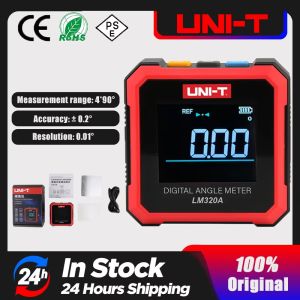
UNI-T Angle Meter Magnetic Inclinometer Digital Protractor Angle Finder Bevel Box Angle Measurement Tool LM320A LM320B

COD Stainless Steel One/Two Way Angle Valve 1/2" Angle Valve With Ring Cover For Faucet Toilet
42cm Folding Road Safety Warning Sign Traffic Cone Orange Reflective Tape
5Pcs 32/41/53mm Clear Screws Suction Cup Hooks Suction Pads With Thread
Multi-Functional Wall Mounted Door Back Clothes Hanger Six Row Track Adhesive Hook for Bathroom Kitchen No Drilling Required
Steel Toe Safety Shoes Men Work Sneakers Puncture-Proof Protective Safety Shoes Men Indestructible Shoes Work Safety Boots Male

360 Degree Rotation Stainless Steel 304 Concealed Door Offset Pivot Rotating Hinge for Hidden Wood Door Side Hung Shaft
Stainless Steel Welded Wire Mesh/ Welded wire mesh stainless steel welded wire mesh for fencing
Vehicle Tool Bag Organizer for Repair Tools Canvas Roll Wrench Screwdriver Hanging Tool Zipper Pouch
FUXING 1Pcs 150mm Extension Socket Wrench Hexagon Nut Driver Drill Bit Adapter 5.5-19mm