Smart RGB Neon Light Strip: Flexible DIY Creativity Light & Bluetooth/WiFi APP Remote Control

Smart RGB Neon Light Strip: Flexible DIY Creativity Light & Bluetooth/WiFi APP Remote Control

What is a Smart RGB Neon Light Strip?

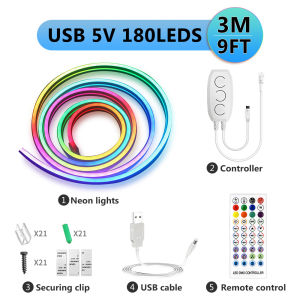
A Smart RGB Neon Light Strip is a versatile and innovative lighting solution that offers users a wide range of customization options. This flexible LED strip light comes with a variety of features, including Bluetooth/WiFi APP remote control, IP67 waterproof rating, and an array of color modes. Ideal for DIY enthusiasts, this product allows users to easily install and set up their lighting system, creating a personalized ambiance for any space.

Key Features & Specifications

  • Input voltage: 5V, 12V
  • Size: 3m/5m
  • Power: USB or EU plug
  • Color: RGBIC
  • Song mode: 30
  • Microphone mode: 16
  • Scene mode: 100
  • LED beads: 60 LEDs per meter
  • Material: Silicone
  • Waterproof grade: IP65

Benefits of Using a Smart RGB Neon Light Strip

By incorporating a Smart RGB Neon Light Strip into your home or office, you'll experience numerous benefits:

  • Energy-efficient: The LED technology used in these strips consumes less power compared to traditional lighting options.
  • Easy installation: The flexible design makes it simple to install the light strip along walls, ceilings, or furniture.
  • Customizable: With the Bluetooth/WiFi APP remote control, you can easily adjust the color, brightness, and effects of the lights.
  • Waterproof: The IP67 waterproof rating ensures that the light strip can withstand exposure to water and moisture.
  • Versatile: The wide range of color modes and scene settings make it suitable for various occasions and environments.

How to Install & Set Up Your Smart RGB Neon Light Strip

Follow these steps to successfully install and set up your Smart RGB Neon Light Strip:

Connecting the Power Source

  1. Unpack the Smart RGB Neon Light Strip and locate the power adapter.
  2. Connect the power adapter to the appropriate input voltage (5V or 12V).
  3. Plug the power adapter into a power outlet or USB port.

Downloading the Bluetooth/WiFi APP Remote Control

  1. Visit the app store on your smartphone or tablet.
  2. Search for the Bluetooth/WiFi APP remote control app.
  3. Download and install the app on your device.

Pairing Your Smart RGB Neon Light Strip with the APP

  1. Open the Bluetooth/WiFi APP remote control app on your device.
  2. Follow the on-screen instructions to pair the app with your Smart RGB Neon Light Strip.

Customizing Your Smart RGB Neon Light Strip

Take advantage of the various customization options available with your Smart RGB Neon Light Strip:

Exploring Different Color Modes

  • Select from a wide range of color modes, including red, green, blue, white, and more.
  • Adjust the brightness and saturation levels to create the perfect ambiance.

Setting Up Song & Microphone Modes

  • Connect your device to the Smart RGB Neon Light Strip via Bluetooth/WiFi APP remote control.
  • Select the song mode and choose from 30 pre-set songs.
  • Activate the microphone mode to sync the lights with the sound of your voice or music.

Creating Custom Scenes

  • Combine different color modes, brightness levels, and effects to create custom scenes.
  • Save your favorite scenes for easy access in the future.

Maintaining Your Smart RGB Neon Light Strip

To ensure the longevity of your Smart RGB Neon Light Strip, follow these maintenance tips:

Cleaning & Storage Tips

  • Clean the light strip using a soft, damp cloth.
  • Store the light strip in a cool, dry place when not in use.

Troubleshooting Common Issues

  • If the light strip does not turn on, check the power connection and ensure that the power adapter is properly connected.
  • If the Bluetooth/WiFi APP remote control is not working, try restarting both the app and the light strip.
  • If the light strip is not syncing with the sound, check the microphone mode settings within the app.
GUICAN

GUICAN

Seller ratings 97%