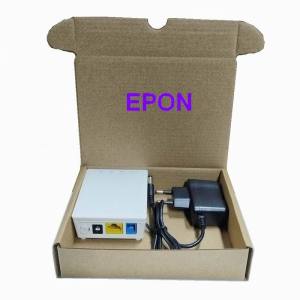
Original New Mini HG8310M EPON /GPON /XPON ONU 1GE ONU ONT With Single Lan Port Apply to FTTH Modes English-Firmware
Original New Mini HG8310M EPON /GPON /XPON ONU 1GE ONU ONT With Single Lan Port Apply to FTTH Modes English-Firmware
Overview of HG8310M Mini ONU
The HG8310M mini ONU is a versatile device designed for seamless connectivity in Fiber-to-the-Home (FTTH) networks. It supports multiple access technologies, including EPON, GPON, and XPON, making it an ideal choice for various network environments. This article will provide a comprehensive guide to understanding, installing, and troubleshooting the HG8310M mini ONU.
Key Features
- EPON/GPON/XPON Support: The HG8310M mini ONU supports multiple access technologies, allowing it to adapt to different network environments and deliver reliable performance.
- 1GE ONU ONT: Equipped with a single LAN port, this device offers fast data transfer rates, ensuring a smooth user experience.
- FTTH Modes ONU: Designed specifically for FTTH networks, the HG8310M mini ONU simplifies installation and maintenance processes.
- English-Firmware ONU: This device comes with English firmware, making it easier for users to configure and troubleshoot the device.
Power Supply Requirements
The HG8310M mini ONU requires a power supply of 12V DC, which can be provided by a standard power adapter. It is important to ensure that the power adapter meets the device's specifications to avoid any potential issues.
How to Install HG8310M Mini ONU
Installing the HG8310M mini ONU is a straightforward process that involves connecting the device to the network and configuring the settings.
Connecting the Device
To connect the HG8310M mini ONU to the network, follow these steps:
- Connect the fiber optic cable from the optical line terminal (OLT) to the ONU's fiber port.
- Plug in the power adapter to the ONU's power port and connect it to a power outlet.
- Wait for the device to boot up and establish a connection with the network.
Configuring the Network
Once the HG8310M mini ONU is connected to the network, you can configure the settings using a web-based interface. To access the interface, follow these steps:
- Open a web browser and enter the default IP address (usually 192.168.1.1) in the address bar.
- Log in using the default username and password (usually admin/admin).
- Configure the network settings according to your requirements, such as setting up Wi-Fi, VLANs, or QoS policies.
Troubleshooting Common Issues
Despite its robust design, the HG8310M mini ONU may occasionally encounter issues that require troubleshooting. Here are some common problems and their solutions:
Connectivity Problems
If you experience connectivity issues with the HG8310M mini ONU, try the following steps:
- Check the fiber optic cable connection to ensure it is secure and not damaged.
- Restart the device by unplugging the power adapter and plugging it back in after a few seconds.
- Verify that the network settings are configured correctly.
Firmware Update
To keep the HG8310M mini ONU running smoothly, it is essential to update the firmware regularly. To update the firmware, follow these steps:
- Download the latest firmware from the manufacturer's website.
- Access the web-based interface and navigate to the firmware update section.
- Upload the downloaded firmware file and follow the on-screen instructions to complete the update process.
Conclusion & Next Steps
The HG8310M mini ONU is a reliable and versatile device designed for FTTH networks. With its support for multiple access technologies, fast data transfer rates, and easy-to-use firmware, this device is an excellent choice for users looking to improve their network performance. By following the installation and troubleshooting guidelines outlined in this article, you can ensure a smooth experience with the HG8310M mini ONU. }

Fibertelecom
Review

You May Also Like

Kitchen Stove Accessories Stove Fittings Bracket Nonslip Pans Holder Stove Fittings Bracket Nonslip Pans Holder Replace
For Huawei Y6P Phone Case Cartoon Girl Cover CHA30

Redmi Note14 pro plus Silicone Phone Case with Stand Butterfly Knot Protection Quick Version Fresh Style Girl Heart

Transparent Protective Case for Xiaomi Redmi Buds6 Youth Edition Air4se Air3se Anti-Fall Soft Shell Earphone Cover
Transparent Core Four-in-One Spring Aromatherapy Fast Charging Data Cable for All Ages Men and Women Portable Fragrant
USB Charging Cable Magnetic Power Adapter Smartwatch Charge Cord Portable Wire Dock Station for W66
![[Cumarba] Outdoor Rainproof Air Conditioning Cover Anti-Dust Anti-Snow Cleaning Cover](https://img.lazcdn.com/g/p/12b3fd076b00ec98143a7fb0d111e51a.jpg_300x300q80.jpg)
[Cumarba] Outdoor Rainproof Air Conditioning Cover Anti-Dust Anti-Snow Cleaning Cover

Vacuum Suction Cup Magnetic Car Phone Holder: A Comprehensive Guide
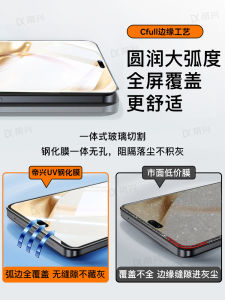
Honor 200 Tempered Glass Screen Protector for Curved Screen Mobile Phones Privacy Protection High Definition Clear Film
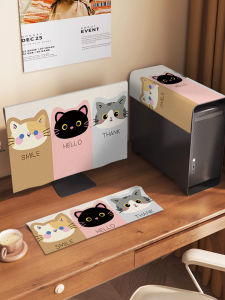
Modern Minimalist Computer Dustproof Cover Cloth Display Screen Dust Cover Three-piece Set Desktop Host Keyboard Protector

PIIFOX Key Cap Piifox Neon Party Theme Transparent Key Cap Sublimation PBT Double-Layer Milk Custard Key Cap ASA Height 138 Keys