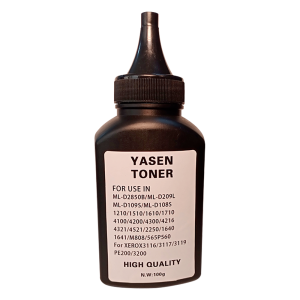
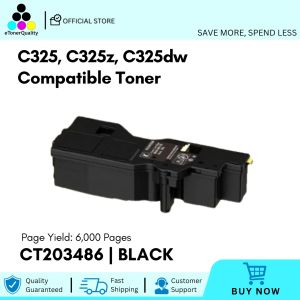
Samsung 100g Premium Compatible Toner Powder for Mono Samsung Laser Printer

No Brad

Mesa Center

Mesa Center

Seller ratings 98%

Review

Oops
This video has no reviews.

You May Also Like
Deli Double Row Manual Price Labeller & Single Row Price Code Printer: Handheld Supermarket Store Labeling Price Device
00:15

Deli Double Row Manual Price Labeller & Single Row Price Code Printer: Handheld Supermarket Store Labeling Price Device

Sharp MX237FT Toner Cartridge for use and Compatible with  AR-6020 AR-6023 AR-2048 AR-2348
00:25

Sharp MX237FT Toner Cartridge for use and Compatible with AR-6020 AR-6023 AR-2048 AR-2348

BrotherR. TN-2280 (TN2280) Black Original Toner Cartridge
00:25

BrotherR. TN-2280 (TN2280) Black Original Toner Cartridge

Replacement Set Epson L360 T664 L350 L358 L380 Maintenance Box Waste Ink Tank Sponge Pad Absorber
00:53

Replacement Set Epson L360 T664 L350 L358 L380 Maintenance Box Waste Ink Tank Sponge Pad Absorber

AOS Brand New Compatible Toner Cartridge TN261 TN-261 TN 261 CMYK TN221 TN-221 TN 221 for Brother Color Printer\\n\\n What is AOS Compatible Toner Cartridge TN261 & TN221?\\n\\nThe AOS compatible toner cartridge TN261 and TN221 is a high-quality replacement option for Brother color printers. These cartridges come in CMYK (Cyan, Magenta, Yellow, and Black) colors and offer a cost-effective solution for printing tasks.\\n\\n Key Features\\n\\n- High-quality output: AOS compatible toner cartridges TN261 and TN221 provide excellent print quality, rivaling original Brother cartridges.\\n- Cost-effective: These cartridges offer a more affordable alternative to the OEM (Original Equipment Manufacturer) options, without compromising on print quality.\\n- Easy installation: Installing these cartridges is simple and straightforward, even for users who are not familiar with printer maintenance.\\n\\n Compatibility\\n\\nAOS compatible toner cartridge TN261 and TN221 are designed to work seamlessly with Brother color printers, providing reliable performance and consistent results.\\n\\n Cost-effectiveness\\n\\nThe AOS compatible toner cartridge TN261 and TN221 offer significant cost savings compared to OEM alternatives, allowing users to enjoy high-quality printing without breaking the bank.\\n\\n How to Install AOS Compatible Toner Cartridge TN261 & TN221\\n\\nInstalling AOS compatible toner cartridges TN261 and TN221 is a simple process that can be completed in just a few steps.\\n\\n Preparing the Printer\\n\\nBefore installing the new toner cartridge, make sure the printer is powered on and connected to a power source. Open the front cover of the printer to access the toner compartments.\\n\\n Installing the Toner Cartridge\\n\\n1. Remove the old toner cartridge from its compartment by gently pulling it out.\\n2. Take the new AOS compatible toner cartridge TN261 or TN221 out of its packaging and remove any protective tape or seals.\\n3. Insert the new cartridge into the appropriate compartment, making sure it clicks into place.\\n\\n Final Steps\\n\\nAfter installing the new toner cartridge, close the front cover of the printer and allow the printer to initialize. The printer will automatically detect the new cartridge and adjust settings accordingly.\\n\\n How to Maintain AOS Compatible Toner Cartridge TN261 & TN221\\n\\nTo ensure optimal performance and longevity of AOS compatible toner cartridges TN261 and TN221, follow these maintenance tips.\\n\\n Cleaning Tips\\n\\n- Keep the printer clean and free of dust to prevent clogging and ensure smooth operation.\\n- Clean the toner compartments regularly using a soft, lint-free cloth.\\n\\n Storage Recommendations\\n\\n- Store unused cartridges in a cool, dry place away from direct sunlight and moisture.\\n- Keep cartridges in their original packaging until ready for use.\\n\\n Troubleshooting Common Issues\\n\\nIf you encounter any issues with your AOS compatible toner cartridge TN261 or TN221, refer to the troubleshooting guide included with the product or consult the manufacturer's website for further assistance.\\n\\n Why Choose AOS Compatible Toner Cartridge TN261 & TN221?\\n\\nThere are several reasons why users should consider choosing AOS compatible toner cartridges TN261 and TN221 for their Brother color printers.\\n\\n High-Quality Output\\n\\nThese cartridges provide excellent print quality, rivaling OEM options and ensuring consistent results for all printing tasks.\\n\\n Easy Installation\\n\\nInstalling AOS compatible toner cartridges TN261 and TN221 is simple and straightforward, even for users who are not familiar with printer maintenance.\\n\\n Eco-Friendly Solution\\n\\nBy choosing AOS compatible toner cartridges TN261 and TN221, users can reduce their environmental impact and contribute to a more sustainable future.\n}
00:12

AOS Brand New Compatible Toner Cartridge TN261 TN-261 TN 261 CMYK TN221 TN-221 TN 221 for Brother Color Printer\\n\\n What is AOS Compatible Toner Cartridge TN261 & TN221?\\n\\nThe AOS compatible toner cartridge TN261 and TN221 is a high-quality replacement option for Brother color printers. These cartridges come in CMYK (Cyan, Magenta, Yellow, and Black) colors and offer a cost-effective solution for printing tasks.\\n\\n Key Features\\n\\n- High-quality output: AOS compatible toner cartridges TN261 and TN221 provide excellent print quality, rivaling original Brother cartridges.\\n- Cost-effective: These cartridges offer a more affordable alternative to the OEM (Original Equipment Manufacturer) options, without compromising on print quality.\\n- Easy installation: Installing these cartridges is simple and straightforward, even for users who are not familiar with printer maintenance.\\n\\n Compatibility\\n\\nAOS compatible toner cartridge TN261 and TN221 are designed to work seamlessly with Brother color printers, providing reliable performance and consistent results.\\n\\n Cost-effectiveness\\n\\nThe AOS compatible toner cartridge TN261 and TN221 offer significant cost savings compared to OEM alternatives, allowing users to enjoy high-quality printing without breaking the bank.\\n\\n How to Install AOS Compatible Toner Cartridge TN261 & TN221\\n\\nInstalling AOS compatible toner cartridges TN261 and TN221 is a simple process that can be completed in just a few steps.\\n\\n Preparing the Printer\\n\\nBefore installing the new toner cartridge, make sure the printer is powered on and connected to a power source. Open the front cover of the printer to access the toner compartments.\\n\\n Installing the Toner Cartridge\\n\\n1. Remove the old toner cartridge from its compartment by gently pulling it out.\\n2. Take the new AOS compatible toner cartridge TN261 or TN221 out of its packaging and remove any protective tape or seals.\\n3. Insert the new cartridge into the appropriate compartment, making sure it clicks into place.\\n\\n Final Steps\\n\\nAfter installing the new toner cartridge, close the front cover of the printer and allow the printer to initialize. The printer will automatically detect the new cartridge and adjust settings accordingly.\\n\\n How to Maintain AOS Compatible Toner Cartridge TN261 & TN221\\n\\nTo ensure optimal performance and longevity of AOS compatible toner cartridges TN261 and TN221, follow these maintenance tips.\\n\\n Cleaning Tips\\n\\n- Keep the printer clean and free of dust to prevent clogging and ensure smooth operation.\\n- Clean the toner compartments regularly using a soft, lint-free cloth.\\n\\n Storage Recommendations\\n\\n- Store unused cartridges in a cool, dry place away from direct sunlight and moisture.\\n- Keep cartridges in their original packaging until ready for use.\\n\\n Troubleshooting Common Issues\\n\\nIf you encounter any issues with your AOS compatible toner cartridge TN261 or TN221, refer to the troubleshooting guide included with the product or consult the manufacturer's website for further assistance.\\n\\n Why Choose AOS Compatible Toner Cartridge TN261 & TN221?\\n\\nThere are several reasons why users should consider choosing AOS compatible toner cartridges TN261 and TN221 for their Brother color printers.\\n\\n High-Quality Output\\n\\nThese cartridges provide excellent print quality, rivaling OEM options and ensuring consistent results for all printing tasks.\\n\\n Easy Installation\\n\\nInstalling AOS compatible toner cartridges TN261 and TN221 is simple and straightforward, even for users who are not familiar with printer maintenance.\\n\\n Eco-Friendly Solution\\n\\nBy choosing AOS compatible toner cartridges TN261 and TN221, users can reduce their environmental impact and contribute to a more sustainable future.\n}

57mm Mini Thermal Printer Portable Bluetooth Label Maker Photo Sticker Label Memo Wrong Question Printing
00:56

57mm Mini Thermal Printer Portable Bluetooth Label Maker Photo Sticker Label Memo Wrong Question Printing

[Authentic Guarantee]Yilong Cordless Stencil Paper Para sa ATS886 Printer
00:21

[Authentic Guarantee]Yilong Cordless Stencil Paper Para sa ATS886 Printer

AOS Brother Toner TN240 -Compatible Toner Cartridge for Brother HL3040CN HL3045CN MFC9320CW Printer
00:20

AOS Brother Toner TN240 -Compatible Toner Cartridge for Brother HL3040CN HL3045CN MFC9320CW Printer

300 grams P115 M115 P115w M115w premium black toner powder for Fuji Xerox monochrome printers
00:16

300 grams P115 M115 P115w M115w premium black toner powder for Fuji Xerox monochrome printers

Original Epson Ink 003: High-Quality Replacement Options
00:59

Original Epson Ink 003: High-Quality Replacement Options

For Lab Lithophane Led Panel LED Backlight Board Lithophane 3D Printing Accessories for CMYK Lithophane Bundle
00:14

For Lab Lithophane Led Panel LED Backlight Board Lithophane 3D Printing Accessories for CMYK Lithophane Bundle

HiTech Wireless Wired Type Handheld 1D/2D Barcode Scanner Reader Portable For POS With USB Receiver
00:33

HiTech Wireless Wired Type Handheld 1D/2D Barcode Scanner Reader Portable For POS With USB Receiver