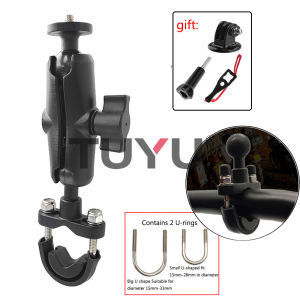
Motorcycle Bike Holder Handlebar Mirror Mount Bracket 1/4 Metal Stand For insta 360 X5 one X X4 X3 R SJCAM GoPro MAX Hero Camera Accessory
Motorcycle Bike Holder Handlebar Mirror Mount Bracket 1/4 Metal Stand For insta 360 X5 one X X4 X3 R SJCAM GoPro MAX Hero Camera Accessory
What is a Motorcycle Bike Holder?
A motorcycle bike holder, also known as a handlebar mirror mount bracket, is a versatile accessory designed to securely hold action cameras, such as the GoPro MAX Hero, Insta360 X5, and SJCAM models, onto motorcycle handlebars. This allows riders to capture their adventures hands-free while enjoying the thrill of riding.
Key Features
- Compatibility: Supports popular action camera brands such as DJI, yi, Insta360, Sjcam, SOOCOO, EKEN, and GoPro.
- Material: Made of durable aluminum alloy and ABS plastic for maximum durability and stability.
- Mount Type: Skeletons & Frames design ensures a secure fit on various handlebar sizes.
- Color: Available in sleek black to match most motorcycle styles.
Benefits of Using a Motorcycle Bike Holder
- Hands-Free Recording: Enjoy hands-free operation while capturing your rides.
- Stability: Securely holds your camera in place, even during bumpy rides.
- Versatility: Compatible with multiple action camera models, allowing you to upgrade or switch brands easily.
How to Install a Handlebar Mirror Mount Bracket
Installing a handlebar mirror mount bracket is a straightforward process. Follow the step-by-step guide below to ensure a secure fit on your motorcycle handlebars.
Step-by-Step Installation Guide
- Prepare Your Tools: Gather necessary tools, including a screwdriver and pliers.
- Remove Existing Mirror: If your motorcycle has an existing mirror, carefully remove it using the appropriate tools.
- Install Handlebar Mirror Mount Bracket: Attach the handlebar mirror mount bracket to your motorcycle handlebars using the provided screws and nuts. Tighten securely.
- Attach Action Camera: Mount your chosen action camera onto the handlebar mirror mount bracket using the included mounting accessories.
Troubleshooting Common Issues
- Loose Fit: Ensure all screws and nuts are tightened securely.
- Camera Not Level: Adjust the camera mount until the camera is level.
- Handlebar Damage: Check for any damage to the handlebars before installation. If necessary, consult a professional mechanic.
Compatibility with Action Cameras
This motorcycle bike holder is compatible with a wide range of action cameras, including popular brands such as DJI, yi, Insta360, Sjcam, SOOCOO, EKEN, and GoPro. Refer to the model numbers and specifications below for compatibility.
Supported Action Camera Brands
- DJI
- yi
- Insta360
- Sjcam
- SOOCOO
- EKEN
- GoPro
Model Numbers & Specifications
- SM-01: Compatible with GoPro MAX Hero, Insta360 X5, and SJCAM models.
Tips for Using a SJCAM Camera Mount
Using a SJCAM camera mount effectively requires some best practices to ensure optimal performance and longevity.
Best Practices for Recording Videos
- Stabilize Your Camera: Ensure the camera mount is securely attached to avoid shaky footage.
- Adjust Settings: Customize camera settings according to your preferences, such as resolution, frame rate, and stabilization.
- Test Before Riding: Test your camera setup before embarking on a ride to ensure everything is working correctly.
Maximizing Battery Life
- Monitor Battery Levels: Regularly check battery levels during rides to avoid unexpected shutdowns.
- Use Low-Power Settings: Opt for lower resolution and frame rate settings to conserve battery life.
- Charge Regularly: Charge your camera battery after each use to maintain optimal performance.
Metal Stand for Camera: A Must-Have Accessory
A metal stand for camera is a valuable addition to any action camera setup, providing stability and ease of use during recording.
Key Features & Benefits
- Durability: Made of high-quality aluminum alloy for maximum strength and stability.
- Adjustability: Allows for easy adjustment of camera angle and positioning.
- Compatibility: Works with various action camera models, including those supported by the motorcycle bike holder.
How to Use a Metal Stand for Camera
- Attach Camera: Secure your action camera onto the metal stand using the included mounting accessories.
- Adjust Position: Adjust the camera angle and positioning to capture the desired shot.
- Place on Surface: Place the metal stand on a stable surface, such as a table or tripod, to begin recording.

AI Photography Shop
Review

You May Also Like
Sport Silicone Strap for Garmin Descent G2 G1 Mk3i Mk2 Mk1/Fenix 8 Pro E 7 7X 6 6X 5 5X/Epix Soft Bracelet 22/26mm Quickfit Band
Newest for GoPro Action Sports Camera Neck Mobile Hanging Holder Hold Mount Lanyard Strap Accessories Smartphone Mount Bracket
Home Window Lock Refrigerator Fridge Freezer Door Lock with 3 Digit Code Child Protections Password Lock Enduring

Leather Wallet Cases & Magnetic Solutions: A Comprehensive Guide

14-55 Inch TV Wall Bracket: Telescopic Adjustable Rotatable Monitor & LCD LED Extension Bracket
Anime Cartoon Soft Shell Protective Case for Sony WF1000XM5 LinkBuds S Bluetooth Earphones Compatible with WF1000XM4 XM5 LS900N

Phone Case OPPO A5i Pro OPPO Reno 14 Pro Reno 14F 5G Casing New Design Hot Deals Creativity Painted Flowers Leaf Silicone Shockproof Soft Back Cover 2025

⚡【Cold Air Does Not Blow Directly】Suction Cup Air Conditioner Vent Fan Free Installation Universal Wind Shield Home Hanging Machine Windproof

LeLangDe Leaf Koi Fish Phone Case for VIVOY300 Y200i Y100 Y78+ Y77E 76S 73S Womens Style Anti-Fall Silicone Protective Cover

Xiaomi 11 5G Glass Back Cover Replacement Battery Cover for Xiaomi 11 pro Mobile Phone Parts Accessories MIUI Compatible
BNC To Banana Jacks Adapter 4mm Interfaces Rapid Installation Wear Resistant Construction Signal Stability Assured