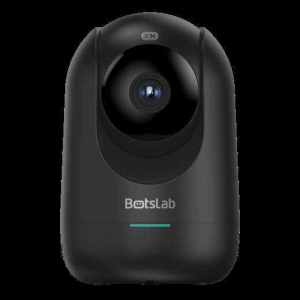
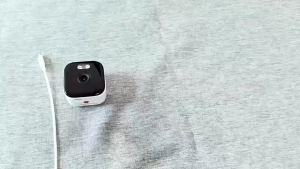
360 Botslab C211 2K 3MP HD Indoor CCTV Camera Connect Cellphone Wifi Indoor Home Smart IP Dome Camera 360°Rotation With Human Motion Detection Two-Way Audio Night Vision Pan & Tilt IP Security Camera Up to 128GB Storage

The 360 Botslab C211 2K HD Indoor CCTV Camera is a smart home security camera that offers advanced features such as human motion detection, two-way audio, night vision, and integration with Alexa and Google Assistant. This article will provide a comprehensive overview of the camera's specifications, setup process, and integration with smart home devices.
What is the 360 Botslab C211 2K HD Indoor CCTV Camera?
The 360 Botslab C211 2K HD Indoor CCTV Camera is a high-quality security camera designed for indoor use. It features a 3MP image sensor that captures sharp, clear images in 2K resolution. The camera has a focal length of 4mm and an aperture of F2.0, providing excellent low-light performance.
Resolution & Image Sensor
The 360 Botslab C211 2K HD Indoor CCTV Camera features a 1/2.8" Progressive Scan CMOS image sensor that captures high-resolution images at 3MP. This results in crisp, clear video footage even in low-light conditions. The camera's night vision function uses infrared (IR) technology to provide clear images in complete darkness.
Connectivity & Storage Options
The camera connects to your home WiFi network via a 2.4GHz connection. It supports both cloud storage and local storage using a Micro SD card. The camera can store up to 128GB of footage locally, providing ample space for recording.
Setting Up the 360 Botslab C211 Camera
Setting up the 360 Botslab C211 Camera is straightforward and can be completed in just a few steps.
Connecting to WiFi & Installing the App
To connect the camera to your WiFi network, first plug it into a power source and wait for the LED light to turn green. Next, download the Botslab app from the App Store or Google Play and follow the on-screen instructions to connect the camera to your WiFi network.
Configuring Motion Detection & Two-Way Audio
Once connected, you can configure the camera's motion detection settings within the app. The camera supports AI human detection, which allows it to distinguish between humans and other objects. This reduces false alarms and ensures that you only receive notifications when necessary. Additionally, the camera supports two-way audio, allowing you to communicate with anyone within its field of view.
Enhancing Home Security with the 360 Botslab C211 Camera
The 360 Botslab C211 Camera offers several features that enhance home security.
Leveraging AI Human Detection & Night Vision
The camera's AI human detection feature allows it to distinguish between humans and other objects, reducing false alarms and ensuring that you only receive notifications when necessary. Additionally, the camera's night vision function uses infrared (IR) technology to provide clear images in complete darkness.
Integrating with Alexa & Google Assistant
The camera supports integration with both Alexa and Google Assistant, allowing you to control the camera using voice commands. This makes it easy to check on your home security from anywhere, at any time.
Troubleshooting Common Issues
If you experience connectivity problems or audio/video quality issues, there are several steps you can take to troubleshoot the issue.
Connectivity Problems
If you are experiencing connectivity problems, try restarting the camera and your WiFi router. If the problem persists, ensure that the camera is within range of your WiFi network.
Audio & Video Quality Issues
If you are experiencing audio or video quality issues, try adjusting the camera's settings within the app. Additionally, ensure that the camera is not obstructed and that there are no objects blocking its field of view.
In conclusion, the 360 Botslab C211 2K HD Indoor CCTV Camera is a high-quality security camera that offers advanced features such as human motion detection, two-way audio, night vision, and integration with Alexa and Google Assistant. By following the setup process and troubleshooting tips outlined in this article, you can enjoy peace of mind knowing that your home is secure.

Smartifact Technology
You May Also Like

Night Vision Binoculars & Long Range Telescopes: A Comprehensive Guide

Childrens cartoon telescope toy

ICSEE XM R6 Dual lens cctv camera Camera Power Cord outdoor Waterproof Wifi Camera Surveillance PTZ 6MP HD night vision dual lens cctv camera

Fujifilm Instax Mini Evo Hybrid Instant Camera with FREE 10s Mini Plain Film
![[BUY 1 TAKE 1] V380 Pro 5G Dual Lens Bulb CCTV Camera No Need Internet waterproof Full Color night vision two-way audio auto tracking smart CCTV with speaker 360° mini camera APP Control Dual Screens dual cameras COD](https://img.lazcdn.com/g/ff/kf/S25a9d49ca54740389dfd1383e46e1528H.jpg_300x300q80.jpg)
[BUY 1 TAKE 1] V380 Pro 5G Dual Lens Bulb CCTV Camera No Need Internet waterproof Full Color night vision two-way audio auto tracking smart CCTV with speaker 360° mini camera APP Control Dual Screens dual cameras COD

Tripod Mount Collar Mount Adapter For Telephoto Lens For EF 70-200mm F4 And More Precise Aluminum

Pocket Cam 2.7K/1080P HD Action Camera 180° Rotatable Vlog Wifi Mini Sports Cam With magnetic lanyard Helmet Travel Recorder

Outdoor Security CCTV Camera Connect Cellphone Indoor ANRAN Home Security Camera IP WIFI Wired Camera Audio and Speaker Automatic tracking Night Vision IP66 Waterproof ANRAN P3

CCD Retro Video Recorder 4K Digital Camera 2.4 Inch 16X Digital Zoom 180° Flip Screen Selfile Compact Digital Photography Camera

Clever E88 4K Drone Wide-angle Camer 1080P FPV HD Drone Optical Flow Obstacle Avoidance WiFi real-time transmissio Foldable Mini Drone with Camera One-key Return RC Quadcopter Toys

Tapo C840 Dual-Lens Smart Baby Camera