Niimbot D110 Label Printer Wireless Bluetooth Thermal Label Maker Portable Printer for Android / IOS Phone Inkless Household Mark Classification Name stickers
Niimbot D110 Label Printer Wireless Bluetooth Thermal Label Maker Portable Printer for Android / IOS Phone Inkless Household Mark Classification Name stickers
Introduction to Niimbot D110 Label Printer
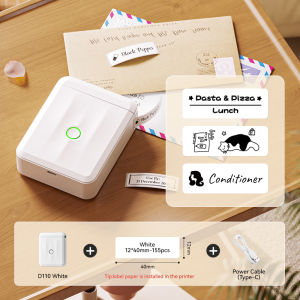
The Niimbot D110 Label Printer is a versatile, wireless Bluetooth thermal label maker designed specifically for Android and iOS devices. This portable printer is perfect for creating custom labels for household items, office supplies, and much more. In this article, we will explore the key features of the Niimbot D110, discuss how to choose the right label printer, and guide you through setting up, using, and maintaining your new printer.
Key Features of the Niimbot D110
The Niimbot D110 Label Printer offers several key features that make it stand out among other label printers:
-
Wireless Bluetooth Connectivity: Connect your Niimbot D110 Label Printer to Android and iOS devices via Bluetooth, allowing for easy printing on the go.
-
Portable Design: This compact label printer is lightweight and portable, making it perfect for use at home, in the office, or on-the-go.
-
Inkless Thermal Printing: No ink cartridges required! The Niimbot D110 uses thermal printing technology, which eliminates the need for messy ink cartridges and reduces maintenance costs.
-
Customizable Labels: Create custom labels for household items, office supplies, and more using the built-in label templates or by designing your own using the free Niimbot app.
-
Battery-Powered Operation: The Niimbot D110 Label Printer runs on a rechargeable battery, allowing for extended use without the need for constant charging.
How to Choose the Right Label Printer
When choosing a label printer, consider the following factors:
-
Compatibility: Ensure the label printer is compatible with your device (Android or iOS).
-
Connectivity: Look for a label printer with wireless connectivity options such as Bluetooth or Wi-Fi.
-
Printing Technology: Consider whether you prefer thermal printing or inkjet printing.
-
Label Size: Determine the size of labels you will be printing and choose a label printer that can accommodate those sizes.
-
Portability: If you plan to use the label printer on-the-go, look for a compact and lightweight design.
Setting Up Your Niimbot D110 Label Printer
To set up your Niimbot D110 Label Printer, follow these steps:
-
Install the Niimbot App: Download and install the free Niimbot app on your Android or iOS device.
-
Connect Your Printer: Turn on your Niimbot D110 Label Printer and connect it to your device via Bluetooth.
-
Configure Your Printer: Follow the on-screen instructions in the Niimbot app to configure your printer settings, such as label size and font style.
Using Your Niimbot D110 Label Printer
Once your Niimbot D110 Label Printer is set up, you can start printing custom labels using the following steps:
-
Printing Name Stickers: Create name stickers for household items, office supplies, or personal use by selecting the appropriate template in the Niimbot app.
-
Creating Mark Classification Labels: Organize your belongings by creating mark classification labels for different categories of items using the built-in templates or designing your own custom labels.
Maintaining Your Niimbot D110 Label Printer
To keep your Niimbot D110 Label Printer in good working condition, follow these maintenance tips:
-
Cleaning Your Printer: Regularly clean the printer head and label feed mechanism using a soft, lint-free cloth.
-
Troubleshooting Common Issues: Refer to the troubleshooting guide in the Niimbot app for solutions to common issues such as paper jams or connectivity problems.

NIIMBOT
Review
You May Also Like
NIIMBOT B21 Label Maker Printer Portable Bluetooth Thermal Printer Sticker Printer Barcode Printer Commodity Price Tag Printer
TN2480 2480 Compatible Toner Cartridge for DCP L2550 L2550dw L2375 L2750 (Brand New)
Compatible TN263 Toner Cartridge for use in Brother Printer
Brandnew Ink Cartridge 704: Black & Colored
【E-WOITD】 50PCS CISS Hollow Plug Transparent Ink Rubber Plug Empty Connector for
1Pcs 30mm x 100m Thermal Ribbon Thermal Transfer Ribbon For Coding Machine By Codephil Inc
Label Printing Balance Cash Register Receipt Scale Label Printer Scale Pos Retail Balance Scale With Printer
Lightweight Protective Holder For SCRIB3D P1 Childrens 3D Printing Pen Organizers With EVA Material
New Handheld Printer Portable Mini Intelligent Hand-Held Inkjet Printer Full-Automatic Small Inkjet Printers Date Of Production
DPS DTF Powder Triumph Hotmelt High Quality (Fine Powder) 1kg for DTF Printer
30mmx100m Thermal Hot Stamp Ribbon Hot Code Printer Ribbon Roll For DY8 HP241B Coding Machine