Bluetooth Lighting Crystal Magic Ball: Ultimate Guide to Remote Control DJ & Party Lights

Bluetooth Lighting Crystal Magic Ball: Ultimate Guide to Remote Control DJ & Party Lights

Introduction to Bluetooth Lighting Crystal Magic Balls

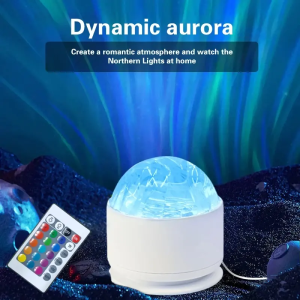
Bluetooth Lighting Crystal Magic Balls are a unique addition to any party or dance club setting. These innovative devices combine the elegance of crystal with the versatility of Bluetooth technology, providing a seamless way to control lighting effects through remote control. In this guide, we will explore the features, benefits, and usage of these magical devices.

Understanding the Features

Bluetooth Lighting Crystal Magic Balls come equipped with a range of features that make them perfect for enhancing any party atmosphere. Here are some of the key features:

  • Bluetooth Connectivity: Connect your device to the crystal ball using Bluetooth technology, allowing you to control the lighting effects effortlessly.

  • Remote Control: Enjoy a hassle-free experience with the included remote control, which allows you to adjust light intensity, color, and patterns at the touch of a button.

  • Crystal Design: The crystal ball design adds a touch of elegance and sophistication to any setting, making it a great addition to both home and commercial environments.

  • Compatibility: These devices are compatible with various Bluetooth-enabled devices, including smartphones, tablets, and laptops, making them versatile for different users.

Key Benefits

The Bluetooth Lighting Crystal Magic Ball offers numerous benefits for users looking to enhance their party or dance club lighting experience:

  • Enhanced Party Atmosphere: With customizable lighting effects, these devices can transform any space into a vibrant and lively party atmosphere.

  • Ease of Use: The remote control and Bluetooth connectivity make it easy to adjust lighting settings, even during a busy event.

  • Versatility: These devices can be used in various settings, from home parties to professional dance clubs, making them a valuable investment.

  • Affordability: Compared to traditional lighting systems, these devices offer a cost-effective solution for enhancing party lighting.

Setting Up Your Bluetooth Lighting Crystal Magic Ball

To get started with your Bluetooth Lighting Crystal Magic Ball, follow these simple steps:

Connecting to Bluetooth Devices

  1. Turn on your device and ensure it is within range of the crystal ball.

  2. Open the Bluetooth settings on your device and search for available devices.

  3. Select the Bluetooth Lighting Crystal Magic Ball from the list of available devices.

  4. Follow the on-screen instructions to complete the pairing process.

Customizing Light Effects

Once connected, you can customize the light effects using the remote control:

  • Light Intensity: Adjust the brightness of the lights using the remote control.

  • Color Options: Choose from a variety of colors to match your party theme or mood.

  • Patterns: Select from different light patterns to create a dynamic and engaging atmosphere.

Maximizing Your Party Lighting Experience

To get the most out of your Bluetooth Lighting Crystal Magic Ball, consider these tips:

Using Remote Control for Seamless Performance

  • Keep the remote control handy: Always keep the remote control within reach during events to make quick adjustments to lighting effects.

  • Practice beforehand: Familiarize yourself with the remote control features before using it at an event to ensure smooth performance.

  • Use presets: Save your favorite lighting settings as presets to quickly switch between different effects.

Integrating with Dance Club Lighting

  • Coordinate with existing lighting: If you have other lighting systems in place, coordinate the crystal ball's lighting effects to complement them.

  • Use the crystal ball as a focal point: Place the crystal ball in a prominent location to draw attention and enhance the overall atmosphere.

  • Experiment with different settings: Don't be afraid to try out different lighting settings to find what works best for your space and audience.

Troubleshooting Common Issues

If you encounter any issues while using your Bluetooth Lighting Crystal Magic Ball, here are some solutions:

Connectivity Problems

  • Check the distance: Ensure your device is within range of the crystal ball for optimal connectivity.

  • Restart the devices: If experiencing connectivity issues, try restarting both the crystal ball and your device.

  • Update firmware: Check if there are any firmware updates available for the crystal ball and install them if necessary.

Compatibility Concerns

  • Check device compatibility: Ensure your device is compatible with the crystal ball before attempting to connect.

  • Use a different device: If experiencing compatibility issues, try using a different Bluetooth-enabled device.

  • Contact customer support: If you continue to experience issues, reach out to the manufacturer's customer support for assistance.

Nan Valiant

Nan Valiant

Seller ratings 96%

Review

Oops
This video has no reviews.