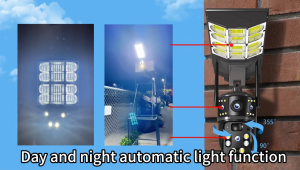
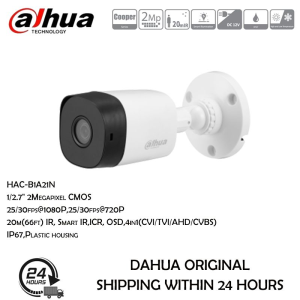
Dahua 2MP/5MP HD IR Bullet CCTV Camera With Audio Outdoor Wired Weatherproof Night Vision Camera
Dahua 2MP/5MP HD IR Bullet CCTV Camera With Audio Outdoor Wired Weatherproof Night Vision Camera
Overview of Dahua 2MP/5MP HD IR Bullet CCTV Camera
The Dahua 2MP/5MP HD IR Bullet CCTV Camera is a highly versatile security solution designed to provide reliable surveillance in various environments. This weatherproof outdoor wired camera comes equipped with advanced features such as night vision, audio dual alarm, and PoE network connectivity.
Key Features and Benefits
- High-Quality Video: Both models offer 2MP resolution (1920 x 1080p) at 30 frames per second, providing crystal-clear images and smooth video playback.
- Smart H265+/H264+: These efficient video compression standards ensure high-quality video while minimizing storage requirements.
- Smart IR: The camera's Smart IR technology enables optimal night vision performance, with a maximum range of 30 meters.
- DWDR, HLC, BLC: Digital Wide Dynamic Range, High Light Compensation, and Backlight Compensation technologies work together to deliver balanced images in challenging lighting conditions.
- Built-in Mic: The built-in microphone allows for audio monitoring and two-way communication, enhancing situational awareness.
- Weatherproof Design: With an IP67 rating, the camera can withstand harsh weather conditions, making it ideal for outdoor use.
Comparison with Other Dahua Cameras
Compared to other Dahua cameras, the 2MP/5MP HD IR Bullet CCTV Camera offers a compelling combination of features, performance, and value. While other models may have higher resolutions or more advanced capabilities, this camera strikes an excellent balance between affordability and functionality.
Installation and Setup Guide
To get the most out of your Dahua 2MP/5MP HD IR Bullet CCTV Camera, it's essential to follow these steps:
Preparing the Environment
Before installing the camera, ensure that the installation location is free from obstructions and has adequate power supply. If using PoE, verify that the network switch supports Power over Ethernet.
Connecting the Network Camera
Connect the camera to the network using either a PoE cable or a standard Ethernet cable, depending on your setup. Power the camera using the included 12V DC adapter or PoE.
Configuring the Camera Settings
Access the camera's web interface via a computer or mobile device connected to the same network. Configure settings such as video resolution, frame rate, and audio options according to your preferences.
Maximizing the Performance of Your Dahua Camera
To make the most of your Dahua 2MP/5MP HD IR Bullet CCTV Camera, consider the following tips:
Enhancing Image Quality
- Adjust Lighting Conditions: Fine-tune the DWDR, HLC, and BLC settings to optimize image quality in varying lighting conditions.
- Optimize IR Range: Experiment with different IR settings to achieve optimal night vision performance.
Utilizing Advanced Features
- Enable Smart H265+/H264+: Take advantage of these efficient video compression standards to minimize storage requirements while maintaining high-quality video.
- Configure Audio Settings: Set up the built-in microphone for audio monitoring and two-way communication.
Troubleshooting Common Issues
- Check Network Connectivity: Verify that the camera is connected to the network and can communicate with other devices.
- Update Firmware: Regularly update the camera's firmware to ensure optimal performance and security.
Conclusion
The Dahua 2MP/5MP HD IR Bullet CCTV Camera is an excellent choice for those seeking a reliable, feature-rich security solution. With its high-quality video, smart IR technology, and weatherproof design, this camera delivers outstanding performance in various environments. By following the installation and setup guide and maximizing the camera's capabilities, you'll be well-equipped to protect your property and monitor your surroundings with confidence.

Dahua.PH
You May Also Like
Industrial Endoscope HD108P: A Comprehensive Guide
Waterproof Outdoor For Camera Accessories Electrical CCTV Enclosure Square Junction Box White

Robot Wireless Camera Mobile Remote 360 Degree Monitoring No Blind Spot Home High Definition Night Vision Pet Surveillance
4K Pocket Action Camera 4x Zoom Touch Screen Anti-Shake Digital Vlogging Camera Waterproof HD Sports DV Portable Video Recorder
SJCAM SJ8 PRO | 4K 60 FPS Video Capture | 6 Axis Gyro Stabilization | 170 Ultra-Wide FOV with Distortion Correction | 8x Digital Zoom
S136 PrO MAX Better Drone with Camera Original brushless motor GPS with Dual Camera
SIRUI 40mm T1.8 1.33X S35 Frame Autofocus Anamorphic Lens Cine lens Zoom Blue Flares

Dahua CCTV 1/8CH 2MP HD With Audio Bullet CCTV Camera Package with HD Cellphone Remote Monitoring IP67 Outdoor Waterproof Security Camera Dahua Nvr Dahua Ip Kamera Daua Camera Camara Dahua - Lazada

A9 HD 1080P Portable Spy Camera with Voice
NICELECT Original cctv camera with voice connect to cellphone cctv wifi wireless indoor outdoor set cctv camera outdoor with night vision 360 mini camera connect to phone hidden camera mini vlogging camera 4k computer ip camera v380 pro 1080p
Monocular Telescope 16X52: A High Magnification Non-Infrared Low Light Night Vision All-Optical Telescope