Stylus S Pen Tips Replacement for Samsung Galaxy Tab S9 S8 S7 FE S6 Lite Plus Ultra Pens Nibs Refill Tool Set for Tab P610 P615 T870 T875 T860 T865
Stylus S Pen Tips Replacement for Samsung Galaxy Tab S9 S8 S7 FE S6 Lite Plus Ultra Pens Nibs Refill Tool Set for Tab P610 P615 T870 T875 T860 T865
Introduction to Stylus S Pen Tips Replacement
Overview of Stylus S Pen Tips
The S Pen is a must-have accessory for Samsung Galaxy Tab users, providing a more natural writing experience compared to fingers or other styluses. As the S Pen is frequently used, its nib tips may wear out or become damaged over time, affecting the overall performance of the device. To maintain optimal functionality, it is crucial to replace the S Pen nib tips periodically.
Importance of Stylus S Pen Tips Replacement
Replacing the S Pen nib tips ensures that users continue to enjoy a seamless writing experience, which is essential for tasks such as note-taking, drawing, and signing documents. Additionally, replacing worn-out nib tips can help prevent damage to the screen and maintain the overall longevity of the tablet.
Understanding Samsung Galaxy Tab Models
Samsung Galaxy Tab S9 & S8
The Samsung Galaxy Tab S9 and S8 are high-end tablets designed for productivity and entertainment. Both models feature a large display, powerful processors, and long-lasting battery life. They are compatible with the S Pen, which offers a more natural writing experience.
Tab P610 & P615
The Tab P610 and P615 are mid-range tablets designed for everyday use. They feature a compact design, making them easy to carry around. These tablets are also compatible with the S Pen, allowing users to take notes and draw with ease.
Tab T870 & T875
The Tab T870 and T875 are entry-level tablets designed for basic tasks such as browsing the internet, watching videos, and playing games. They are also compatible with the S Pen, providing users with a more natural writing experience.
Tools & Accessories for Stylus S Pen Tips Replacement
Removal Tweezers Tool
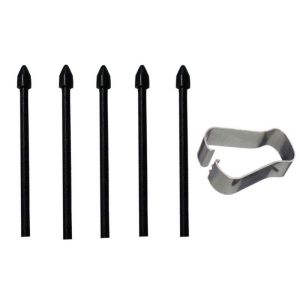
The removal tweezers tool is essential for safely removing the old S Pen nib tips without causing any damage to the pen or the tablet. It allows users to easily access the nib tip and remove it without applying excessive force.
Touch Stylus S Pen Nib Tips
The touch stylus S Pen nib tips are designed to provide a natural writing experience on Samsung Galaxy Tab devices. They are compatible with various models, including the S9, S8, S7 FE, S6 Lite Plus Ultra, P610, P615, T870, T875, T860, and T865.
Refill Tool Set
The refill tool set includes everything needed to replace the S Pen nib tips, including the removal tweezers tool and a pack of touch stylus S Pen nib tips. This convenient kit ensures that users have all the necessary tools at their disposal.
How to Replace Stylus S Pen Tips
Preparing the Tools
Before replacing the S Pen nib tips, ensure that all necessary tools are within reach, including the removal tweezers tool and the new nib tips. It is also essential to have a clean, flat surface to work on to avoid dropping any small parts.
Removing Old Stylus S Pen Tips
To remove the old S Pen nib tips, carefully insert the removal tweezers tool into the pen and gently pull out the nib tip. Be sure to apply even pressure to avoid damaging the pen or the nib tip.
Installing New Stylus S Pen Tips
Once the old nib tip has been removed, carefully insert the new nib tip into the pen, making sure it is securely in place. Test the new nib tip by writing on the tablet to ensure it is functioning correctly.
Maintaining Your Stylus S Pen
Cleaning Your Stylus S Pen
To maintain the performance of the S Pen, it is essential to clean it regularly. Wipe the pen with a soft, dry cloth to remove any dirt or debris that may have accumulated on the nib tip.
Proper Storage of Stylus S Pen
To prevent damage to the S Pen, store it in a safe place when not in use. Consider using a protective case or sleeve to keep the pen safe from accidental drops or bumps.
Troubleshooting Common Issues
If the S Pen is not functioning correctly, try replacing the nib tip or cleaning the pen. If the issue persists, consult the user manual or contact Samsung support for further assistance.

MAC-JUXINDA
You May Also Like
2pcs* 4 in 1 65W Charging Cable Multi Port USB Type C Fast Charging Data Cable For iPhone 16 15 14 13 Xiaomi Samsung
YOONIA Liquid Silicone Phone Case for OPPO Find X7 Ultra Protective Shell Shockproof Simple Design Colorful Pure Color Options

Handmade Beaded Phone Strap with Cat Paw Pendant White Jade Charcoal Burnt Attraction Female Mobile Phone Accessories
![[COD] SHGMYD 3 8 to 1 4 Male to Female Thread Screw Mount Adapter Tripod Plate Screw Mount](https://img.lazcdn.com/g/p/7968e3499debecbb9ca9a7405331be2d.jpg_300x300q80.jpg)
[COD] SHGMYD 3 8 to 1 4 Male to Female Thread Screw Mount Adapter Tripod Plate Screw Mount

20pcs/pack Y/T Shape 3-Way Ink Tube Connector Hose Joint Tube Ink Hose Connector Connecting Pipe
Universal Metal Dual Pull Tablet Phone Holder Bed Head Lazy Stand 4-12.9 Inch Tablet Clamp Mobile Phone Clip for Outdoor Use
Case for vivo y12s vivo y12a vivo y20 vivo y20s vivo y20i vivo y20s g phone casing Softcase Silicone shockproof Cover quadrangle clear with lanyard SJSTBYNS01
Phone Case RealmeC71 Realme C71 NFC Simple Luxury Jelly Colored Shiny Pink Fresh Summer New Soft Casing Solid Color Sweatproof Back Cover 2025
【Photography Artifact】Octopus Lazy Phone Holder Mini Flexible Sponge Octopus Stand Portable Camera Tripod Clip八爪懒人手机支架
INS Minimalist Transparent Pleated Water Ripple for Xiaomi Mix Flip Phone Case Foldable Screen Protective Case Xiaomi New Arrival Protective Case Mix Flip Flip Cover All-Inclusive Drop-Resistant Small Folding
Portable Laptop Risers Aluminum Alloy Stand Multifunctional Reading Rack Fit Laptop Tablets 10 17.3inch Silver