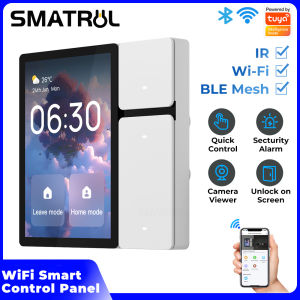
SMATRUL Tuya Smart Home Multi-functional Touch Screen Control Panel 3.5 inch Central Control for Intelligent Scenes Smart Tuya Devices Button Switch Infrared Bluetooth Gateway Remote Control
SMATRUL Tuya Smart Home Multi-functional Touch Screen Control Panel 3.5 inch Central Control for Intelligent Scenes Smart Tuya Devices Button Switch Infrared Bluetooth Gateway Remote Control
Introduction to the SMATRUL Tuya Smart Home Multi-functional Touch Screen Control Panel
The SMATRUL Tuya Smart Home Multi-functional Touch Screen Control Panel is a central control device that provides easy access to various smart home devices and scenes. This panel supports infrared, Bluetooth, and gateway remote control functions, making it a versatile solution for managing smart home devices.
Key Features
The SMATRUL Tuya Smart Home Multi-functional Touch Screen Control Panel has several key features:
- 3.5-inch touch screen display
- Supports infrared, Bluetooth, and gateway remote control functions
- Centralized control of multiple smart home devices
- Automatic synchronization of added devices and scenes
- User-friendly interface for quick control of devices and scenes
Compatibility with Smart Devices
The SMATRUL Tuya Smart Home Multi-functional Touch Screen Control Panel is compatible with a wide range of smart home devices, including lights, thermostats, locks, and more. It works seamlessly with Tuya Smart Home devices, allowing users to easily manage their smart home ecosystem.
Power On Guidance
To get started with the SMATRUL Tuya Smart Home Multi-functional Touch Screen Control Panel, follow these steps:
- Power on the device
- Select your preferred language
- View and agree to the terms of use
- Connect to your WLAN network
- Bind the device using the Tuya Smart Home app
- Select the area to be controlled by the device
Home Page & Quick Control
The home page of the SMATRUL Tuya Smart Home Multi-functional Touch Screen Control Panel displays the current time, date, weather, and network signal. It also includes two shortcut controls for quick access to frequently used devices or scenes.
Device Control
To manage your smart home devices using the SMATRUL Tuya Smart Home Multi-functional Touch Screen Control Panel, navigate to the "All Devices" list page. Here, you'll find a list of all the devices that have been added to the Tuya Smart Home app. Devices that meet any of the following conditions will automatically appear in the central control screen device list:
- Devices connected to the Tuya Smart Home app
- Devices within the selected area to be controlled by the device
Scene Control
To manage scenes using the SMATRUL Tuya Smart Home Multi-functional Touch Screen Control Panel, navigate to the "One click execution" list page. Here, you'll find a list of all the scenes that have been added to the Tuya Smart Home app. Clicking on a scene card will execute the scene, allowing you to quickly control multiple devices at once.
If your smart home ecosystem includes light scenes, they will also be automatically synchronized and displayed on the "One click execution" list page.
Conclusion
The SMATRUL Tuya Smart Home Multi-functional Touch Screen Control Panel is a powerful and versatile solution for managing smart home devices and scenes. With its user-friendly interface and support for infrared, Bluetooth, and gateway remote control functions, it provides a seamless experience for users looking to control their smart home ecosystem.
If you have any questions, please consult customer service for assistance.

SMATRUL
Review

You May Also Like
Hoco E91 Original 100% Smart Tiger Intelligent Positioning Mini Anti-Lost Wireless Track Device Support Apple Find My Network
Yueer Smart Wireless Multifunction Audio Glasses High Definition Calling Real-time Al Languages Translation Double UV Protection Sunglasses
Fashionable Bluetooth Smart Heart Rate Tracker Pedometer Watch with Touchscreen and Sports Function
32+256GB 4G Smart Watch Android System With 2.2 inch Amoled Screen 800W Camera WiFi GPS 4g SIM card S10 Ultra Smartwatch For Men

Underwater Metal Detector 9.84FT IP68 Fully Waterproof 4.2inch Coil Metal Detector with LED and Alarm Handheld GT-120 Metal
NORTH EDGE Blood Pressure Smartwatch 710Mah Battery Bluetooth Call Waterproof Blood Oxygen Sleep Monitoring Voice Assistant Work On Android and IOS system V99 Relo For Men Watch
8CH Tuya Smart Wifi Switch Module DC 12V 24V APP Remote Control 8 Channel Inching Self-locking Relay Work With Alexa Google Home
Aolon GT5 Pro Smart Watch: Compass HD Bluetooth Call Heart Rate 1.6 inch Full Screen Smartwatch
2024 NEW SmartWatch Android Phone 1.44\" Color Smart Watch: Men & Women Custom Dial Smart Watch
Yueer Intelligent Bluetooth Glasses 3D Sound Surround HD Voice Easy to Operate Comfortable Waterproof Anti-blue Light Sunglasses
Q85 Smart Watch 4G: A Comprehensive Guide