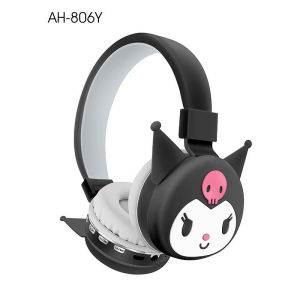
Sanrio Bluetooth Headphone Kitty Kuromi Wireless Headsets Cartoon Mic Foldable Lightweight Earphone Phones Laptop Gifts

Sanrio Bluetooth Headphone Kitty Kuromi Wireless Headsets Cartoon Mic Foldable Lightweight Earphone Phones Laptop Gifts

Introduction to Sanrio Bluetooth Headphones

Sanrio Bluetooth Headphones are a perfect blend of style and functionality, making them ideal gifts for tech enthusiasts. These wireless earphones come in various cartoon designs, including the popular Kitty and Kuromi characters, providing a fun twist to your audio experience.

What Are Sanrio Bluetooth Headphones?

Sanrio Bluetooth Headphones are wireless earphones designed with a focus on both aesthetics and practicality. They feature a lightweight foldable design, wireless connectivity, and a cartoon mic design that adds a playful touch to your listening experience.

Why Choose Sanrio Bluetooth Headphones?

Sanrio Bluetooth Headphones offer a unique combination of style and performance, making them a popular choice among tech enthusiasts. With their lightweight, foldable design, they are easy to carry around, while their wireless connectivity ensures a seamless listening experience. Additionally, the cartoon mic design adds a playful touch, making them perfect gifts for friends and family.

Features and Benefits of Sanrio Bluetooth Headphones

Sanrio Bluetooth Headphones come packed with features that enhance their performance and make them ideal for everyday use.

Lightweight Foldable Design

The lightweight foldable design of Sanrio Bluetooth Headphones makes them easy to carry around, whether you're commuting, traveling, or just moving around the house. This design ensures that you can enjoy your music on the go without worrying about the weight or bulkiness of the earphones.

Cartoon Mic Design

The cartoon mic design of Sanrio Bluetooth Headphones adds a playful touch to your listening experience. Whether you're listening to music, watching videos, or taking calls, the mic design ensures clear audio quality and enhances the overall experience.

Wireless Connectivity

Sanrio Bluetooth Headphones offer wireless connectivity, allowing you to enjoy your music without the hassle of tangled wires. With their easy-to-use pairing process, you can quickly connect your earphones to your device and start enjoying your favorite tunes.

Choosing the Right Pair: Kitty Kuromi Wireless Earphones

When choosing Sanrio Bluetooth Headphones, consider the Kitty Kuromi Wireless Earphones as a great option. These earphones come in various designs featuring the popular Kitty and Kuromi characters, making them perfect gifts for tech enthusiasts who love these iconic characters.

Gift Ideas for Tech Enthusiasts

If you're looking for gift ideas for tech enthusiasts, Sanrio Bluetooth Headphones are a great choice. They offer a unique blend of style and functionality, making them perfect for anyone who loves music and technology.

Finding the Perfect Match: Sanrio Bluetooth Headphones for Everyone

Sanrio Bluetooth Headphones come in various designs and styles, making it easy to find the perfect match for everyone. Whether you're looking for a gift for a friend, family member, or yourself, there's a pair of Sanrio Bluetooth Headphones that will suit your needs.

How to Use Sanrio Bluetooth Headphones

Using Sanrio Bluetooth Headphones is simple and straightforward. Follow these steps to get started:

Step-by-Step Guide to Pairing Your Headphones

  1. Turn on your Sanrio Bluetooth Headphones by pressing the power button.
  2. Turn on Bluetooth on your device.
  3. Select Sanrio Bluetooth Headphones from the list of available devices.
  4. Once connected, you can start enjoying your music!

Tips for Maximizing Battery Life

To maximize the battery life of your Sanrio Bluetooth Headphones, follow these tips:

  • Turn off Bluetooth when not in use.
  • Store your earphones in a cool, dry place.
  • Charge your earphones regularly.

Troubleshooting Common Issues

If you're experiencing issues with your Sanrio Bluetooth Headphones, try the following troubleshooting steps:

  • Restart your earphones and device.
  • Ensure that Bluetooth is turned on.
  • Check for any software updates.

In conclusion, Sanrio Bluetooth Headphones offer a unique blend of style and functionality, making them ideal gifts for tech enthusiasts. With their lightweight foldable design, cartoon mic design, and wireless connectivity, these earphones provide a fun and enjoyable listening experience. So why wait? Get your pair of Sanrio Bluetooth Headphones today and start enjoying your music in style!

Have a HAHA day
Have a HAHA day

Seller ratings 92%

Review

Oops
This video has no reviews.

You May Also Like

Mezone TWS Bluetooth Earphones Stereo Wireless 5.3 Bluetooth Earphones Touch Control Noise Cancelling Gaming Headset
00:26

Mezone TWS Bluetooth Earphones Stereo Wireless 5.3 Bluetooth Earphones Touch Control Noise Cancelling Gaming Headset

【New Arrival】 12000mAh Multifunction Radio with 2 Solar Panels Solar Hand Crank Flashlight Reading Lamp Power Bank for Outdoor Camping
01:22

【New Arrival】 12000mAh Multifunction Radio with 2 Solar Panels Solar Hand Crank Flashlight Reading Lamp Power Bank for Outdoor Camping

Modern Earphone Clip Quickly snap Technology for Freeclip Wireless Earbuds Zircon Construction For Active Lifestyles
00:20

Modern Earphone Clip Quickly snap Technology for Freeclip Wireless Earbuds Zircon Construction For Active Lifestyles

100% Original Jcam 3 Inch HF-285 Sound Jet Wireless Bluetooth Karaoke Speakers Deep Bass USB
00:38

100% Original Jcam 3 Inch HF-285 Sound Jet Wireless Bluetooth Karaoke Speakers Deep Bass USB

100% Original Jcam Earphone Wireless Bluetooth 5.0 Headphones Sport Gaming Headsets Noise Reduction Earbuds
00:30

100% Original Jcam Earphone Wireless Bluetooth 5.0 Headphones Sport Gaming Headsets Noise Reduction Earbuds

Lenovo GM2 Pro TWS Earphones: Comfortable & High-Quality Wireless Earbuds
00:49

Lenovo GM2 Pro TWS Earphones: Comfortable & High-Quality Wireless Earbuds

Joson/FT STAR Mars Mixing Equalizer: A Comprehensive Guide to 600Wx2 Professional Karaoke Amplifier
00:57

Joson/FT STAR Mars Mixing Equalizer: A Comprehensive Guide to 600Wx2 Professional Karaoke Amplifier

JBL Wave Beam True Wireless Bluetooth Earbuds
00:22

JBL Wave Beam True Wireless Bluetooth Earbuds

Charging Adapter Magnetic Converter for AS800 AS803 AS810 ASC100SG AS100 Headphone Charging Connector
00:14

Charging Adapter Magnetic Converter for AS800 AS803 AS810 ASC100SG AS100 Headphone Charging Connector

Fosi Audio V3 Stereo Power Amplifier 300W x2 TPA3255 Class D Mini Speaker Amp 2 Channel Audio Amplifier for Passive Bookshelf
00:30

Fosi Audio V3 Stereo Power Amplifier 300W x2 TPA3255 Class D Mini Speaker Amp 2 Channel Audio Amplifier for Passive Bookshelf

Newmsnr 2024 New Earclip 360° ACS Panoramic Sound Wireless Earbuds AUAR Pure Voice Bluetooth Earphone ENC Noise Reduction Call Wireless Earphones Bluetooth5.3 No Delay Gaming Headphone Waterproof Sweatproof Sport Headset
00:08

Newmsnr 2024 New Earclip 360° ACS Panoramic Sound Wireless Earbuds AUAR Pure Voice Bluetooth Earphone ENC Noise Reduction Call Wireless Earphones Bluetooth5.3 No Delay Gaming Headphone Waterproof Sweatproof Sport Headset

BOSCA D10 OK HIFI Amplifier Board: A Comprehensive Guide\\n\\n Introduction to BOSCA D10 OK HIFI Amplifier Board\\n\\nThe BOSCA D10 OK HIFI Amplifier Board is a versatile, high-quality power amplifier designed to provide an exceptional audio experience for car enthusiasts and audiophiles alike. This amplifier board supports both AC 220V and DC 12V/24V power sources, making it compatible with a wide range of devices. It also features a built-in Bluetooth 5.0 module, allowing seamless connectivity to various Bluetooth-enabled devices.\\n\\n Key Features of the Amplifier Board\\n\\n- **Supports AC 220V and DC 12V/24V power sources**: Ensuring compatibility with a wide range of devices and applications.\\n- **Built-in Bluetooth 5.0 module**: Enables wireless connectivity to Bluetooth-enabled devices, providing a hassle-free audio experience.\\n- **High-quality audio output**: The BOSCA D10 OK HIFI Amplifier Board delivers crystal-clear sound with excellent bass response, making it perfect for enhancing your car audio system.\\n\\n How to Choose the Right Amplifier Board\\n\\nWhen selecting an amplifier board, consider the following factors:\\n\\n- **Power requirements**: Ensure the amplifier board is compatible with your power source, whether it's AC 220V or DC 12V/24V.\\n- **Audio quality**: Look for an amplifier board that offers high-quality audio output, with a focus on clear sound and excellent bass response.\\n- **Connectivity options**: Consider the available connectivity options, such as Bluetooth, to ensure seamless integration with your existing audio devices.\\n\\n Setting Up Your Amplifier Board\\n\\nTo set up your BOSCA D10 OK HIFI Amplifier Board, follow these steps:\\n\\n Connecting Power Sources: AC 220V & DC 12V/24V\\n\\n- **For AC 220V**: Connect the power cord to the amplifier board and plug it into a standard AC outlet.\\n- **For DC 12V/24V**: Connect the DC line to the amplifier board and connect the other end to your vehicle's battery or a DC power supply.\\n\\n Connecting the Remote Control & Speaker Cable\\n\\n- **Remote control**: Insert the remote control's batteries and press the \"ON/OFF\" button to turn on the amplifier board.\\n- **Speaker cable**: Connect the speaker cable to the amplifier board and your speakers.\\n\\n Using the BOSCA D10 OK HIFI Amplifier Board\\n\\nNow that your amplifier board is set up, you can start enjoying your music!\\n\\n How to Connect the Amplifier Board to Bluetooth Devices\\n\\n1. Press the \"SOURCE\" button on the remote control until \"BT\" appears on the display.\\n2. On your Bluetooth-enabled device, go to the Bluetooth settings and search for available devices.\\n3. Select \"BOSCA D10 OK HIFI Amplifier Board\" from the list of available devices.\\n4. Once connected, you can stream music wirelessly from your device to the amplifier board.\\n\\n Controlling the Amplifier Board Using the Remote Control\\n\\nUse the remote control to adjust the volume, switch between audio sources, and access other features.\\n\\n Troubleshooting Common Issues\\n\\nIf you encounter any issues while using the BOSCA D10 OK HIFI Amplifier Board, try the following solutions:\\n\\n Amplifier Board Not Turning On\\n\\n- Check the power source connection and ensure it's properly connected.\\n- Verify that the remote control's batteries are inserted correctly and have sufficient power.\\n\\n Audio Quality Issues\\n\\n- Adjust the equalizer settings on your audio source device to optimize the sound output.\\n- If you're experiencing interference or static, try moving the amplifier board away from potential sources of electromagnetic interference.\\n\\n Conclusion & Final Thoughts\\n\\nThe BOSCA D10 OK HIFI Amplifier Board is a powerful, high-quality amplifier that offers a versatile audio solution for car enthusiasts and audiophiles. With its support for AC 220V and DC 12V/24V power sources, built-in Bluetooth 5.0 module, and easy-to-use remote control, this amplifier board is a must-have addition to any audio setup. Enjoy your music like never before with the BOSCA D10 OK HIFI Amplifier Board!\"\n}
00:12

BOSCA D10 OK HIFI Amplifier Board: A Comprehensive Guide\\n\\n Introduction to BOSCA D10 OK HIFI Amplifier Board\\n\\nThe BOSCA D10 OK HIFI Amplifier Board is a versatile, high-quality power amplifier designed to provide an exceptional audio experience for car enthusiasts and audiophiles alike. This amplifier board supports both AC 220V and DC 12V/24V power sources, making it compatible with a wide range of devices. It also features a built-in Bluetooth 5.0 module, allowing seamless connectivity to various Bluetooth-enabled devices.\\n\\n Key Features of the Amplifier Board\\n\\n- **Supports AC 220V and DC 12V/24V power sources**: Ensuring compatibility with a wide range of devices and applications.\\n- **Built-in Bluetooth 5.0 module**: Enables wireless connectivity to Bluetooth-enabled devices, providing a hassle-free audio experience.\\n- **High-quality audio output**: The BOSCA D10 OK HIFI Amplifier Board delivers crystal-clear sound with excellent bass response, making it perfect for enhancing your car audio system.\\n\\n How to Choose the Right Amplifier Board\\n\\nWhen selecting an amplifier board, consider the following factors:\\n\\n- **Power requirements**: Ensure the amplifier board is compatible with your power source, whether it's AC 220V or DC 12V/24V.\\n- **Audio quality**: Look for an amplifier board that offers high-quality audio output, with a focus on clear sound and excellent bass response.\\n- **Connectivity options**: Consider the available connectivity options, such as Bluetooth, to ensure seamless integration with your existing audio devices.\\n\\n Setting Up Your Amplifier Board\\n\\nTo set up your BOSCA D10 OK HIFI Amplifier Board, follow these steps:\\n\\n Connecting Power Sources: AC 220V & DC 12V/24V\\n\\n- **For AC 220V**: Connect the power cord to the amplifier board and plug it into a standard AC outlet.\\n- **For DC 12V/24V**: Connect the DC line to the amplifier board and connect the other end to your vehicle's battery or a DC power supply.\\n\\n Connecting the Remote Control & Speaker Cable\\n\\n- **Remote control**: Insert the remote control's batteries and press the \"ON/OFF\" button to turn on the amplifier board.\\n- **Speaker cable**: Connect the speaker cable to the amplifier board and your speakers.\\n\\n Using the BOSCA D10 OK HIFI Amplifier Board\\n\\nNow that your amplifier board is set up, you can start enjoying your music!\\n\\n How to Connect the Amplifier Board to Bluetooth Devices\\n\\n1. Press the \"SOURCE\" button on the remote control until \"BT\" appears on the display.\\n2. On your Bluetooth-enabled device, go to the Bluetooth settings and search for available devices.\\n3. Select \"BOSCA D10 OK HIFI Amplifier Board\" from the list of available devices.\\n4. Once connected, you can stream music wirelessly from your device to the amplifier board.\\n\\n Controlling the Amplifier Board Using the Remote Control\\n\\nUse the remote control to adjust the volume, switch between audio sources, and access other features.\\n\\n Troubleshooting Common Issues\\n\\nIf you encounter any issues while using the BOSCA D10 OK HIFI Amplifier Board, try the following solutions:\\n\\n Amplifier Board Not Turning On\\n\\n- Check the power source connection and ensure it's properly connected.\\n- Verify that the remote control's batteries are inserted correctly and have sufficient power.\\n\\n Audio Quality Issues\\n\\n- Adjust the equalizer settings on your audio source device to optimize the sound output.\\n- If you're experiencing interference or static, try moving the amplifier board away from potential sources of electromagnetic interference.\\n\\n Conclusion & Final Thoughts\\n\\nThe BOSCA D10 OK HIFI Amplifier Board is a powerful, high-quality amplifier that offers a versatile audio solution for car enthusiasts and audiophiles. With its support for AC 220V and DC 12V/24V power sources, built-in Bluetooth 5.0 module, and easy-to-use remote control, this amplifier board is a must-have addition to any audio setup. Enjoy your music like never before with the BOSCA D10 OK HIFI Amplifier Board!\"\n}