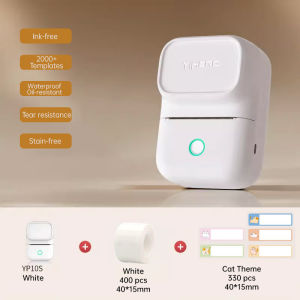
YiHero YP10S Mini Label Printer: Portable & Bluetooth Wireless Thermal Sticker Printer
YiHero YP10S Mini Label Printer: Portable & Bluetooth Wireless Thermal Sticker Printer
Introduction to YiHero YP10S Mini Label Printer
The YiHero YP10S Mini Label Printer is an innovative, ink-free rechargeable portable thermal sticker printer designed specifically for small businesses and individuals looking to label their products, packages, and inventory efficiently. This Bluetooth wireless shop label printer is compact, lightweight, and easy to use, making it perfect for on-the-go professionals who need to label items quickly and easily.
Key Features & Benefits
The YiHero YP10S Mini Label Printer comes with several features that make it stand out from other portable thermal sticker printers:
- Ink-free Technology: No ink cartridges or toner required, saving you money and reducing waste.
- Bluetooth Connectivity: Connect wirelessly to your smartphone, tablet, or computer via Bluetooth for easy printing.
- Compact Size: Small enough to fit in your pocket or bag, making it perfect for traveling or working remotely.
- High-Quality Print: Produces clear, sharp labels with high-resolution printing technology.
- Customizable Labels: Design your own labels using the included software or choose from pre-designed templates.
Comparison with Other Portable Thermal Sticker Printers
Compared to other portable thermal sticker printers on the market, the YiHero YP10S Mini Label Printer offers several advantages:
- Cost-effective: No ink cartridges or toner required, saving you money in the long run.
- User-friendly: Easy-to-use interface and intuitive design make it simple to operate.
- High-quality print: Produces clear, sharp labels with high-resolution printing technology.
- Customizable: Design your own labels using the included software or choose from pre-designed templates.
How to Use Your New YiHero YP10S Mini Label Printer
Using your new YiHero YP10S Mini Label Printer is simple and straightforward. Follow these steps to get started:
Setting Up & Charging
- Unbox your printer and remove all packaging materials.
- Charge your printer using the included charging cable.
- Once charged, turn on your printer by pressing the power button.
Printing Your First Label
- Connect your printer to your smartphone, tablet, or computer via Bluetooth.
- Open the included software or choose from pre-designed templates.
- Design your label using the software or template editor.
- Preview your label and make any necessary adjustments.
- Print your label by pressing the print button.
Customizing Your Labels
The YiHero YP10S Mini Label Printer comes with a built-in software that allows you to design your own labels. You can add text, images, and barcodes to your labels using the intuitive interface. Additionally, you can choose from pre-designed templates to save time and effort.
Troubleshooting Common Issues
If you experience any issues with your YiHero YP10S Mini Label Printer, refer to the troubleshooting guide below:
Printer Not Responding
If your printer is not responding, try the following steps:
- Check that your printer is turned on and charged.
- Ensure that your printer is connected to your device via Bluetooth.
- Restart your printer and device.
Incorrect Label Size
If your labels are coming out the wrong size, try the following steps:
- Check that you have selected the correct label size in the software.
- Ensure that the thermal paper is loaded correctly.
- Adjust the settings in the software to match the size of your labels.
Printer Won't Charge
If your printer won't charge, try the following steps:
- Check that the charging cable is securely connected to both the printer and power source.
- Try using a different charging cable or power source.
- If the issue persists, contact customer support for assistance.
Conclusion & Final Thoughts
The YiHero YP10S Mini Label Printer is a compact, lightweight, and easy-to-use portable thermal sticker printer that offers several advantages over other printers on the market. With its ink-free technology, Bluetooth connectivity, and customizable labels, it's perfect for small businesses and individuals looking to label their products, packages, and inventory efficiently. So why wait? Order your YiHero YP10S Mini Label Printer today and start labeling your items with ease!

Hyselec Shop
You May Also Like
70ml Original Dye Epson 003 Ink Refill Guide

Peripage A6 Original Mini Portable Printer Experience Impeccable Precision Printing at 203dpi/304dpi On-the-Go Unleash Creativity Anywhere Anytime with This Innovative Compact Printing Companion.
3D Printer Tips Nozzle Assembly 3 Piece Set High Temperature Resistant Steel Enhances Durability For AD5X
ETQ Compatible TK439 Toner Cartridge for Kyocera Copier
Soonpos 80mm Thermal POS Receipt Printer With Paper Auto Cutter Wall-Mounted USB LAN Bluetooth WiFi Connection Desktop Cashier Compatible with Loyverse POS Salesplay POS Kyte For Restaurant Catering Retail Kitchen
Japan High-Blackness Toner for Toshiba E-Studio 45 Toner Powder E-Studio 230 232 233 280 282 283 1kg 500g
Eyoyo 2D Barcode Scanner: A Comprehensive Guide
Quali-Products - CUYI Cleaning Solution 1L For Eco Solvent Ink

INKSCRIBED W1112A 110A Compatible Toner for Laserjet 108A 108W 136A 136W 136NW 138FNW Printer
Rollo USB Shipping Label Printer - Commercial Grade Thermal Label Printer for Shipping Packages - High Speed Direct Thermal 4x6 Label Printer
Bluetooth Portable Thermal printer POS Printer Handheld 58mm Receipt Printer