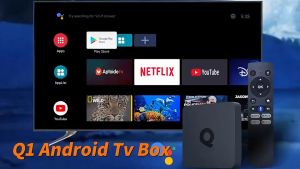
Alston MXQ PRO 5G 4K TV Box & I8 Mini Keyboard: A Comprehensive Guide
Alston MXQ PRO 5G 4K TV Box & I8 Mini Keyboard: A Comprehensive Guide
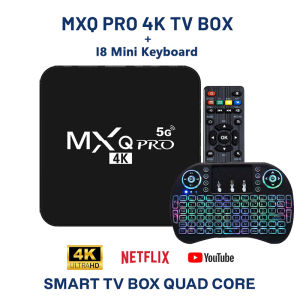
What is the Alston MXQ PRO 5G 4K TV Box?
The Alston MXQ PRO 5G 4K TV Box is a powerful Android smart TV box that supports 4K resolution, providing a high-quality viewing experience for movie enthusiasts and gamers alike. Equipped with advanced WiFi connectivity, this smart TV box allows seamless streaming of your favorite content from platforms like YouTube, Netflix, and Amazon Prime Video. Moreover, it comes with a built-in KODI media center, which can be customized to access various streaming add-ons.
Key Features
- Advanced WiFi Connectivity: The Alston MXQ PRO 5G TV Box supports both 2.4GHz and 5GHz WiFi bands, ensuring fast and stable internet connectivity for smooth streaming experiences.
- 4K Ultra HD Resolution: With support for 4K resolution, the Alston MXQ PRO 5G TV Box delivers stunning visuals, making it perfect for watching movies, playing games, or browsing the web.
- KODI Media Center: Pre-installed KODI media center enables users to access a wide range of streaming add-ons, enhancing their entertainment experience.
- User-Friendly Interface: The Alston MXQ PRO 5G TV Box features a simple and intuitive interface, making it easy for users to navigate and access their favorite content.
Comparison with Other Smart TV Boxes
Compared to other smart TV boxes available in the market, the Alston MXQ PRO 5G TV Box stands out due to its advanced WiFi connectivity, 4K resolution support, and built-in KODI media center. It offers a superior viewing experience and provides users with greater customization options.
Setting Up Your Alston MXQ PRO 5G 4K TV Box
Setting up your Alston MXQ PRO 5G TV Box is a straightforward process. Follow the steps below to connect your TV box to WiFi and install KODI.
Connecting to WiFi
To connect your Alston MXQ PRO 5G TV Box to WiFi, follow these steps:
- Connect the TV box to your TV using an HDMI cable.
- Power on the TV box and select your preferred language.
- Navigate to the WiFi settings and select your network.
- Enter the WiFi password and wait for the connection to establish.
Installing KODI
Once connected to WiFi, you can install KODI to access various streaming add-ons. Follow these steps to install KODI:
- Download the KODI APK file from the official website.
- Transfer the APK file to your TV box using a USB drive or through cloud storage services like Google Drive.
- Install the APK file on your TV box.
- Launch KODI and customize it according to your preferences.
Enhancing Your Experience with the I8 Mini Keyboard
The I8 Mini Keyboard is a compact wireless keyboard designed to enhance your experience with the Alston MXQ PRO 5G TV Box. It features a touchpad and supports 2.4GHz wireless connectivity, allowing you to control your TV box effortlessly.
Connecting the I8 Mini Keyboard
To connect the I8 Mini Keyboard to your Alston MXQ PRO 5G TV Box, follow these steps:
- Turn on your TV box and navigate to the Bluetooth settings.
- Power on the I8 Mini Keyboard by pressing the power button.
- Pair the keyboard with your TV box by selecting it from the list of available devices.
- Once paired, you can use the keyboard and touchpad to control your TV box.
Customizing Keyboard Settings
The I8 Mini Keyboard allows you to customize its settings according to your preferences. You can adjust the sensitivity of the touchpad, change the keyboard layout, and customize the backlight settings.
Conclusion
In summary, the Alston MXQ PRO 5G 4K TV Box is a powerful Android smart TV box that offers advanced WiFi connectivity, 4K resolution support, and a built-in KODI media center. By following the steps outlined in this guide, you can easily set up your TV box and enhance your viewing experience with the I8 Mini Keyboard.
Summary of Key Points
- The Alston MXQ PRO 5G TV Box supports 4K resolution and advanced WiFi connectivity.
- It comes with a built-in KODI media center, which can be customized to access various streaming add-ons.
- The I8 Mini Keyboard enhances the viewing experience by providing a compact wireless keyboard with a touchpad.
Final Thoughts
The Alston MXQ PRO 5G TV Box is an excellent choice for movie enthusiasts and gamers who want a high-quality viewing experience. With its advanced features and easy setup process, it is sure to become a favorite among smart TV box users.

Alston Sports
Review
You May Also Like
![[HOT] Skyworth Google TV Box [LEAP-S3] 2G+16G 4K Ultra HD Google Software w/ Android 11 LAN Dual BandWIFI BT5.0 Chromecast Leap S3 Slope3 - Lazada](https://img.lazcdn.com/g/ff/kf/S20125d2b012042139488bd6bc5fbf81dy.jpg_300x300q80.jpg)
[HOT] Skyworth Google TV Box [LEAP-S3] 2G+16G 4K Ultra HD Google Software w/ Android 11 LAN Dual BandWIFI BT5.0 Chromecast Leap S3 Slope3 - Lazada
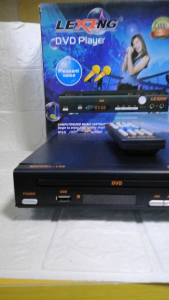
LEXING LX-12 MIDI DVD PLAYER USB 2.0 INPUT LED
KAMPEON Smart TV 32 Inch FHD Bluetooth Android 12.0 LED DIgital TV Flat Screen YouTube Netflix CCTV Google TV
Vankyo Burger 101 Mini Projector
YAMY Smart TV Stick 4K HD Android 12.0 TV Box 8+128G 2.4G/5G Wifi With Netflix/Disney/Youtube

HY320 Smart Projector Portable Mini WiFi Bluetooth Android Wireless Connection Phone Automatic Keystone Correction
XIAOHUI Wall Mounted Projector Screen Shredded Milk 60-133 Inch White Wrinkle-Free 160° Viewing Angle Screen Home Theater Indoor
MODOFO Projector Y400 4K Uitra Projector Android12 Portable 5G High-Definition Bluetooth Projector
3D Hologram Fan & Mini Holographic Projector: A Complete Guide
XNANO X1 ANDROID PROJECTOR: Smart Laser Projection TV 1080p 4K and 8K Video Decoder
Metal Projector Mount With Collapsible Design Lightweight And Space Saving For Indoor Outdoor