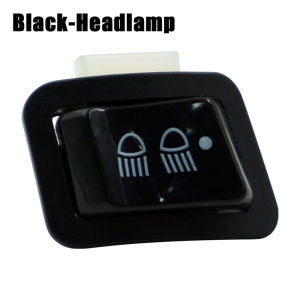
For Honda Wave / Scoopy / Zoomer x/Beat Fi v1/v2 3 Way Switch for Headlight High Quality
For Honda Wave / Scoopy / Zoomer x/Beat Fi v1/v2 3 Way Switch for Headlight High Quality
What is a 3 Way Switch?
A 3 way switch is a crucial accessory for Honda Wave, Scoopy, Zoomer x/Beat Fi v1/v2 scooters, enabling users to control their headlight with ease. This switch offers a simple yet effective way to manage the headlights, providing better visibility and safety while riding.
Key Features & Benefits
The 3 way switch for Honda Wave/Scoopy/Zoomer boasts several features and benefits:
- Easy Installation: The switch is straightforward to install, requiring minimal tools and effort.
- Compatibility: Designed specifically for Honda Wave/Scoopy/Zoomer x/Beat Fi v1/v2 models, ensuring seamless integration.
- Durability: Made from high-quality materials, this switch is built to last and withstand various weather conditions.
- Improved Visibility: The switch allows users to adjust their headlight settings easily, enhancing visibility during night rides.
Compatibility with Scoopy & Zoomer
The 3 way switch is compatible with both Scoopy and Zoomer models, offering a versatile solution for scooter owners. It works seamlessly with the headlight control system, providing a reliable and convenient way to manage the lights.
How to Install a 3 Way Switch
Installing a 3 way switch is a simple process that can be completed with minimal effort. Here's a step-by-step guide to help you get started:
Tools & Materials Needed
- Screwdriver
- Electrical tape
- Wire cutters
- Multimeter (optional)
Step-by-Step Installation Guide
- Turn off the scooter's power source to ensure safety during installation.
- Locate the headlight wiring harness and carefully disconnect it from the existing switch.
- Connect the new 3 way switch to the wiring harness using the appropriate connectors.
- Secure the switch in place using screws or adhesive tape.
- Test the switch by turning on the scooter's power source and adjusting the headlight settings.
Choosing the Right 3 Way Switch
Selecting the right 3 way switch for your Honda Wave/Scoopy/Zoomer x/Beat Fi v1/v2 scooter is essential for optimal performance. Consider the following factors:
- Compatibility: Ensure the switch is compatible with your scooter model.
- Quality: Choose a switch made from high-quality materials to ensure durability and reliability.
- Ease of Installation: Opt for a switch that is easy to install, requiring minimal tools and effort.
- Price: Consider the cost of the switch and compare it with other options available in the market.
Popular Brands & Models
Some popular brands and models of 3 way switches include:
- Brand A Model X: Known for its compatibility with Honda Wave/Scoopy/Zoomer x/Beat Fi v1/v2 scooters, this switch offers excellent quality and durability.
- Brand B Model Y: Renowned for its ease of installation and affordability, this switch is a popular choice among scooter owners.
- Brand C Model Z: A high-end option that offers superior quality and performance, this switch is ideal for those seeking a premium headlight control solution.
Maintaining Your 3 Way Switch
To ensure the longevity and optimal performance of your 3 way switch, follow these cleaning and care tips:
- Clean the switch regularly: Use a soft cloth to wipe away dirt and debris from the switch.
- Check for loose connections: Periodically inspect the wiring harness and connectors to ensure they are secure.
- Replace worn-out components: If any parts of the switch show signs of wear and tear, replace them promptly to avoid potential issues.
Troubleshooting Common Issues
If you encounter any problems with your 3 way switch, try the following troubleshooting steps:
- Check the wiring harness: Ensure that the wiring harness is properly connected to the switch.
- Inspect the connectors: Verify that all connectors are securely attached.
- Test the switch: Use a multimeter to test the switch's functionality.
- Consult the manual: Refer to the user manual for further guidance on troubleshooting common issues.

Dreamer-711
Review

You May Also Like
80Pcs Assorted Carbon Steel Woodruff Keys set Comprehensive Woodruff Key Assortment for Flywheels Pulleys Crankshaft Tool
Multi-Purpose Derusting Oil: A Comprehensive Guide
MIO I 125/M3 RUBBER MATTING FOR MIO I 125/M3 MOTORCYCLE

BOSCH SPARK PLUG START COPPER (KH6RKC3 (FR8SC+)) FOR TOYOTA FORTUNER 2.7 2011 - 2015 INNOVA 2.0 2012 - 2016 VITARA 2017 - PRESENT
9.66-inch Full Screen Touch Screen Streaming Media Driving Recorder Rearview Mirror HD Night Vision Front and Rear Dual Recording Reversing Image
2pcs DRL LED Lighting Strip: A Comprehensive Guide
GASKET HEAD COVER FOR YAMAHA NMAX | AEROX | YAMAHA GENUINE PARTS | B3F-E1193-00-00
90 Degree Angle Wheel Tire Stem Motorcycle Tire Valves Stems Replacement Tubeless Tyre Valves Stem Modified Accessory
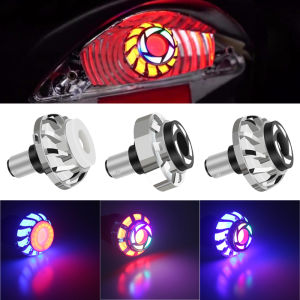
Universal Motorcycle Tail Angel Eye Eagle Eye LED Brake Light Strobe Flash Light LED Motorbike Brake Rear Lamp Motorcycle Accessories
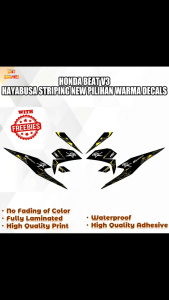
HONDA BEAT V3 HAYABUSA STRIPING NEW PILIHAN WARMA DECALS (WATERPROOF LAMINATED FADE PROOF)

【VIDKHSY Store】Thickened Waterproof Motorcycle Raincoat Durable Riding Raincoat Men & Women All-Weather Protection Rain Gear for Rainy Season One Size