Dual Lens V380 Pro: The Ultimate WiFi Connected Smart Home Security Camera
What is Dual Lens V380 Pro?
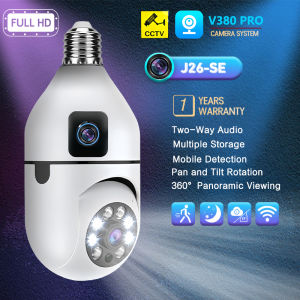
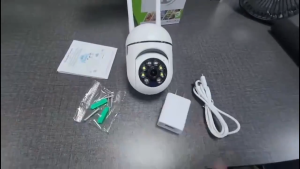
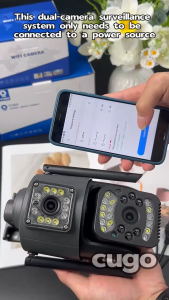
The Dual Lens V380 Pro is a cutting-edge WiFi connected smart home security camera designed to provide unparalleled surveillance and monitoring capabilities. This innovative device combines advanced features such as auto tracking, dual lens technology, and full color night vision to ensure your home remains secure at all times.
Key Features
- Auto Tracking Camera: The Dual Lens V380 Pro is equipped with intelligent motion detection and auto tracking capabilities, allowing it to automatically follow moving objects within its field of view.
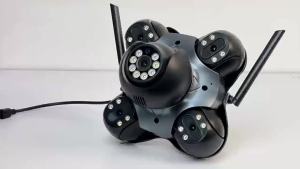
- Dual Lens CCTV Camera: With dual lenses, this camera offers a wide-angle view, providing comprehensive coverage of your property.
- Smart Home Security Camera: Designed specifically for smart homes, the Dual Lens V380 Pro seamlessly integrates with popular home automation systems, allowing you to monitor your property remotely via your smartphone or tablet.
- Night Vision Camera: The Full Color Night Vision feature ensures that you can see clearly in low-light conditions, eliminating the need for traditional infrared night vision cameras.
- WiFi Connected Camera: Connect the Dual Lens V380 Pro to your home WiFi network for easy setup and remote monitoring.
Comparison with Other Smart Home Security Cameras
Compared to other smart home security cameras on the market, the Dual Lens V380 Pro offers superior features such as auto tracking, dual lens technology, and full color night vision. These advanced features provide unparalleled surveillance capabilities, making it the ideal choice for homeowners who demand the best in home security.
How to Set Up Dual Lens V380 Pro
Setting up the Dual Lens V380 Pro is a straightforward process that can be completed in just a few simple steps.
Installation Process
- Choose a suitable location for your camera, taking into account the coverage area and potential obstructions.
- Mount the camera securely using the included mounting hardware.
- Connect the power adapter to the camera and plug it into a nearby power outlet.
Connecting to WiFi & App
- Download the Dual Lens V380 Pro app from the App Store or Google Play.
- Open the app and follow the on-screen instructions to connect your camera to your home WiFi network.
- Once connected, you can begin monitoring your property remotely via the app.
Utilizing Dual Lens V380 Pro's Advanced Features
The Dual Lens V380 Pro offers a range of advanced features that enhance its surveillance capabilities and provide greater peace of mind for homeowners.
Motion Detection & Auto Tracking
The Dual Lens V380 Pro is equipped with intelligent motion detection and auto tracking capabilities, allowing it to automatically follow moving objects within its field of view. This feature ensures that you never miss a moment, even when you're away from home.
Full Color Night Vision & Two-Way Audio
The Full Color Night Vision feature ensures that you can see clearly in low-light conditions, eliminating the need for traditional infrared night vision cameras. Additionally, the Dual Lens V380 Pro supports two-way audio, allowing you to communicate with anyone in the camera's field of view.
P2P Remote Monitoring & Cloud Storage
With P2P remote monitoring, you can access live video feeds from your Dual Lens V380 Pro camera at any time, from anywhere in the world. The camera also supports cloud storage, allowing you to save recordings for later review.
Maximizing Dual Lens V380 Pro's Performance
To get the most out of your Dual Lens V380 Pro camera, it's essential to follow these tips for optimal usage and troubleshooting common issues.
Tips for Optimal Usage
- Positioning: Ensure that your camera is positioned to provide the best possible coverage of your property.
- Maintenance: Regularly clean the lens to maintain optimal image quality.
- Updates: Keep your app and firmware up to date to ensure you're taking advantage of the latest features and bug fixes.
Troubleshooting Common Issues
- Connection Issues: If you're experiencing connection issues, check your WiFi network settings and ensure that your camera is within range of the router.
- Audio Issues: If you're experiencing audio issues, check the volume settings on your device and ensure that the camera's microphone and speaker are functioning correctly.

JHcamera PH
You May Also Like

V380 Pro Bulb Dual Lens CCTV Camera To Cellphone Camera 8MP HD No Wifi Needed Two-Way Audio Full Color Night Vision Camerip Security Cameras Full HD Human Detection Smart CCTV Camera

Rover Systems 19cm x 30.5cm Tool Pouch: A Durable & Portable Storage Solution

Original 10-380X100 High Magnification Long Range Zoom 10-60 Times Telescope Binoculars HD Professiona Zoom

Xiaomi Mi Home Security Camera 360° 1296P IP Cam Mi Smart Camera PTZ 2K Infrared Night Vision AI Humen Detection

COD-80X80 Binocular Night Vision Telescope Waterproof High Power Long Range Outdoor Telescope

TP-Link Official | VIGI C340-W | 4MP Outdoor Home Security Network CCTV Camera Connect to Cellphone

16mm Door Wifi Eye Camera 5G 2.4G TUYA Diameter 15.8mm Wide-angle Security Door Peephole WiFi Wireless Cat-eye Camera P2P ONVIF

TP-Link Tapo C110: 3MP Wireless Security WiFi CCTV Camera Indoor IP Baby Surveillance Camera Connect to Cellphone

IMOU CUE 2 Indoor Smart Security Camera CCTV Camera Baby Pet Monitor / 2-Way Audio | 2-Year Warranty

4K Drone Profesional GPS 5KM Dual HD Quadcopter With Camera With 360 Obstacle Avoidance 5G WiFi VS DJI small Drone RC QuadcopterRC Distance5000M

GTMEDIA N4 Binoculars: 1080P FHD Night Vision Goggles & Hunting Observation