Hagibis 3.5inch IPS USB Mini Screen: A Comprehensive Guide
Hagibis 3.5inch IPS USB Mini Screen: A Comprehensive Guide
What is Hagibis USB Mini Screen
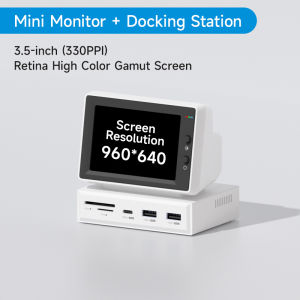
The Hagibis USB Mini Screen is a versatile, compact display solution designed to enhance productivity and user experience for laptop users. With its 3.5-inch IPS screen, USB-C hub functionality, and compatibility with various devices, this mini monitor offers a convenient way to monitor data, view floating lyrics, and optimize performance.
Core Features
- 3.5-inch IPS screen
- USB-C hub functionality
- Compatible with Windows and macOS systems
- Supports USB-C and HDMI connections
- Lightweight and portable design
Key Specifications
- Display size: 3.5 inches
- Resolution: 800 x 480 pixels
- Refresh rate: 60Hz
- Interface: USB-C
- Weight: 120 grams
Compatibility & Applications
The Hagibis USB Mini Screen is compatible with a wide range of devices, including laptops, desktops, tablets, and smartphones. It works seamlessly with Windows and macOS systems, making it an ideal choice for users who want to enhance their productivity and monitor data on the go.
How to Use Hagibis USB Mini Screen
Using the Hagibis USB Mini Screen is simple and straightforward. Follow these steps to set up your monitor and start enjoying its benefits.
Setting Up Your Monitor
- Connect the Hagibis USB Mini Screen to your device using the USB-C cable.
- Power on your device and wait for the monitor to initialize.
- Adjust the display settings according to your preferences.
Connecting Devices
The Hagibis USB Mini Screen supports both USB-C and HDMI connections, allowing you to connect various devices easily. To connect a device via USB-C, simply plug the cable into the monitor and your device. For HDMI connections, use the included HDMI adapter to connect your device to the monitor.
Optimizing Performance
To get the most out of your Hagibis USB Mini Screen, consider the following tips:
- Adjust the display settings to optimize brightness, contrast, and color balance.
- Use the built-in USB-C hub to connect additional devices, such as keyboards, mice, or external storage.
- Utilize the monitor's data monitoring capabilities to keep track of CPU, RAM, HDD, and temperature metrics.
Benefits of Using Hagibis USB Mini Screen
Using the Hagibis USB Mini Screen offers numerous advantages, including enhanced productivity, improved user experience, and better data monitoring capabilities.
Enhancing Productivity
The compact size and portability of the Hagibis USB Mini Screen make it an ideal companion for on-the-go users. By providing a secondary display, you can multitask more efficiently, view additional information, and increase your overall productivity.
Improving User Experience
The Hagibis USB Mini Screen offers a seamless user experience, thanks to its intuitive design and compatibility with various devices. With its built-in USB-C hub, you can connect multiple devices simultaneously, eliminating the need for additional cables and adapters.
Enhancing Data Monitoring Capabilities
The Hagibis USB Mini Screen provides real-time data monitoring capabilities, allowing you to keep track of essential metrics such as CPU, RAM, HDD, and temperature. This feature is especially useful for users who want to monitor system performance and ensure optimal operation.
Comparing Hagibis USB Mini Screen with Other Options
When choosing a data monitor for your laptop, it's essential to consider various options available in the market. Here's a comparison of the Hagibis USB Mini Screen with other popular alternatives.
USB-C HDMI Monitor
A USB-C HDMI monitor offers similar functionality to the Hagibis USB Mini Screen, but with a larger display size. While it may be more suitable for users who require a bigger screen, the Hagibis USB Mini Screen remains a more compact and portable option.
AIDA64 Mini PC Display
The AIDA64 Mini PC Display is another popular data monitoring solution that provides real-time system performance metrics. However, it lacks the built-in USB-C hub functionality and portability offered by the Hagibis USB Mini Screen.
Floating Lyrics Sub Screen
The floating lyrics sub screen is a specialized display designed for music enthusiasts who want to view lyrics while listening to their favorite songs. While it may not offer the same level of data monitoring capabilities as the Hagibis USB Mini Screen, it remains a viable option for users who prioritize floating lyrics display.
Conclusion & Recommendations
In conclusion, the Hagibis USB Mini Screen is a versatile, compact display solution that enhances productivity, improves user experience, and provides real-time data monitoring capabilities. Whether you're a professional on-the-go or a casual user looking to optimize performance, the Hagibis USB Mini Screen is an excellent choice.
Final Thoughts
The Hagibis USB Mini Screen is a highly recommended option for users who want to monitor data, view floating lyrics, and optimize performance on their laptop or desktop. Its compact size, portability, and built-in USB-C hub make it a valuable addition to any workspace.
Choosing the Right Option for You
When choosing a data monitor for your laptop, consider your specific needs and preferences. If you prioritize portability and data monitoring capabilities, the Hagibis USB Mini Screen is an excellent choice. However, if you require a larger display or specialized features, other options may be more suitable.
Additional Tips & Tricks
To get the most out of your Hagibis USB Mini Screen, consider the following tips:
- Utilize the built-in USB-C hub to connect multiple devices simultaneously.
- Adjust the display settings to optimize brightness, contrast, and color balance.
- Keep track of essential metrics such as CPU, RAM, HDD, and temperature using the monitor's data monitoring capabilities.

Hagibis official store
Review
You May Also Like
Auto Adjusting Graphics Fan Cable 4Pin PWMs Thermals Controls For Quiet Cooling And Efficient Airflows
TP-Link TL-WN881ND 300Mbps Wireless N PCI Express Adapter Wi-Fi Adapter for PC Wi-Fi Receiver for PC
Two M.2 NVME to PCIExpress X8 RAIDs Controller Expansion Solution for Prolonged Computer System Usage
200/300/500cm DisplayPort to VGA Cable 1080P Video Converter Feature Double Magnetic Rings Enjoy Stable Transmission
RD6018P/RD6018PW 60V 18A 5-digit display DC adjustable step down voltage power supply Buck Converter laptop repair and 1200W PSU
Permanent ABS Air Cooled Petrodiesel Engine Factors Consistent 170F 173 Upgraded Consumption Plan For Improved Efficiency
RYZEN 7 5700G: A High-Performance Gaming CPU
HKBTM POE Splitter: A Comprehensive Guide
USB C Sound Card Adapter for Music Playbacks and Live Streaming with Quick Charging and OTG Support

Windows 11 Pro laptop Intel Core i7 8500y 15.6 "16GB DDR 1TB SSD laptop Office PC fingerprint unlock laptop
New G12038ha2 Kowloon Cooling Fan 4-Inch Ac220v Chassis Electric Welding Machine Cabinet Fan 3