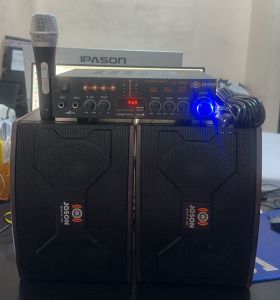
JOSON JS-6000 6 Inches Micro Component System (Amplifier + Speakers) set 300Watts Can Use Audio Karaoke Bluetooth Remote Control

JOSON JS-6000 6 Inches Micro Component System (Amplifier + Speakers) set 300Watts Can Use Audio Karaoke Bluetooth Remote Control

What is JOSON JS-6000

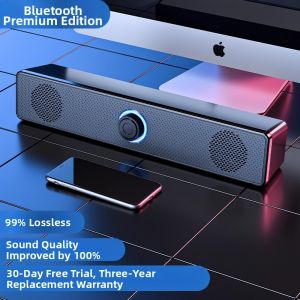
The JOSON JS-6000 is a 6 Inch Micro Component System that offers a powerful and versatile audio experience. This compact system includes a 300Watts amplifier and speakers, allowing users to enjoy high-quality sound output. Additionally, it features a Bluetooth Karaoke System and Remote Control Audio System, making it perfect for home entertainment, parties, or casual listening.

Key Features

  • Compact Design: The JOSON JS-6000 is small enough to fit in any room, yet powerful enough to fill a large space with rich, clear sound.

  • 300Watts Amplifier Speakers: The powerful amplifier delivers crisp and clear audio, allowing users to enjoy their favorite music or movies without distortion.

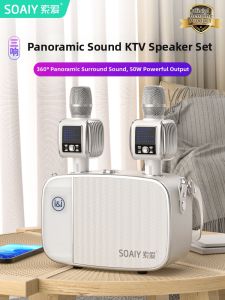
  • Bluetooth Karaoke System: Connect your smartphone or tablet to the system and sing along to your favorite songs. The Bluetooth Karaoke System allows for easy and convenient karaoke sessions.

  • Remote Control Audio System: The included remote control lets you adjust volume, change inputs, and switch between different audio sources without leaving your seat.

Target Audience

The JOSON JS-6000 is designed for music enthusiasts, party hosts, and casual listeners who want a compact yet powerful audio system. It is perfect for home entertainment, parties, or any situation where high-quality sound is desired.

How to Set Up Your JOSON JS-6000 System

Setting up the JOSON JS-6000 is simple and straightforward. Follow these steps to get started:

  1. Unpack the Components: Remove all components from the box and place them in a convenient location.

  2. Connect the Speakers: Connect the left and right speakers to the amplifier using the provided speaker cables.

  3. Connect Bluetooth Speakers: To connect Bluetooth speakers, press and hold the Bluetooth button on the amplifier until the LED light turns blue. Then, pair the speakers with your device using the Bluetooth settings.

  4. Configure Remote Control Audio System: Insert the batteries into the remote control and test its functionality by adjusting the volume or changing inputs.

Exploring JOSON JS-6000's Audio Capabilities

The JOSON JS-6000 offers a wide range of audio capabilities, allowing users to enjoy their favorite music, movies, or karaoke sessions. Here are some ways to make the most of your system:

Utilizing 300Watts Amplifier Speakers

The 300Watts amplifier in the JOSON JS-6000 delivers powerful and clear sound output. To get the best performance, follow these tips:

  • Position the Speakers: Place the speakers in a location that allows sound to travel freely without obstruction.

  • Adjust the Volume: Start with a moderate volume setting and gradually increase it until you achieve the desired level of sound.

  • Use High-Quality Sources: Connect high-quality audio sources, such as CDs, vinyl records, or digital files, to get the best possible sound quality.

Using Bluetooth Karaoke System

The JOSON JS-6000's Bluetooth Karaoke System lets users sing along to their favorite songs with ease. To use this feature, follow these steps:

  1. Connect Your Device: Pair your smartphone or tablet with the amplifier using the Bluetooth settings.

  2. Select a Song: Play a song from your device's music library or streaming service.

  3. Sing Along: Use the microphone included with the system to sing along to the song.

Troubleshooting Common Issues

Even with the best audio systems, issues can arise. Here are some common problems and solutions for the JOSON JS-6000:

Dealing with Connectivity Problems

If you're having trouble connecting your devices to the JOSON JS-6000, try these troubleshooting steps:

  • Restart the System: Turn off the amplifier and speakers, wait for a few seconds, and then turn them back on.

  • Check Bluetooth Settings: Ensure that your device's Bluetooth settings are enabled and that the system is within range.

  • Reset the System: Press and hold the reset button on the amplifier for 10 seconds to reset the system.

Addressing Sound Quality Concerns

If you're experiencing issues with sound quality, try these troubleshooting steps:

  • Check Speaker Connections: Ensure that the speaker cables are securely connected to the amplifier.

  • Adjust Volume Settings: Lower the volume setting to avoid distortion.

  • Use High-Quality Sources: Connect high-quality audio sources to improve sound quality.

In conclusion, the JOSON JS-6000 is a powerful and versatile audio system that offers a wide range of features and capabilities. With its compact design, powerful amplifier, and Bluetooth Karaoke System, it is the perfect choice for music enthusiasts, party hosts, and casual listeners. By following the setup instructions and troubleshooting tips provided in this guide, users can enjoy a high-quality audio experience with the JOSON JS-6000.

dennisco1688

dennisco1688

Seller ratings 96%