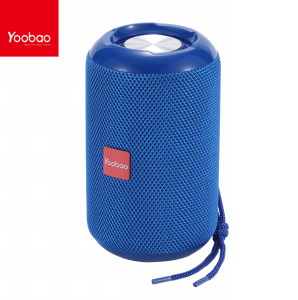
Original YOOBAO M12 Portable Wireless Bluetooth Super Speaker V5.3 TWS with Strap High Quality
Original YOOBAO M12 Portable Wireless Bluetooth Super Speaker V5.3 TWS with Strap High Quality
What is the YOOBAO M12 Portable Wireless Bluetooth Super Speaker?
The YOOBAO M12 Portable Wireless Bluetooth Super Speaker is a high-quality super speaker designed to provide exceptional sound quality and portability. With its V5.3 Bluetooth technology, this portable wireless speaker allows you to enjoy your favorite music and audio content from various sources, all while maintaining excellent sound quality.
Key Features & Specifications
Here are some of the key features and specifications of the YOOBAO M12 Portable Wireless Bluetooth Super Speaker:
- V5.3 Bluetooth technology
- TWS with strap
- High-quality sound output
- Long battery life
- Lightweight and portable design
- Easy-to-use controls
Package Contents
When you purchase the YOOBAO M12 Portable Wireless Bluetooth Super Speaker, you will receive the following items:
- 1 x Yoobao M12 TWS Bluetooth Portable Wireless Speaker
- 1 x Type-C Charging Cable
- 1 x Aux Cord
- 1 x User Manual
How to Set Up Your YOOBAO M12 Speaker
Setting up your YOOBAO M12 speaker is a breeze. Here's how to get started:
Pairing with Bluetooth Devices
To pair your YOOBAO M12 speaker with a Bluetooth device, follow these steps:
- Turn on your Bluetooth device and make sure it is discoverable.
- Press and hold the power button on the speaker until the blue LED light starts flashing.
- On your Bluetooth device, select the YOOBAO M12 speaker from the list of available devices.
- Once connected, the blue LED light will stop flashing and remain solid.
Charging the Speaker
To charge your YOOBAO M12 speaker, connect the Type-C charging cable to the speaker and plug it into a power source. The red LED light will turn on while charging and will turn off once the battery is fully charged.
How to Use Your YOOBAO M12 Speaker
Using your YOOBAO M12 speaker is simple and intuitive. Here's how to get the most out of your new portable wireless Bluetooth super speaker:
Playing Music from Various Sources
To play music from various sources, simply connect your Bluetooth device to the speaker and select the desired audio file or streaming service. The YOOBAO M12 speaker supports various audio formats, including MP3, AAC, and FLAC.
Adjusting Volume & Sound Settings
To adjust the volume and sound settings on your YOOBAO M12 speaker, press the volume up or down buttons on the speaker. You can also adjust the bass and treble settings using the provided app or through the speaker's built-in controls.
Troubleshooting Common Issues
If you encounter any issues with your YOOBAO M12 speaker, here are some common solutions:
Connection Problems
If you're having trouble connecting your Bluetooth device to the speaker, try the following:
- Make sure both devices are turned on and within range of each other.
- Restart both devices and try pairing again.
- Make sure your Bluetooth device is discoverable.
Sound Quality Issues
If you're experiencing sound quality issues, try the following:
- Adjust the bass and treble settings on the speaker.
- Make sure the speaker is not placed near any objects that may interfere with the sound output.
- Try using a different audio file or streaming service.

IOS Electronics
Review

You May Also Like
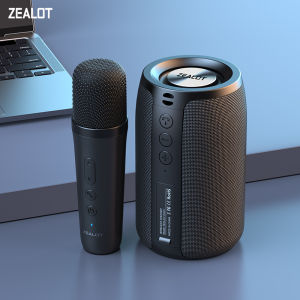
ZEALOT S32M 3D Bass Bluetooth Speaker Wireless Subwoofer Portable Water Resistant Support Micro SD Card USB Pendrive Playback With Microphone

O.SHINE CS-0513 Portable Wireless Bluetooth Karaoke Speaker Rechargeable 4" TWS Pairing Speaker w/ RGB Light
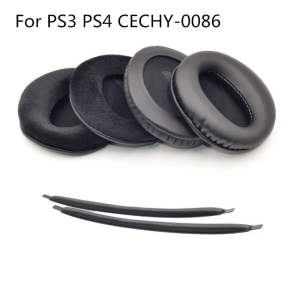
Comfortable Earpads for Head Beams for 7.1 Pulse Elite Edition Wireless CECHYA-0086 Headset Headband
TQTQ High End Wireless Audio Mini Home Karaoke Speaker & Microphone
Single Ear Open Wearable Stereo Wireless Bluetooth Earphones with Mic & Digital Display SeaSpark
JBL M19 TWS Bluetooth Earphones: A Comprehensive Guide
Soundcore by Anker Life Q35/Q45 Multi Mode Active Noise Cancelling Headphones: Key Features & Benefits
Recording Cassette Tape 45min/60min/90min Clear Body Easy Content Identification Plastic Texture for Music Recording
Disney KD-21 TWS Bluetooth Earphone BT5.3 Brand Quality Mini Wireless Earbuds Sport Gaming Bluetooth Headset with Mic Support Call Video IOS Android Universal
V2S Partybox 200 Bluetooth Wireless Rechargeable Mini Speaker With Wireless Microphone KTV Speaker karaoke
V2S VS801 Portable Mini Wireless Bluetooth Speaker with USB TF Card and FM Radio Function