V380 Pro CCTV Camera: Features & Benefits
The V380 Pro CCTV Camera is a state-of-the-art surveillance solution designed to provide top-notch security and peace of mind for your home or business. This advanced security system boasts numerous features that make it stand out from the competition. In this article, we will explore the key features, setup process, and benefits of the V380 Pro CCTV Camera.
What is the V380 Pro CCTV Camera?
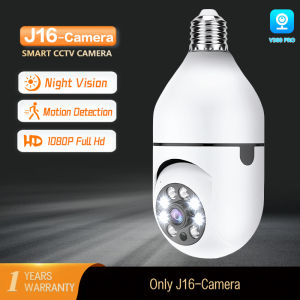
The V380 Pro CCTV Camera is a 1080P 2MP Ultra HD Video Resolution security camera that offers exceptional clarity and detail. It is a wifi connected security camera that allows you to monitor your property from anywhere in the world, as long as you have an internet connection. This auto tracking camera also features motion detection and real-time alerts, providing you with instant notifications when someone enters your monitored area.
Key Features
The V380 Pro CCTV Camera comes equipped with a built-in microphone and speaker, allowing you to have a conversation with visitors or create a sound alarm to scare away intruders. It also offers multiple view options and double storage capabilities, including saving videos to an SD card (not included) and sharing footage with friends and family. The camera's privacy protection feature ensures that your videos remain secure, even if the camera is stolen or damaged.
How Does It Work?
The V380 Pro CCTV Camera works by connecting to your home or business Wi-Fi network. Once connected, you can access live video feeds and recorded footage through the dedicated app on your smartphone or tablet. The camera's motion detection and auto tracking capabilities allow it to automatically focus on moving objects within its field of view, providing real-time alerts when someone enters your monitored area.
Setting Up Your V380 Pro CCTV Camera
Setting up your V380 Pro CCTV Camera is a straightforward process that can be completed in just a few simple steps.
Installation Process
First, choose a suitable location for your camera, taking into account its 360-degree surveillance capabilities. Next, mount the camera securely using the included mounting hardware. Once mounted, connect the camera to power and plug it into your home or business Wi-Fi network.
Connecting to Wi-Fi
To connect your V380 Pro CCTV Camera to your Wi-Fi network, open the dedicated app on your smartphone or tablet and follow the on-screen instructions. This will guide you through the process of selecting your Wi-Fi network and entering your password.
Downloading the App
The V380 Pro CCTV Camera requires a dedicated app to access live video feeds and recorded footage. Download the app from the Google Play Store or Apple App Store, and follow the installation instructions to get started.
Enhancing Security with V380 Pro CCTV Camera
The V380 Pro CCTV Camera offers numerous features that enhance your home or business security.
Motion Detection & Auto Tracking
The V380 Pro CCTV Camera's motion detection and auto tracking capabilities allow it to automatically focus on moving objects within its field of view. This provides real-time alerts when someone enters your monitored area, giving you peace of mind knowing that your property is being watched.
Real-time Alerts
Real-time alerts are a crucial feature of the V380 Pro CCTV Camera. When motion is detected, you will receive instant notifications on your smartphone or tablet, allowing you to take action immediately.
Two-Way Audio & Sound Alarm
The built-in microphone and speaker on the V380 Pro CCTV Camera allow you to have a conversation with visitors or create a sound alarm to scare away intruders. This feature enhances your security by providing an additional layer of protection.
Sharing & Storing Videos
The V380 Pro CCTV Camera allows you to share videos with friends and family, save footage to an SD card (not included), and protect your privacy.
Sharing with Friends & Family
Share your camera with friends and family to view live video feeds and recorded footage simultaneously on their phones. This feature is perfect for keeping loved ones informed about what's happening at your home or business.
Saving Videos to SD Card
Save videos to an SD card (not included) to keep a record of important events. This feature ensures that you have a backup of your footage, even if the camera is stolen or damaged.
Privacy Protection
With high-level encryption, your videos can only be viewed by you, even if the camera is stolen or broken. This privacy protection feature ensures that your footage remains secure and confidential.

HongDa PH
Review
You May Also Like

2MP wireless WIFI video call camera baby safety protection monitor 2.8-inch screen button call PTZ human shape detection ICSEE

SPY Camera Charger Hidden Cam DVR - 1080P Night Vision & Motion Detection Portable Nanny Cam for Home Security (Philippines Free Shipping)

Hamrol 8MP Dual Lens WiFi PTZ Camera 36X Optical Zoom Outdoor Color Night Vision Security CCTV

WiFi Bulb Security Camera with Human Tracking & Floodlight - 3MP Indoor/Outdoor Monitor Color Night Vision 2-Way Talk

⭐⭐⭐NV8300 3D Night Vision Goggles Binocular Binoculars Telescope Hunting Googles for Helmet 4K HD Night Vision Device

Acarte Poe 4MP/5MP/8MP IP Camera: High-Quality Outdoor Surveillance

WIFI IP Camera 6K 12MP HD Three Lens PTZ Camera Outdoor Motion Detection Security Camera Waterproof Surveillance

1080P Kids Digital Flip & Printing Camera and Toy Photo Print Games MP3 Pix & Play Co.

DAHUA DH-HAC-HFW1239CN-A-LED 2MP 2.8MM FULL COLOR WITH BUILT-IN MIC

HD 4K Camera With Mini Drone Foldable Drones One-Key Return FPV Quadcopter Follow Me RC Helicopter Quadrocopter Kids Toys

4K HD 18mm Wide Angle with 10x Macro Adapter Ring Kit for Sony ZV1 RX100 VII VA ZV-1 Canon Powershot G5X G7X IIII