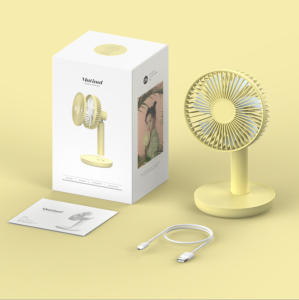
Bladeless Tower Fan Inverter with Remote Control Floor Fan Refrigeration Air Conditioning Fan Cold Fan For Home Office Warehouse
Bladeless Tower Fan Inverter with Remote Control Floor Fan Refrigeration Air Conditioning Fan Cold Fan For Home Office Warehouse
What is the Camel TC-TS 17?
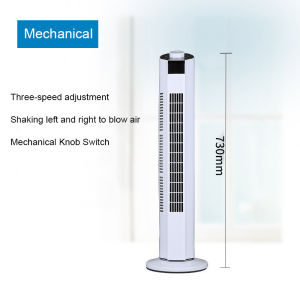
The Camel TC-TS 17 is a state-of-the-art, bladeless tower fan inverter designed to provide cooling comfort and energy efficiency for various environments. This innovative product combines sleek design, advanced technology, and user-friendly features to deliver an exceptional experience. The fan is equipped with a remote control, making it convenient for users to adjust settings without getting up from their seats. The TC-TS 17 is suitable for home offices, warehouses, and other commercial spaces, offering an excellent solution for enhancing comfort and productivity.
Key Features & Specifications
- Fan Type: Tower fan
- Brand: Camel
- Model: TC-TS 17
- Speed Adjustment Stalls: Tranche 3
- Type of Switch: Touch style
- Timing Function: 7 hours
- Cable Length: 1.5m
- Power Supply Mode: Communication power
- Wind Selection: Sleep wind, normal wind, natural winds
- Type of Air Conditioner Fan: Single-cold
- Rated Voltage: 220V
- Rated Power: 45W
- Rated Frequency: 50Hz
- Type of Control: Remote control or manual
How It Compares to Other Fans
The Camel TC-TS 17 stands out among other fans due to its unique features and benefits. Some of the key differences include:
- Bladeless Design: The TC-TS 17 features a bladeless design, which reduces the risk of injuries and eliminates the noise associated with traditional fans.
- Remote Control: The fan comes with a remote control, allowing users to adjust settings without having to physically interact with the device.
- Energy Efficiency: With a rated power of just 45W, the TC-TS 17 is an energy-efficient option for cooling spaces without breaking the bank.
- Multiple Wind Selections: The fan offers sleep wind, normal wind, and natural winds, providing users with a variety of options to suit their preferences.
Setting Up Your New Fan
Setting up your new Camel TC-TS 17 is a straightforward process that can be completed in just a few simple steps.
Unboxing & Assembly
- Open the box and remove the fan and all included accessories.
- Check the contents against the list provided in the instruction manual.
- Follow the instructions to assemble the fan, if necessary.
Connecting Power Supply
- Locate the power cord and plug it into the fan.
- Plug the other end of the power cord into a nearby outlet.
Using Remote Control or Manual Switch
The Camel TC-TS 17 can be controlled using either the remote control or the manual switch located on the fan itself.
- Remote Control: Press the power button on the remote to turn the fan on or off. Use the other buttons to adjust settings such as wind selection, speed, and timer.
- Manual Switch: Press the power button on the fan to turn it on or off. Use the touch-style switch to adjust settings such as wind selection, speed, and timer.
Using Your Fan Effectively
To get the most out of your new Camel TC-TS 17, it's essential to understand how to use it effectively.
Adjusting Speed & Wind Selection
The TC-TS 17 offers three speed adjustment stalls and multiple wind selections, allowing users to customize their experience. To adjust the speed, use the remote control or manual switch to select the desired setting. To change the wind selection, use the remote control or manual switch to choose from sleep wind, normal wind, or natural winds.
Setting Timer & Power Mode
The TC-TS 17 features a 7-hour timer function, allowing users to set the fan to turn off automatically after a specified period. To set the timer, use the remote control or manual switch to select the desired duration. The fan also offers two power modes: standard and energy-saving. To switch between power modes, use the remote control or manual switch to select the desired setting.
Maintaining Optimal Performance
To ensure optimal performance, it's important to clean and maintain your Camel TC-TS 17 regularly. Follow the instructions in the instruction manual to learn how to clean the fan and replace any filters, if necessary.
Where to Use Your Fan
The Camel TC-TS 17 is versatile and can be used in a variety of environments, including home offices and warehouses.
Home Office & Warehouse Applications
In a home office, the TC-TS 17 provides a comfortable and productive environment by maintaining a consistent temperature and eliminating hot spots. In warehouses, the fan helps to circulate air and maintain a stable temperature, reducing the risk of overheating and improving worker comfort.
Enhancing Comfort & Productivity
By using the Camel TC-TS 17, users can enhance their comfort and productivity in various environments. The fan's bladeless design, remote control, and multiple wind selections make it an ideal choice for creating a comfortable workspace.
Energy Efficiency & Cost Savings
With its energy-efficient design and low power consumption, the TC-TS 17 helps users save money on their electricity bills while still enjoying a comfortable environment.
Conclusion
In summary, the Camel TC-TS 17 is a top-of-the-line bladeless tower fan inverter that offers numerous benefits and features. Its bladeless design, remote control, and multiple wind selections make it an ideal choice for enhancing comfort and productivity in home offices and warehouses. With its energy-efficient design and low power consumption, the TC-TS 17 helps users save money on their electricity bills while still enjoying a comfortable environment.
Final Thoughts & Recommendations
Overall, the Camel TC-TS 17 is a highly recommended product for anyone looking for a reliable and efficient cooling solution. Whether you're working from home or managing a warehouse, this fan is sure to provide the comfort and convenience you need.

Amy PH
Review

You May Also Like

Best Seller Portable USB Mini Fan: A Comprehensive Guide

Silk Material Classical Dance Performance Semi-Transparent Fan Childrens Group Dance Props Elegant round Fan
10000mAh Multifunctional Portable Waist Fan 5 Speed Adjustable Hanging Neck Fan Strong Wind With Powerbank and LED Light Up to 40H Cooling Suitable for Outdoor Camping Trip

American ACA 12L Electric Oven: A Multi-Function Toaster Microwave & Baking Oven
【Free Shipping】 Smart Robotic Vacuum Cleaner 1000Pa Suction Automatic Sweeping USB Rechargeable for Hard Floors and Carpets
Camping Fan Tripod Rotary Fan Desk Fan/Ceiling fan/Chandelier 3in1-10000mAh
Wall Fan Inverter With Remote Electric Fan Wall Fans Sale Circulating Shake Head Cooling Fan High Wind Silent Moving Multifuction Energy Saving For Home Office Bedroom

Bosch Maika Rechargeable Wireless Mites Vacuum Cleaner: A Comprehensive Guide

luckyLKH❁ Mini Manual Food Chopper with Stainless Steel Blades Compact and Portable white
16" inch Wall fan 5 Blade household Electric Wall fan Energy saving easy to install Buy 1 Take 1

Pure Water Distiller Machine Electric Distillation Purifier Distilled Water Machine Vevor Distiller for Home Office Dental Lab 4L 110V/220V 750W