How to Keep Your Electronics Clean & Dust-Free
How to Keep Your Electronics Clean & Dust-Free
Introduction to Portable Cleaning Tools
Maintaining a clean environment for your electronics is crucial for optimal performance and longevity. In this article, we will explore various portable cleaning tools designed specifically for electronics, such as handheld dust collectors, mini keyboard cleaners, and cleaning brushes.
Overview of Cleaning Brushes for Electronics
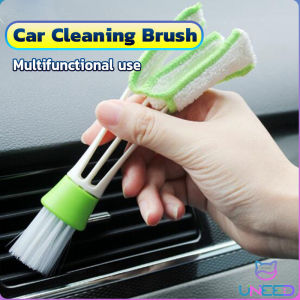
Cleaning brushes play a vital role in keeping your electronics clean and dust-free. They come in different shapes and sizes, making them suitable for various cleaning tasks. For instance, the car cleaning brush, with its unique shape and two brush heads, can easily clean small gaps and hard-to-reach areas.
Key Features of Handheld Dust Collectors
Handheld dust collectors are another essential tool for keeping your electronics clean. They are portable, easy to use, and effective at removing dust and debris. These devices can be used on keyboards, air conditioners, and other electronic devices.
Benefits of Using Mini Keyboard Cleaners
Mini keyboard cleaners are specifically designed to clean keyboards and other small electronic devices. They are compact, easy to store, and effective at removing dust and debris. Additionally, mini keyboard cleaners are gentle on delicate surfaces, making them ideal for use on sensitive electronics.
Choosing the Right Tool for Your Needs
Selecting the right cleaning tool depends on your specific cleaning requirements. Consider the size and type of device you need to clean, as well as the level of dirt and debris present.
Assessing Your Cleaning Requirements
Before choosing a cleaning tool, assess the cleaning requirements of your electronic devices. Determine the size and type of device, the level of dirt and debris, and any special considerations, such as sensitive surfaces or hard-to-reach areas.
Comparing Different Types of Cleaning Tools
Once you have assessed your cleaning requirements, compare different types of cleaning tools to find the best option for your needs. Consider factors such as portability, ease of use, effectiveness, and cost.
Evaluating Cost & Effectiveness
When choosing a cleaning tool, consider both the cost and effectiveness. While some tools may be more expensive, they may offer better performance and longer-lasting results.
Proper Usage Techniques
To ensure the best results from your cleaning tools, follow proper usage techniques. This includes disassembly and cleaning instructions, how to clean gaps and hard-to-reach areas, and pre- and post-cleaning wiping techniques.
Disassembly & Cleaning Instructions
Before using any cleaning tool, refer to the manufacturer's instructions for disassembly and cleaning. This will help you avoid damaging your electronic devices and ensure a thorough clean.
How to Clean Gaps & Hard-to-Reach Areas
Cleaning gaps and hard-to-reach areas requires special attention. Use a cleaning brush or handheld dust collector with a small, flexible head to reach these areas effectively.
Pre- & Post-Cleaning Wiping Techniques
Pre-cleaning wiping involves removing loose dirt and debris before using a cleaning tool. Post-cleaning wiping ensures that all dirt and debris have been removed and helps prevent smudging.
Maintenance & Storage Tips
Proper maintenance and storage of your cleaning tools will extend their lifespan and ensure optimal performance.
Proper Storage Methods
Store your cleaning tools in a cool, dry place away from direct sunlight. Keep them clean and dry to prevent damage and extend their lifespan.
Extending the Lifespan of Your Cleaning Tools
Regular maintenance, such as cleaning and inspecting your tools, will help extend their lifespan. Replace worn or damaged parts as needed to maintain optimal performance.
Troubleshooting Common Issues
If you encounter any issues with your cleaning tools, refer to the manufacturer's instructions for troubleshooting. This may include cleaning or replacing parts, adjusting settings, or seeking professional assistance.

UNeedShop
Review

You May Also Like
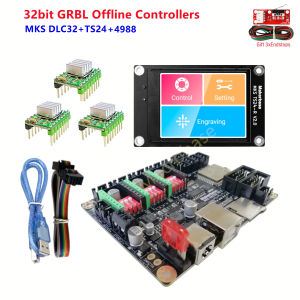
CNC3018 PRO 3020 MAX offline controller GRBL 32 bits control card MKS DLC32 TS24-R touch screen CNC mahine DIY parts
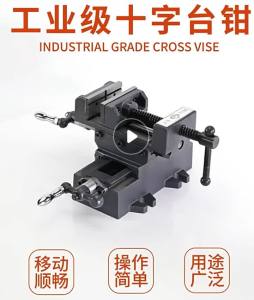
6Inch Heavy-Duty Drill Press Vise 1900LBS Max Clamping Force Cast Iron Machine Vise with Swivel Base & Replaceable Jaw Plates for Milling Drilling Woodworking & Metalworking
50pcs Shelves Support Nails with Non-Slip Silicone Sleeve Cap Punch-Free Self Tapping Screws

1 Liter MAJESTIC Liquid Marble w/ 25g Pigments: A Guide for Creative Art Supplies
24V 36V 200W 5 Inch Scooter Solid Tire Brushless DC Gearless Hub Motor Wheel With Hall Sensor

Silicone High Temperature Resistant Seam Hand Pressure Roller Roofing PVC Welding Tool 40mm

KYL-01 Bathroom Faucet: A Luminous Stainless Steel Choice
Multifunctional Torx Wrench: Universal Adjustable Double-Head Multi-Purpose

8 Inch Cordless LED Work Light Outdoor Floodlight Emergency Light with Rechargeable Li-ion Battery

Window Waterproof Sealing Tape Kitchen Bathroom Mildew Antifouling Transparent Acrylic Tape

2.0inch 500X Digital Microscope: A Comprehensive Guide