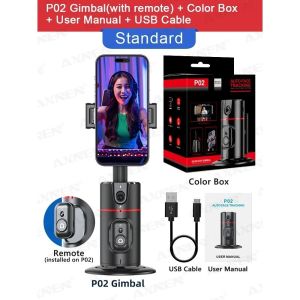
360 rotary gimbal stabilizer Tiktok smartphone live follow-up selfie desktop face tracking gimbal
P02360° Rotation Gimbal with Remote Control AI Automatic Tracking Shooting Portable Desktop Stabilizer for Huawei Iphone Smartphone. 1 360 ° intelligent facial recognition tracking, 2 Removable phone clip, 3 No APP required, 4 Adopting iFLYTEK AI chip algorithm, it follows with true intelligence and provides a better experience, 5 Intelligent gesture recognition, 6 Mobile phone rack 360 ° horizontal and vertical shooting, 180 ° front and back shooting, 7 Equipped with wireless remote control, 8 Adjustable lens up and down for easy shooting. Product description: Appearance parameter. Product Size: 220X95X95mm including base). Colour: back. Packing Size: 116x100x72mm. Weight: 270g. Electrical Parameters. Battery Capacity: 1200mAh. Charging Current: 1.0A. Working Current: 100mA~800mA. Work Time: 2h. Consumption Power: 3.0. WRated Voltage: 3.7V. Best Distance: 1-3m. Tracking Mode: Face Recognition. Gesture Operation: Gesture Recognition. Hardware Parameters. Mater

WELCOME HOME HONEY
Review

You May Also Like
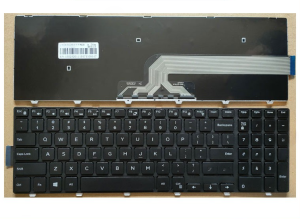
Dell Inspiron 17 Keyboard: A Comprehensive Guide\\n\\n What is the Dell Inspiron 17 Keyboard?\\n\\nThe Dell Inspiron 17 keyboard is a high-quality accessory designed specifically for select Dell Inspiron models, including the 17 5758, 15-3546, 3558, 3559, 3551, 5543, 5548, 5552, 5759, 7557, 5551, 5555, and 5558. This black keyboard offers a sleek and durable design that seamlessly integrates with your Dell Inspiron laptop.\\n\\n Key Features & Specifications\\n\\nThe Dell Inspiron 17 keyboard boasts several notable features:\\n\\n- **Layout**: US layout\\n- **Condition**: Brand new\\n- **Warranty**: 6 months\\n\\nOur team of quality control experts rigorously inspects every product before shipping, ensuring that you receive a high-quality keyboard that meets our exacting standards.\\n\\n Compatibility with Dell Inspiron Models\\n\\nThe Dell Inspiron 17 keyboard is compatible with the following models:\\n\\n- Dell Inspiron 17 5758\\n- Dell Inspiron 15-3546\\n- Dell Inspiron 3558\\n- Dell Inspiron 3559\\n- Dell Inspiron 3551\\n- Dell Inspiron 5543\\n- Dell Inspiron 5548\\n- Dell Inspiron 5552\\n- Dell Inspiron 5759\\n- Dell Inspiron 7557\\n- Dell Inspiron 5551\\n- Dell Inspiron 5555\\n- Dell Inspiron 5558\\n\\n How to Install the Dell Inspiron 17 Keyboard\\n\\nInstalling the Dell Inspiron 17 keyboard is a straightforward process that can be completed in just a few simple steps.\\n\\n Step-by-Step Installation Process\\n\\n1. **Shut down your laptop**: Before installing the new keyboard, make sure your Dell Inspiron laptop is powered off.\\n2. **Remove the old keyboard**: Carefully disconnect the old keyboard from the laptop's motherboard by removing the screws and disconnecting any cables.\\n3. **Install the new keyboard**: Align the new Dell Inspiron 17 keyboard with the laptop's frame and secure it in place using the screws and cables from the old keyboard.\\n4. **Power on your laptop**: Once the new keyboard is installed, power on your laptop and test its functionality.\\n\\n Troubleshooting Common Issues\\n\\nIf you encounter any issues during installation or after installing the Dell Inspiron 17 keyboard, refer to the troubleshooting guide below:\\n\\n- **Keyboard not working**: Ensure that all cables and screws are properly connected and tightened.\\n- **Keys not registering**: Check if the keyboard is properly seated and make sure there are no debris blocking the keys.\\n- **Strange behavior**: Try restarting your laptop and check if the issue persists.\\n\\n Why Choose the Black Dell Inspiron 17 Keyboard?\\n\\nThere are several reasons why you should consider purchasing the black Dell Inspiron 17 keyboard:\\n\\n Aesthetic Appeal & Durability\\n\\nThe sleek black design of the Dell Inspiron 17 keyboard complements the look of your Dell Inspiron laptop, providing a cohesive aesthetic. Additionally, the keyboard is built to last, offering reliable performance even after extended use.\\n\\n Long-Term Cost Savings\\n\\nBy purchasing a replacement keyboard for your Dell Inspiron laptop, you can save money in the long run by avoiding the need to replace the entire laptop due to keyboard issues.\\n\\n Warranty & Support\\n\\nWe stand behind our products and offer a 6-month warranty on all Dell Inspiron 17 keyboards sold in our store.\\n\\n Understanding the 6-Month Warranty\\n\\nThe warranty covers any defects in materials or workmanship that may occur during normal use. It does not cover damage caused by accidents, misuse, or unauthorized modifications.\\n\\n Contacting Customer Support\\n\\nIf you have any questions or concerns about your Dell Inspiron 17 keyboard, please don't hesitate to contact our customer support team. We're here to help!\"
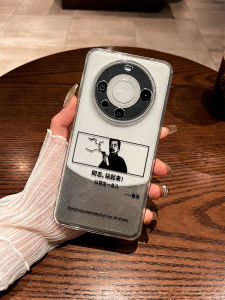
Creative Anti-Fall Huawei Mate80Pro Phone Case with Full Lens Protection LuXun Quotes Transparent Soft TPU Shell for Mate70
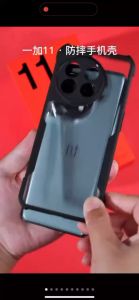
ONEPLUS 11 5G Case XUNDD Beatle Series AIRBAG Shockproof Case

YOOBAO YC10 Premium Magsafe Protection Strong Magnetic Clear Phone Case For iPh 11/ 12/ 13/ 14/ 15/ 16/ 17
![LG AN-MR21GC TV Silicone Remote Control Case Shockproof Remote Control Cover Dust-proof Protective Cover [COD][Ready Stock]](https://img.lazcdn.com/g/ff/kf/Sded17e4b07224167a7b534131f9e8f04L.jpg_300x300q80.jpg)
LG AN-MR21GC TV Silicone Remote Control Case Shockproof Remote Control Cover Dust-proof Protective Cover [COD][Ready Stock]
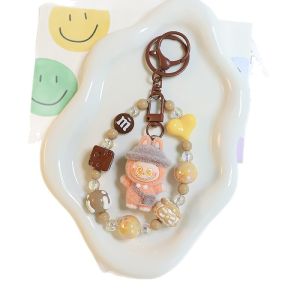
Cartoon Plush Shoulder Bag Labubu Keychain Doll Pendant Mobile Chain Cute Grain Bag Chain Hanging Accessories

Travel-Friendly Phone Tripod & Monopod: A Comprehensive Guide
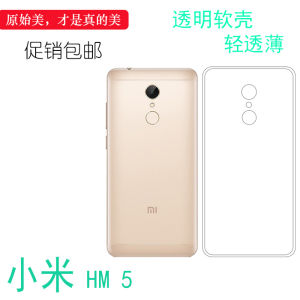
Transparent Protective Case for Xiaomi HM 5 Crystal Soft Shell Full Cover Anti-Fall Rear Cover Compatible with Phone Models
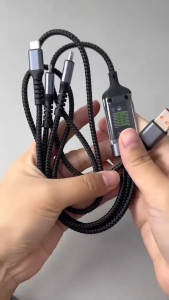
New Nylon material luminous 3in1 USB data cable 100W Type C cable 3in1 super fast charging data cab
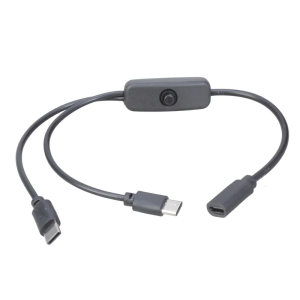
Double Port Type C Splitter Charging Cord switches Control 5V 2A Power Supply 2 Port Type C Cable for Smartphones

Cute Bear Mascot Flip Cover Mirror Silicone Phone Case for Huawei Mate60 pro Anti-Fall Protection Cute Style Transparent Design