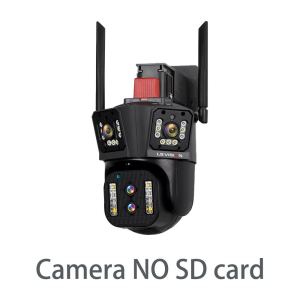
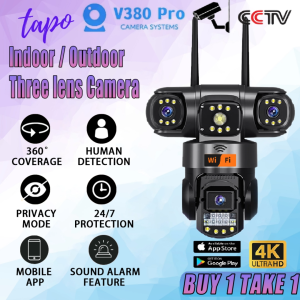
8K 16MP Three Lens WIFI CCTV Camera: A Comprehensive Guide
What is a Hybrid Optical Zoom PTZ Camera?
A Hybrid Optical Zoom PTZ Camera, like the one described here, combines both optical and digital zoom capabilities. This allows users to capture images and videos with exceptional clarity, even from far distances. PTZ stands for Pan-Tilt-Zoom, which means the camera can move horizontally, vertically, and zoom in/out to focus on specific areas.
Understanding PTZ Technology
PTZ technology allows users to remotely control the camera's movements, making it ideal for surveillance and security applications. With a horizontal range of 0~355 degrees and a vertical range of 0~90 degrees, this camera can cover a wide area.
Key Features & Benefits
- 8K 16MP resolution for crystal-clear images
- 10X hybrid optical zoom for enhanced detail
- Waterproof design for outdoor use
- Two-way voice intercom for communication
- 24-hour night vision with full-color imaging
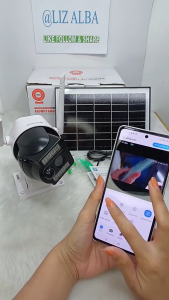
- Remote management via mobile app
Setting Up Your Outdoor Waterproof Security Camera
Installing an outdoor waterproof security camera is a straightforward process, but it requires some basic knowledge. Here are some tips to help you set up your new camera:
Installation Tips
- Choose a suitable location for your camera, taking into account the area you want to monitor and the camera's field of view.
- Make sure the camera is securely mounted and level.
- Connect the power supply to the camera, using the provided DC 12V adapter.
- Connect the camera to your network using either the 2.4G WiFi or RJ45 network port.
- Download the IPC360 Home app on your Android or iOS device and follow the instructions to connect your camera to the app.
Network Connection Options
You can connect your camera to your network using either the 2.4G WiFi or RJ45 network port. Both options provide stable and reliable connectivity, so choose the one that best suits your needs.
Maximizing Your 8K 16MP CCTV Camera's Performance
To get the most out of your 8K 16MP CCTV camera, consider the following strategies:
Optimal Placement Strategies
- Place the camera at a height that allows it to cover the area you want to monitor.
- Make sure there are no obstructions in the camera's field of view.
- Consider the lighting conditions in the area you want to monitor and adjust the camera's settings accordingly.
Customizing Settings for Maximum Efficiency
- Adjust the camera's resolution and frame rate to balance image quality and storage requirements.
- Set up motion detection and alerts to receive notifications when the camera detects movement.
- Customize the camera's PTZ settings to pan, tilt, and zoom to specific areas automatically.
Mastering 24-Hour Night Vision & Full Color Imaging
Night vision is a crucial feature for any security camera, and this camera offers both infrared and full-color imaging modes. Here's how to make the most of these features:
Choosing Between Infrared & Full Color Modes
Infrared mode provides black-and-white imaging in low light conditions, while full-color imaging provides color images even in darkness. Choose the mode that best suits your needs based on the lighting conditions in the area you want to monitor.
Enhancing Image Quality in Low Light Conditions
To improve image quality in low light conditions, consider the following tips:
- Adjust the camera's sensitivity settings to balance image quality and noise.
- Use the camera's built-in infrared and white light sources to illuminate the area you want to monitor.
- Set up motion detection and alerts to receive notifications when the camera detects movement.
Exploring Advanced Features & Applications
In addition to its core features, this camera offers several advanced features and applications that can enhance its functionality:
Remote Management via Mobile App
The IPC360 Home app allows you to remotely manage your camera, including viewing live video feeds, adjusting settings, and receiving alerts. This makes it easy to monitor your home or business from anywhere.
Two-Way Voice Intercom & Synchronized Recording
The camera's two-way voice intercom feature allows you to communicate with people in the area you're monitoring, while synchronized recording ensures that both audio and video are captured together. This can be useful for verifying identities or communicating with visitors.
With its advanced features and applications, this 8K 16MP three-lens WIFI CCTV camera is an excellent choice for home or business security.

Beyond Tech
Review
You May Also Like

V380 PRO Q15S 8MP dual lens HD 1080P IP Security camera outdoor waterproof Wireless WiFi connection 360 full color night vision two-way call connect cellphone surveillance camera

Ezviz H1C HIGH RESOLUTION MOTION DETECTION USB TYPE-C 2WAY AUDIO SMART INDOOR WIFI CAMERA

Industrial Endoscope 4.3 IPS Screen HD1080P Dual Lens 2M-20M 8MM Automotive Endoscopy Inspection Plumbing Borescope Camera

V380 PRO Q28 4MP HD 1080P Video call Smart Camera Automatic Tracking Two Way Video One Click Video Call Indoor Baby Smart camera wifi cctv camera with audio Full Color Night Vision Ip Security Camera

tp-link Tapo C100 Home Security Wi-Fi Camera | TP-Link Tapo by EJD
![[ PH] TTARTISAN 100mm F2.8 Bubble Bokeh M42 Leica M Mount MVP CAMERA](https://img.lazcdn.com/g/p/a687be453c0aac9ac9d9f98dd33489f2.jpg_300x300q80.jpg)
[ PH] TTARTISAN 100mm F2.8 Bubble Bokeh M42 Leica M Mount MVP CAMERA

Double Output 12V 1.5A UPS Power Supply Heavy Duty for WiFi Modem Router

1080P 360 ° network camera with rotatable gimbal equipped with infrared night vision motion detection two-way audio and WiFi mobile monitoring

CCTV Camera V380 Pro 1080P Wifi Connect Indoor Home IP Smart Cellphone With Voice

Mini Toy Camera For Kids HD Camera 1080P Real Camcorder Rechargeable Waterproof 2 inch Display Screen 8 Million Pixel Kids Camera For Birthday/Festival/Educational Gift

HD 1080P Glasses WIFI Camera Outdoor Bicycle Motorcycle Security Protection Sunglasses Video Camera Polarized Lens Sports Cam