Buy 1 Take 1 V380 Pro: A Comprehensive Guide to Dual Lens IP Security Cameras
Introduction to V380 Pro Bulb CCTV Camera
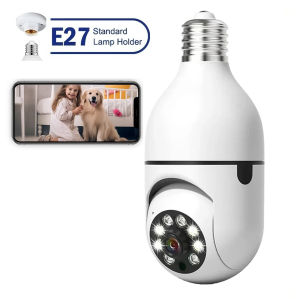
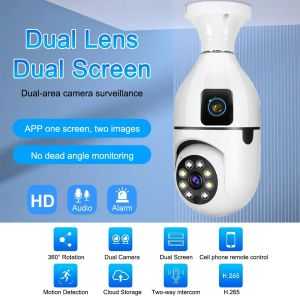
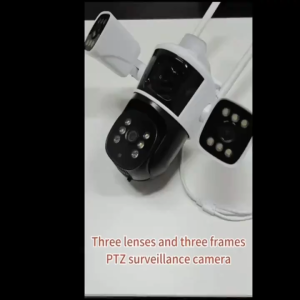
The V380 Pro Bulb CCTV Camera is a cutting-edge Dual Lens IP Security Camera designed for both indoor and outdoor use. It features a 5G WiFi connection, allowing seamless integration with your smartphone, and offers no-internet wireless smart surveillance capabilities. This waterproof camera provides Auto Tracking HD Surveillance with a 360° rotation, making it perfect for monitoring your home or business.
Main Features of V380 Pro Bulb CCTV Camera
- Dual Lens IP Security Camera: With two lenses, this camera offers enhanced coverage and improved image quality.
- Wireless Smart Surveillance System: Connect to your smartphone via 5G WiFi, eliminating the need for internet access.
- Auto Tracking HD Surveillance: The camera automatically tracks movement, ensuring you never miss a moment.
- Indoor Outdoor Waterproof Camera: Durable and weather-resistant, this camera can withstand harsh outdoor conditions.
- 5G Wifi Connect CCTV Camera: Easy setup and connectivity with your smartphone.
Setting Up Your V380 Pro Bulb CCTV Camera
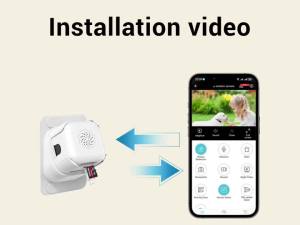
Setting up your V380 Pro Bulb CCTV Camera is simple and straightforward. Here's a step-by-step guide to help you get started:
Installing the Camera Stand & Power Adapter
- Unpack the camera and accessories.
- Attach the camera stand to a suitable location using the screw pack.
- Connect the power adapter to the camera and plug it into a nearby outlet.
Connecting to 5G Wifi & Smartphone
- Download the V380 Pro app from the App Store or Google Play Store.
- Open the app and follow the on-screen instructions to connect your camera to your smartphone.
- Once connected, you can start monitoring your camera feed and configuring settings.
Exploring Auto Tracking HD Surveillance
The V380 Pro Bulb CCTV Camera's Auto Tracking HD Surveillance feature allows you to monitor your surroundings effortlessly. Here's what you need to know:
Understanding 360° Rotation Capabilities
The camera can rotate 360° horizontally, allowing you to cover a wide area with minimal blind spots. This feature ensures that you never miss a moment, whether indoors or outdoors.
Configuring Auto Tracking for Indoor & Outdoor Use
To configure Auto Tracking, open the V380 Pro app and navigate to the settings menu. From there, select the Auto Tracking option and choose whether you want to use it indoors or outdoors. You can also adjust sensitivity settings to fine-tune the camera's tracking capabilities.
Enhancing Security with Audio & Speaker
The V380 Pro Bulb CCTV Camera comes equipped with audio and speaker functionality, allowing you to communicate with people in your monitored area. Here's how to set it up:
Setting Up Audio Communication
- Open the V380 Pro app and navigate to the audio settings.
- Turn on the audio feature and adjust the volume as needed.
- Test the audio by speaking into your smartphone and listening through the camera's speaker.
Utilizing Speaker Functionality
The built-in speaker allows you to communicate with people in your monitored area. This feature is particularly useful for deterring intruders or communicating with family members.
Maintenance & Troubleshooting Tips
To ensure your V380 Pro Bulb CCTV Camera continues to perform at its best, follow these maintenance and troubleshooting tips:
Regular Cleaning & Maintenance
- Clean the camera lens regularly using a soft cloth to prevent dust buildup.
- Inspect the camera stand and power adapter for any signs of damage or wear.
Addressing Common Issues
- Camera not connecting to WiFi: Ensure that your smartphone and camera are within range of the WiFi network. Restart both devices and try connecting again.
- Audio not working: Check the audio settings in the V380 Pro app and ensure that the feature is turned on. Restart both devices and try again if necessary.

Kuer cctv shop
You May Also Like

FNIRSI NVS-20 4K High Definition Night Vision Device with Infrared 6x Digital Zoom

【Free 8G SD】DELILAH A9 Mini Camera CCTV 1080P Ultra HD Camera Surveillance Cameras 360°panoramic voice Infrared Security Camera WifI HD Mini Camera Camcorder Web Video Surveillance CCTV Home IP Camera Package safety APP

Compact WiFi Camera USB Power Supply Non Waterproof Motion Detection Information Push Monitoring Camera Wi-Fi Connection

V380 SC07 Dual Lens 2MP HD IP66 Outdoor CCTV Camera Two Way Audio Auto Tracking Monitor Surveillance Wireless CCTV Camera Up To 128GB Storage (Wi-Fi Supported) - Lazada
![[ PH] TTARTISAN 100mm F2.8 Bubble Bokeh M42 Leica M Mount MVP CAMERA](https://img.lazcdn.com/g/p/a687be453c0aac9ac9d9f98dd33489f2.jpg_300x300q80.jpg)
[ PH] TTARTISAN 100mm F2.8 Bubble Bokeh M42 Leica M Mount MVP CAMERA

100% Original Jcam Smart CCTV Camera Video Calling With LCD Screen 1-Key Video Phone View Two-Way Voice V380

Xiaomi Smart Camera C300 Dual EU Two screens one device Local human detection Xiaomi Home security chip

Techvortex 12MP CCTV Camera Wireless WiFi Camera 3-Lens 3-Screen IP Camera Automatic Tracking Alarm 360 Intelligent Night Vision Bidirectional Communication 10x Zoom Outdoor CCTV WiFi Security Camera IPC 360 HOME

Wireless Indoor Home Surveillance Camera 360 Degree Angle Mobile Remote Monitoring No Need for Plugging in Shop Security

AstrHori 28mm F/13 MF Full Frame 2x Macro Probe Lens Double Tube Lenses for Sony E Mount Mirrorless Camera Manual Focus 360° Rotating View Free Switching with Built-in LED Ring Light USB C Port and Long Lens Barrel for Photography | JG Superstore

Henyou | Solar Powered Outdoor Camera WiFi Remote Mobile Phone Surveillance High Definition Night Vision Full Color 360 Degree No Blind Spot