8K 16MP CCTV Camera with 10X Hybrid Optical Zoom Linkage PTZ Humanoid Tracking Home Security Camera Outdoor Waterproof Full Color Night Vision 24 Hours Video Recording IP Camera

8K 16MP CCTV Camera with 10X Hybrid Optical Zoom Linkage PTZ Humanoid Tracking Home Security Camera Outdoor Waterproof Full Color Night Vision 24 Hours Video Recording IP Camera

Introduction to the 8K 16MP CCTV Camera

The 8K 16MP CCTV camera is a cutting-edge surveillance device designed to provide comprehensive security solutions for residential and commercial properties. With its exceptional features like Full Color Night Vision, 24 Hours Video Recording, and Outdoor Waterproof Design, this camera ensures continuous monitoring and protection.

Key Features

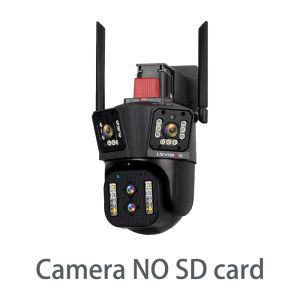
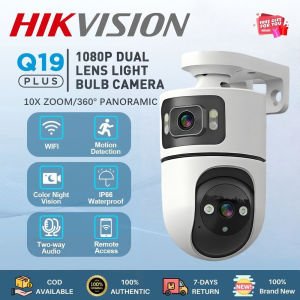
  • 3.5-inch Four-lens Three-screen: This camera offers a wide viewing angle with three screens, providing a clear picture of the surroundings.
  • Pan&Tilt: The camera can pan horizontally from 0 to 355 degrees and tilt vertically from 0 to 90 degrees, allowing it to cover a large area.
  • 2.4G WIFI + RJ45 Network Port: Connect to the internet using either Wi-Fi or Ethernet, making it easy to access and manage the camera remotely.
  • Support Android/IOS APP remote management: Control and monitor the camera through the IPC360 Home app available on Android and iOS devices.
  • Dual light source design: The camera has built-in infrared and white lights, enabling Full Color Night Vision.
  • Two-way voice intercom: Communicate with people in the monitored area using the two-way voice intercom feature.

Benefits of Full Color Night Vision

Full Color Night Vision allows the camera to capture clear images even in low-light conditions. Unlike traditional night vision cameras that produce black-and-white images, this feature enables users to distinguish colors and details in the dark, enhancing the overall security experience.

How to Choose the Right Camera for Your Needs

When selecting a security camera, consider factors such as the required coverage area, lighting conditions, and desired level of connectivity. The 8K 16MP CCTV camera is ideal for outdoor use due to its waterproof design and Full Color Night Vision capabilities.

Setting Up Your 8K 16MP CCTV Camera

To get started with your new camera, follow these steps:

Connecting to Wi-Fi & Network

Connect the camera to your Wi-Fi network by following the instructions provided in the user manual. Alternatively, you can connect it to your network using the RJ45 Ethernet port.

Installing the App & Remote Management

Download the IPC360 Home app on your Android or iOS device and follow the setup process to connect the camera to your account. Once connected, you can remotely manage the camera's settings, view live feeds, and access recorded footage.

Configuring PTZ Settings

Adjust the pan, tilt, and zoom settings to optimize the camera's coverage area. Set up preset positions and schedules to automate the camera's movements and ensure continuous monitoring.

Maximizing Security with 24 Hours Video Recording

Continuous monitoring is crucial for maintaining security, and the 8K 16MP CCTV camera offers 24 Hours Video Recording capabilities.

Benefits of Continuous Monitoring

Continuous monitoring helps deter potential intruders and provides valuable evidence in case of incidents. It ensures that no activity goes unnoticed, enhancing overall security.

How to Set Up Alerts & Notifications

Set up alerts and notifications to receive real-time updates about suspicious activities. Configure motion detection, sound detection, and other triggers to customize the alert system according to your needs.

Integrating with Other Smart Home Devices

Integrate the camera with other smart home devices to create a comprehensive security system. Connect it to smart locks, alarms, and other devices to enhance security and convenience.

Enhancing Outdoor Surveillance with Waterproof Design

The 8K 16MP CCTV camera features a waterproof design, making it suitable for outdoor use.

Benefits of Weatherproof Cameras

Weatherproof cameras can withstand harsh weather conditions, ensuring continuous monitoring even during rain, snow, or extreme temperatures. This feature makes them ideal for outdoor surveillance.

How to Install & Mount Your Camera

Follow the installation instructions provided in the user manual to mount the camera securely. Choose a location that offers optimal coverage and protection from weather elements.

Tips for Maintaining Your Camera

Regularly clean the camera lens and inspect the mounting hardware to ensure proper functioning. Update the firmware and software to access new features and improvements.

BYTE BEAT

BYTE BEAT

Seller ratings 99%