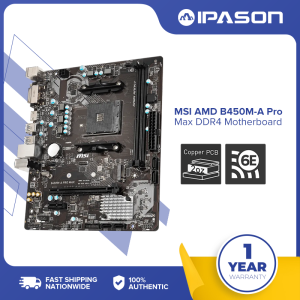
MSI B450M-A Pro Max II Motherboard: Unleashing the Power of Socket AM4
MSI B450M-A Pro Max II Motherboard: Unleashing the Power of Socket AM4
What is the MSI B450M-A Pro Max II Motherboard?
The MSI B450M-A Pro Max II Motherboard is a high-performance motherboard designed specifically for Socket AM4 processors. As a member of the MSI Gaming series, this motherboard is built to provide stability, reliability, and excellent performance for gamers and enthusiasts alike.
Key Features & Specifications
The MSI B450M-A Pro Max II Motherboard boasts a range of features and specifications that make it a top choice for Socket AM4 processors. Some of these features include:
- Support for 1st, 2nd, and 3rd Gen AMD Ryzen™ processors, Ryzen™ with Radeon™ Vega Graphics, 2nd Gen AMD Ryzen™ with Radeon™ Graphics, Athlon™ with Radeon™ Vega Graphics, and A-series processors.
- AMD B450 chipset for enhanced performance and stability.
- Dual-channel memory architecture with support for up to 64GB DDR4 memory.
- Support for ECC UDIMM memory (non-ECC mode).
- PCIe 3.0 x16 slot for high-speed graphics cards.
Supported Processors & Chipset
The MSI B450M-A Pro Max II Motherboard supports a wide range of processors, including:
- 1st, 2nd, and 3rd Gen AMD Ryzen™ processors
- Ryzen™ with Radeon™ Vega Graphics
- 2nd Gen AMD Ryzen™ with Radeon™ Graphics
- Athlon™ with Radeon™ Vega Graphics
- A-series processors
The motherboard features the AMD B450 chipset, which provides excellent performance and stability for Socket AM4 processors.
How to Install the MSI B450M-A Pro Max II Motherboard
Installing the MSI B450M-A Pro Max II Motherboard is a straightforward process that can be completed with the right tools and components.
Necessary Tools & Components
To install the motherboard, you will need the following tools and components:
- Screwdriver
- Thermal paste
- CPU cooler
- RAM
- Power supply unit (PSU)
- Case
Step-by-Step Installation Guide
Follow these steps to install the MSI B450M-A Pro Max II Motherboard:
- Prepare your workspace by laying out all the necessary tools and components.
- Open the case and install the PSU.
- Install the CPU onto the motherboard, ensuring proper alignment with the socket.
- Apply thermal paste to the CPU and install the cooler.
- Install the RAM into the appropriate slots on the motherboard.
- Connect the power cables to the motherboard, CPU, and cooler.
- Install the motherboard into the case, securing it with screws.
- Connect the front panel headers and any other necessary cables.
- Power on the system and enter the BIOS to configure settings as needed.
Maximizing Performance with the MSI B450M-A Pro Max II Motherboard
To get the most out of your MSI B450M-A Pro Max II Motherboard, there are several key areas to focus on.
Memory Support & Configuration
The MSI B450M-A Pro Max II Motherboard supports dual-channel memory architecture, allowing for faster data transfer rates and improved performance. To maximize memory performance, ensure that you install matching RAM modules in the appropriate slots on the motherboard.
Overclocking & Tuning
Overclocking can provide a significant boost in performance for your system. To overclock your CPU, enter the BIOS and adjust the settings as needed. Be sure to monitor temperatures and voltages to avoid damaging your components.
Troubleshooting Common Issues with the MSI B450M-A Pro Max II Motherboard
While the MSI B450M-A Pro Max II Motherboard is a reliable and stable platform, there may be times when issues arise.
Resolving Compatibility Problems
If you are experiencing compatibility issues with your components, ensure that they are compatible with the motherboard and Socket AM4 processors. Check the manufacturer's website for compatibility lists and consult the manual for further guidance.
Addressing Performance Bottlenecks
To address performance bottlenecks, ensure that all components are up-to-date and optimized for maximum performance. Monitor temperatures and voltages to avoid overheating and other issues that can impact performance.
In conclusion, the MSI B450M-A Pro Max II Motherboard is a powerful and reliable platform for Socket AM4 processors. With its range of features and specifications, it is a top choice for gamers and enthusiasts alike. By following the installation guide and maximizing performance through memory configuration and overclocking, you can get the most out of your system. Remember to troubleshoot common issues to ensure optimal performance and reliability.

IPASON
Review
You May Also Like
Safe Operation of DC9-120V to 5V/12V Buck Converters: Advanced Technology for Industrial Use
Japan NMB 3115ps-12t-b30 115v 8038 Industrial Computer Industrial Equipment Fan Aluminum Machine High Temperature Resistant

UpHere 5v 3pin ARGB Gpu Bracket Support Graphics Card Anti Sag Aluminum White Holder G276ARGB
HP Smart Ink Printer Power Supply Adapter GT5810 & GT5820: F5S43-60001 Refurbished
Programmable Voice Recorder Module 4MB Storage USB Rechargeable For Personalize Electronics And Creative Applications
Plastic Turbines Small Bladee Wind Turbines Bladee Propellers Science and Technology Model Fan
Thermalright TL-G12B Black 12CM chassis fan 4pin PWM hydraulic bearing 1500rpm fan
200/300/500cm DisplayPort to VGA Cable 1080P Video Converter Feature Double Magnetic Rings Enjoy Stable Transmission
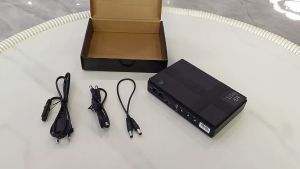
DC1018P DC Power Supply 5V 9V 12V USB DC POE LAN Interface Output 10400MA Prepared Power Supply DC UPS EU / US Plug
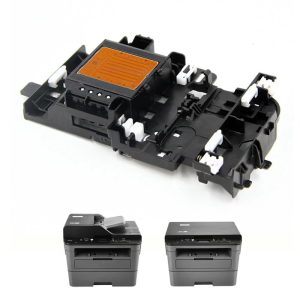
High Speed Printhead Printer Print Head for Brother DCP J105 J200 J25 J152W J132W J152 J205 T300 Printer Spare Parts Kit

Xiaomi Redmi Gaming Monitor G24 23.8 inch 165Hz Fast IPS Full HD HDR10 120%sRGB 8 bit Low Blue Light