Phomemo M220 Mini Thermal Label Printer: A Compact Label Maker for Barcode Jewelry Tags & DIY Stickers
Phomemo M220 Mini Thermal Label Printer: A Compact Label Maker for Barcode Jewelry Tags & DIY Stickers
Overview of Phomemo M220 Mini Thermal Label Printer
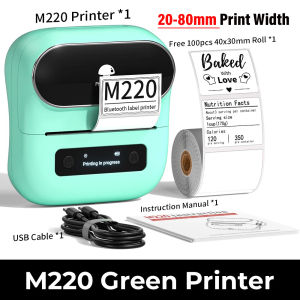
The Phomemo M220 Mini Thermal Label Printer is a versatile, compact label maker designed specifically for barcode jewelry tags and DIY stickers. This innovative device supports label widths ranging from 20 to 80mm, making it perfect for various applications. The printer has a lightweight design, weighing only 400 grams, and measures 125x119x62.8mm (with a slight variation of 1-3mm). It is made of high-quality ABS+PC materials, ensuring durability and reliability.
Key Features
- Label Width Support: 20-80mm
- Weight: 400g
- Size: 125x119x62.8mm (with a slight variation of 1-3mm)
- Material: ABS+PC
- Consumable Type: Thermal Paper
- Max. Resolution: 203dpi
- Paper Feed Mode: Roll Feed
- Sticker Size Support: 20mm-80mm
- Battery Capacity: 2200mAh
- Charging Time: 2 hours
- Wireless Distance: 10 meters
Technical Specifications
- Resolution: 203dpi
- Power Source: Battery-powered (2200mAh)
- Paper Feed Mode: Roll Feed
- Supported Label Widths: 20-80mm
- Charging Time: 2 hours
- Wireless Distance: 10 meters
How to Use Phomemo M220 Mini Thermal Label Printer
Using the Phomemo M220 Mini Thermal Label Printer is simple and straightforward. Follow these steps to get started:
Setting Up Your Printer
- Charge the printer using the included USB cable for at least 2 hours.
- Install thermal paper rolls according to the manufacturer's instructions.
- Connect the printer to your computer or mobile device via Bluetooth or USB.
Printing Barcode Jewelry Tags
To print barcode jewelry tags, follow these steps:
- Create a design for your barcode jewelry tag using a compatible software application.
- Save the design as a file and transfer it to your computer or mobile device.
- Connect the Phomemo M220 Mini Thermal Label Printer to your device and select the desired settings.
- Load thermal paper rolls into the printer and start printing.
Creating DIY Stickers
Creating DIY stickers with the Phomemo M220 Mini Thermal Label Printer is easy. Here's how:
- Design your sticker using a compatible software application.
- Save the design as a file and transfer it to your computer or mobile device.
- Connect the printer to your device and choose the appropriate settings.
- Insert thermal paper rolls into the printer and begin printing.
Benefits of Using Phomemo M220 Mini Thermal Label Printer
There are several advantages to using the Phomemo M220 Mini Thermal Label Printer for your barcode jewelry tags and DIY stickers:
Compact Design & Portability
The Phomemo M220 Mini Thermal Label Printer is incredibly compact and lightweight, making it easy to transport and store. Its small size allows it to fit easily in any workspace, while its durable construction ensures long-lasting performance.
High-Quality Print Resolution
With a maximum resolution of 203dpi, the Phomemo M220 Mini Thermal Label Printer produces crisp, clear prints every time. This makes it ideal for creating professional-looking barcode jewelry tags and DIY stickers.
Easy-to-Use Interface
The Phomemo M220 Mini Thermal Label Printer features an intuitive interface that is simple to navigate. Whether you're a beginner or an experienced user, you'll find it easy to set up and use this printer for your labeling needs.
Conclusion
The Phomemo M220 Mini Thermal Label Printer is a fantastic choice for anyone looking to create barcode jewelry tags and DIY stickers. With its compact design, high-quality print resolution, and easy-to-use interface, this printer offers a convenient and efficient solution for all your labeling needs. Whether you're a hobbyist or a professional, the Phomemo M220 Mini Thermal Label Printer is sure to meet your requirements.

Phomemo official store
Review
You May Also Like

Auto-SMP Printer Style Telescopic Dot Matrix Technology
Brother Printer Drum DR2255: A Comprehensive Guide
10Pcs Universal Replacement Pen Refills For Ballpoint Pen Metal Ballpoint Pen Refill Quick Dry 0.5mm OR 0.7mm Tip
Portable U2 wired 2D U2W 2D Wireless Barcode Scanner Reader U2B Handheld Bluetooth QR Code Scanner 1D Barcode Reader for PDF417
AOS Compatible HP 81A (CF281A) black for HP LaserJet Enterprise Flow MFP M630z M604dn M604nM605dn M605n M605x
PHOTO BOOTH LAPTOP OR PRINTER TRAY

Kyocera Compatible Toner 500grams
Ready Stock: Refill 003 Ink Dye Ink for Epson Inkjet Printer
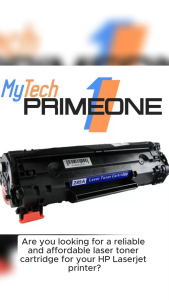
85A (CE285A) A BRAND NEW COMPATIBLE TONER CARTRIDGE FOR HP LASERJET approx. 1600 pages (ready to use)

Canon Printer / Canon Pixma MG2570S / Inkjet Printer / All in One Printer / Printer Scanner and Xerox / Printer for Student / Printer for Small Business / Free Ink
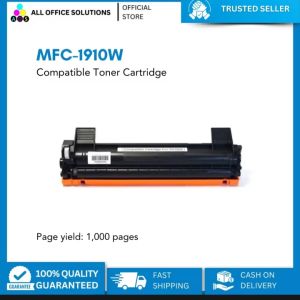
Compatible Toner Cartridge for MFC-1910W MFC1910W MFC 1910W