Slim Mini Keyboard & Compact Bluetooth Mouse: A Comprehensive Guide
Slim Mini Keyboard & Compact Bluetooth Mouse: A Comprehensive Guide
Introduction to Bluetooth Keyboard & Mouse for iPad, Xiaomi, Samsung, Huawei
In today's fast-paced world, users require versatile and portable devices that can seamlessly integrate with their smartphones, tablets, and laptops. A wireless keyboard and mouse set is one such solution that offers unmatched convenience and productivity. In this guide, we will explore the best slim mini keyboard for tablets and compact Bluetooth mouse options available for iPad, Xiaomi, Samsung, and Huawei devices.
Key Features of Slim Mini Keyboard for Tablets
When choosing a slim mini keyboard for tablets, consider the following features:
-
Lightweight and Portable: A slim mini keyboard should be lightweight and easy to carry around, making it perfect for use on-the-go.
-
Ergonomic Design: An ergonomic design ensures comfortable typing, even during extended periods of use.
-
Responsive Keys: High-quality keys provide accurate and responsive typing, reducing errors and increasing efficiency.
-
Compatibility: Make sure the keyboard is compatible with your device, whether it's an iPad, Xiaomi tablet, Samsung tablet, or Huawei tablet.
Best Compact Bluetooth Mouse for Android
When selecting a compact Bluetooth mouse for Android devices, consider the following factors:
-
Compact Size: A compact mouse is easy to carry around and fits comfortably in your hand.
-
Long Battery Life: Look for a mouse with a long battery life to avoid frequent charging.
-
Smooth Scrolling: Smooth scrolling enhances productivity by allowing you to quickly navigate through documents and web pages.
-
Easy Connectivity: A mouse with simple pairing and connectivity options ensures hassle-free setup.
Benefits of Wireless Keyboard & Mouse Set
Using a wireless keyboard and mouse set offers numerous advantages, such as:
-
Increased Productivity: A wireless keyboard and mouse set enables you to work more efficiently, reducing the time spent on typing and navigating.
-
Improved Ergonomics: A slim mini keyboard and compact mouse promote better posture and reduce strain on your wrists and fingers.
-
Enhanced Mobility: A wireless keyboard and mouse set allows you to work comfortably from anywhere, whether you're at home, in the office, or on-the-go.
How to Choose the Right Bluetooth Keyboard & Mouse
When selecting a Bluetooth keyboard and mouse set, consider the following factors:
Factors to Consider When Selecting a Slim Mini Keyboard
-
Compatibility: Ensure the keyboard is compatible with your device.
-
Size and Weight: Choose a keyboard that fits comfortably in your hands and is lightweight enough to carry around.
-
Ergonomics: Opt for a keyboard with an ergonomic design to reduce strain on your wrists and fingers.
Wireless Mouse for Android: What to Look For
-
Size and Weight: Select a mouse that is compact and easy to carry around.
-
Battery Life: Look for a mouse with a long battery life to avoid frequent charging.
-
Smooth Scrolling: Choose a mouse with smooth scrolling capabilities for efficient navigation.
Comparing Bluetooth Keyboard & Mouse Sets
Compare different Bluetooth keyboard and mouse sets based on their features, compatibility, and price to find the best option for your needs.
Setting Up Your Bluetooth Keyboard & Mouse
Setting up your Bluetooth keyboard and mouse is simple:
Pairing Your Slim Mini Keyboard with iPad
-
Turn on your iPad and go to Settings > Bluetooth.
-
Press and hold the power button on your keyboard until the LED indicator blinks.
-
Select your keyboard from the list of available devices.
-
Once paired, your keyboard will automatically connect to your iPad.
Connecting Compact Bluetooth Mouse to Android
-
Turn on your Android device and go to Settings > Bluetooth.
-
Press and hold the power button on your mouse until the LED indicator blinks.
-
Select your mouse from the list of available devices.
-
Once paired, your mouse will automatically connect to your Android device.
Troubleshooting Common Issues
If you encounter any issues during setup, try the following:
-
Restart your device and keyboard/mouse.
-
Ensure your device's Bluetooth is turned on.
-
Check if your keyboard/mouse is compatible with your device.
Maximizing Productivity with Your New Bluetooth Keyboard & Mouse
To get the most out of your new Bluetooth keyboard and mouse, consider the following tips:
Keyboard Shortcuts for Efficiency
Learn keyboard shortcuts to speed up your workflow and increase productivity.
Mouse Techniques for Speed and Accuracy
Master mouse techniques such as double-clicking, scrolling, and right-clicking to navigate through documents and web pages quickly and accurately.
Tips for Customizing Your Setup
Customize your setup by adjusting settings such as keyboard layout, mouse sensitivity, and scrolling speed to suit your preferences.

Global Merch Park
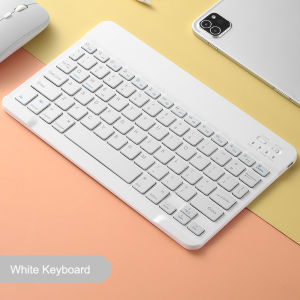
Review
You May Also Like
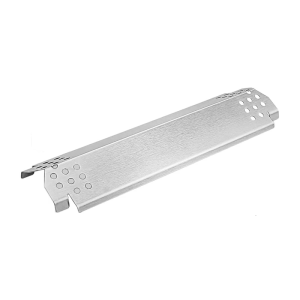
BBQ Heat Deflector Burners Cover for Gas Grills Easy to Use Hot Plate Barbecue Heat Diffuser Camping Grill Accessories

Multi-Brand & 5G Compatible Screen Protectors: UV Liquid Glue & Nano Optics
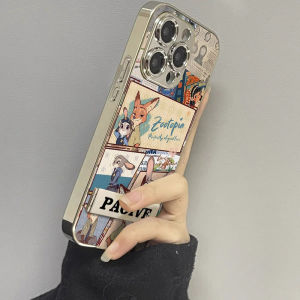
Cute Animal Fox Rabbit Phone Case for Xiaomi 15 14 Ultra/14 pro 13 pro New 12 12s X Soft 11 Youth Civi4 pro Women Max4 Glass 12s pro

Universal Cowhide Treadle Belt for Sewing Machine: A Comprehensive Guide
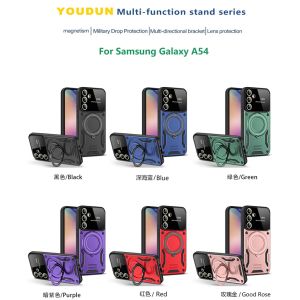
Casing For Vivo V27 E V27e V 27e V27 pro V27pro VivoV27 Shockproof Phone Case Armor Ring Bracket Stent Push Camera Lens Protection Back Cover
Original Screen For XIAOMI REDMI 9/ REDMI 9A / 9C /Redmi 9T LCD Display Touch Screen Digitizer Assembly Replacment Parts
P351X 3-10mm Right Edge Guide Presser Foot: A Comprehensive Guide

Cute Full Screen Cat Huawei MateX6 Phone Case New Foldable Screen Protection Cover Anti-Fall Soft Silicone Female Model Trendy

5G Compatible OPPO Phone Cases: A Comprehensive Guide
Phone Holder Sticker Credit Card Holder 3M Adhesive Soft Silicone Mobile Phone Wallet Compatible for Iphone Android Samsung
9D Black Edge Tempered Glass Film For Vivo 1807 1808 1812 1813 1814 1816 1818 1819 Screen Protector For Vivo 1720 1721 1723 1725 1802 1804 1805 1806