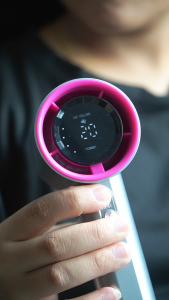
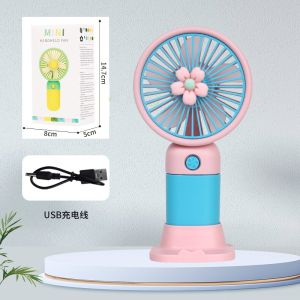
Flower Small Fan Mini Handheld Summer Fresh and Portable Fan USB Electric Fan Cell Phone Holder Fan
Flower Small Fan Mini Handheld Summer Fresh and Portable Fan USB Electric Fan Cell Phone Holder Fan
Introduction to 1Box Flower USB Fan
The 1Box Flower USB fan is a portable cell phone holder and mini handheld summer fresh fan that provides a refreshing breeze anytime, anywhere. With its compact design and versatile features, it's perfect for keeping cool during hot summer days, outdoor activities, or even while working from home.
Key Features of the 1Box Flower USB Fan
The 1Box Flower USB fan boasts several key features that make it stand out from other small fan accessories:
- Compact Size: The compact size of this USB electric fan makes it easy to carry around, fitting comfortably in your bag or pocket.
- USB Charging: The fan can be powered by a USB port, making it convenient to charge using a computer, power bank, or car charger.
- Adjustable Speed: With multiple fan speed settings, users can adjust the airflow to their preference.
- Directional Control: The fan head can be tilted and rotated to direct airflow towards the user or a specific area.
- Cell Phone Holder: The fan comes with a built-in cell phone holder, allowing users to hold their phone while enjoying the cool breeze.
Comparison with Other Small Fan Accessories
Compared to other small fan accessories, the 1Box Flower USB fan offers several advantages:
- Portability: The compact design makes it easier to carry around compared to larger fans.
- Battery Life: With USB charging capabilities, users can easily recharge the fan without needing to replace batteries.
- Adjustability: The adjustable speed and directional control provide a more personalized cooling experience.
- Cell Phone Holder: The built-in cell phone holder adds convenience for users who want to use their phone while enjoying the fan.
How to Use Your 1Box Flower USB Fan
Using the 1Box Flower USB fan is simple and straightforward:
Charging & Powering Up Your USB Electric Fan
To charge the fan, simply plug the included USB cable into a power source, such as a computer, power bank, or car charger. Once charged, connect the USB cable to the fan and turn it on using the power button.
Adjusting Fan Speed & Direction
The fan has multiple speed settings that can be adjusted by pressing the speed button. Additionally, the fan head can be tilted and rotated to direct airflow towards the user or a specific area.
Tips for Maintaining Your 1Box Flower USB Fan
To ensure your 1Box Flower USB fan lasts a long time, follow these tips for cleaning and storage:
Cleaning & Storage
After each use, gently wipe down the fan with a soft cloth to remove any dust or debris. Store the fan in a cool, dry place when not in use to prevent damage.
Troubleshooting Common Issues
If you experience any issues with your 1Box Flower USB fan, refer to the troubleshooting guide included in the user manual. Common issues may include battery drain, fan not turning on, or fan speed not adjusting properly.
Conclusion & Final Thoughts on 1Box Flower USB Fan
The 1Box Flower USB fan is a versatile and convenient accessory for keeping cool during hot summer days. Its compact size, adjustable speed, and directional control make it perfect for a variety of settings, from outdoor activities to working from home. With its built-in cell phone holder, users can enjoy the cool breeze while using their phone. Overall, the 1Box Flower USB fan is a must-have accessory for anyone looking to stay cool and comfortable during the summer months.

URS 3C SHOPE
Review

You May Also Like
ECOR Water Dispensers: Hot & Cold Large Vertical Temperature Display Water Dispensers Household Automatic
DIODIY meat grinder for food 300W/3L/4L capacity kitchen multifunctional electric mixer Speed double gear adjust freely Stainless steel durable easy clean food processor and grinder for baby

MONARIS Bonesaw Machine 850W: The Ultimate J120 Table Top Bone Saw & High Performance Slicer
Portable Mini Juicer: A 1-Cup Wonder with 2 Lids & 10-Leaf Blade
New Ultrasonic Air Humidifier Gentle Luminous Continuous/420ML Portable【Fast Delivery】
XIAOMI MIJIA Air Humidifier 2 Mist Maker 4L Bedroom Aroma Diffuser Home Essential Oils Diffuser 99.9% Antibacterial Water Tank
Replacement Charger for Waterpik Water Flosser WP360 WP360W WP462 WP462W WP450 WP450W YLA-03010 AC Adapter Series Water Flosser Replacement Charger Power Cord 5Ft White

NATOMO SUPERKALAN / KALAN DE KAHOY RING PLATE SET (Iba ibang size para di maulingan ang mga kaldero niyo) RING PLATE SET ONLY! - Lazada

Rongtai Shoulder and Neck Massage Instrument Cervical Spine Back Massager Trapezoid Muscle Waist Back Neck and Shoulder Kneading Hot Compress Multifunctional Tool

1/2PCS Electric Ankle Massager Vibration Infrared Hot Compress Therapy Foot Massager Support Brace For Joint Sprain Pain Relief
Bracket Exhaust Fan: A Comprehensive Guide