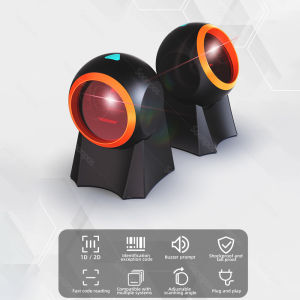
Soonpos Automatic Sensing Scan 1D 2D QR code Scanner: High-Quality Omnidirectional Desktop Barcode Scanner
Soonpos Automatic Sensing Scan 1D 2D QR code Scanner: High-Quality Omnidirectional Desktop Barcode Scanner
What is Soonpos Automatic Sensing Scan?
Soonpos Automatic Sensing Scan is a high-quality omnidirectional desktop barcode scanner designed to meet the needs of various industries, including supermarkets, retail stores, and more. This wired USB scanner supports both 1D and 2D QR code scanning, making it a versatile choice for businesses looking to streamline their inventory management processes.
Key Features & Benefits
Soonpos Automatic Sensing Scan offers a range of features that make it an ideal choice for businesses:
- High-Quality Omnidirectional Scanning: This scanner can read barcodes from any angle, eliminating the need for precise alignment and saving time.
- Wired USB Connection: Connect the scanner directly to your computer via USB, ensuring a stable and reliable connection.
- Automatic QR Code Scanning: The scanner automatically detects and reads QR codes, making it easy to capture product information quickly and accurately.
Applications & Industries
The Soonpos Automatic Sensing Scan is suitable for various industries, including:
- Supermarkets: Streamline inventory management and checkout processes.
- Retail Stores: Improve customer experience by reducing wait times and increasing accuracy.
- Logistics: Track shipments and manage inventory efficiently.
How to Use Soonpos Automatic Sensing Scan
Using the Soonpos Automatic Sensing Scan is simple and straightforward.
Setup & Installation
- Connect the scanner to your computer using the provided USB cable.
- Install the driver software (if required) and follow the on-screen instructions.
- Once connected, the scanner will be ready to use.
Operation & Functionality
To scan a barcode or QR code, simply hold the scanner over the code and press the trigger button. The scanner will automatically detect and read the code, sending the data to your computer.
Comparing Soonpos Automatic Sensing Scan with Other Barcode Scanners
When choosing a barcode scanner, it's essential to consider the differences between omnidirectional and unidirectional scanners, as well as desktop and portable scanners.
Omnidirectional vs. Unidirectional Scanners
An omnidirectional scanner, like the Soonpos Automatic Sensing Scan, can read barcodes from any angle, while a unidirectional scanner requires precise alignment. This makes the omnidirectional scanner more convenient and efficient.
Desktop vs. Portable Scanners
Desktop scanners, such as the Soonpos Automatic Sensing Scan, are designed for stationary use and offer a wired connection, providing a stable and reliable setup. Portable scanners, on the other hand, are more flexible but may require additional accessories for wireless connectivity.
Frequently Asked Questions (FAQ)
Common Issues & Solutions
Q: What if the scanner doesn't work after connecting it to my computer? A: Ensure that the driver software is installed correctly and try restarting your computer. If the issue persists, contact Soonpos support for assistance.
Maintenance & Troubleshooting
To keep your Soonpos Automatic Sensing Scan in good condition, clean the lens regularly and avoid exposing it to extreme temperatures or humidity. If you encounter any issues, refer to the user manual or contact Soonpos support for troubleshooting guidance.

Soonpos Store
Review

You May Also Like
AOS Drum Chip for Xerox WorkCentre 3655 Cartridge
Niimbot D11 Thermal Label Printer Paper Heat Sensitive Adhesive Sticker Refill Designs
264x276mm PEI Magnetic Build Plate Steel Double Sided PEI Spring Steel Sheet Replacement For S1 3D Printer Part Hotbed
Mini Photo Pocket Printer: A Comprehensive Guide
【PH Ready Stock】L&C Toner Cartridge 305A/CE410A/CE411A/CE412A/CE413A Black Cyan Magenta Yellow For HP Laserjet Pro 400 Color M451DN/M451DW/451NW/MFP M475DW/M475DN Laserjet 300 color MFP M375NW
Canon MG2570S Multi Function Color Printer - Print/Scan/Copy
Mini Portable Thermal Printer Bluetooth Portable Wireless A4 Maker with Paper Rolls Case for Mobile World PDF Picture Print Home Office Travel Car USE
Canon GI-790 Ink Cartridge: Original vs Compatible Options
ERYONE 200g Dual/Tri Colors Silk PLA Filament: A High-Quality 3D Printing Solution
Photo Paper Mini Printable Sticker Roll Thermal Printers Clear Printing Smudge-P
DIDBook & Document Camera 1300/1400/A3/A4 high-definition pixels Definition Professional Book Document Scanner Auto-Flatten