Camera Wall Free-Punch Stand Projector Bracket Home Monitoring Stand Camera Shelf

Camera Wall Free-Punch Stand Projector Bracket Home Monitoring Stand Camera Shelf

Introduction to Camera Wall Mounting Solutions

When it comes to installing cameras for home monitoring, having the right wall mounting solutions can make all the difference. There are several types of mounts available, such as adjustable camera supports, free-punch camera shelves, and projector brackets for wall installation. Each of these options has unique features and benefits that cater to specific needs and preferences.

Overview of Adjustable Camera Supports

Adjustable camera supports are designed to provide flexibility in positioning and adjusting the camera angle. These mounts allow users to easily rotate, tilt, or pan the camera to capture the desired view. They are ideal for environments where the camera needs to be repositioned frequently, such as in retail stores or warehouses.

Benefits of Free-Punch Camera Shelves

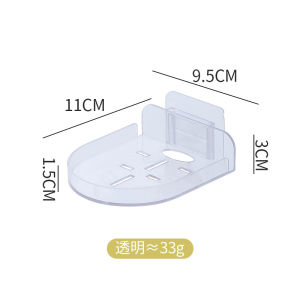
Free-punch camera shelves offer a convenient and customizable solution for wall mounting cameras. These shelves feature pre-drilled holes that can be punched out to accommodate different screw sizes and spacing. This feature allows users to install the shelf at any desired location on the wall without the need for additional drilling. Free-punch shelves are perfect for those who want a hassle-free mounting process.

Advantages of Projector Brackets for Wall Installation

Projector brackets are designed specifically for mounting projectors on walls. They offer a sturdy and secure solution that can support the weight of heavy projectors. Many projector brackets also feature adjustable arms that allow users to fine-tune the position of the projector for optimal viewing angles. These brackets are ideal for home theaters, classrooms, and conference rooms.

How to Choose the Right Camera Wall Mounting Solution

Selecting the appropriate camera wall mounting solution depends on several factors, including the type of camera, its purpose, and the desired features.

Identifying Your Needs: Camera Type & Purpose

First, determine the type of camera you plan to mount and its intended purpose. For instance, if you're installing a security camera for home monitoring, you may want to consider a free-punch camera shelf or an adjustable camera support. On the other hand, if you're mounting a projector for a home theater setup, a projector bracket would be the most suitable option.

Comparing Features: Weight Capacity, Adjustability & Durability

Next, compare the features of different mounting solutions to find one that meets your requirements. Consider factors such as weight capacity, adjustability, and durability. For example, if you have a heavy camera or projector, choose a mount with a higher weight capacity to ensure stability. Similarly, if you need to frequently adjust the camera angle, opt for a mount with greater adjustability.

Budget Considerations: Cost vs. Quality

Lastly, consider your budget when choosing a camera wall mounting solution. While it's important to select a mount that fits within your budget, don't compromise on quality. Look for mounts that offer a good balance of affordability and reliability. Investing in a high-quality mount will ensure a longer lifespan and better performance.

Step-by-Step Guide to Installing Camera Wall Mounts

Installing a camera wall mount is a straightforward process that requires some basic tools and materials.

Tools & Materials Needed

To install a camera wall mount, you'll need the following tools and materials:

  • Drill
  • Screws
  • Level
  • Measuring tape
  • Pencil

Preparation: Marking the Wall & Drilling Holes

Before mounting the camera stand, mark the wall at the desired location using a pencil. Measure and mark the screw holes according to the manufacturer's instructions. Then, drill pilot holes at the marked locations.

Mounting the Camera Stand & Securing It

Once the pilot holes are drilled, attach the camera stand to the wall using screws. Make sure the stand is level and secure before mounting the camera. Finally, attach the camera to the stand and adjust it to the desired angle.

Maintaining & Troubleshooting Camera Wall Mounts

Regular maintenance and troubleshooting can help ensure the longevity and performance of your camera wall mount.

Regular Inspections & Cleaning

Inspect the mount periodically for any signs of wear or damage. Clean the mount and camera regularly to prevent dust buildup and ensure optimal performance.

Addressing Common Issues: Loose Screws, Misalignment & More

If you notice loose screws or misalignment, tighten the screws and adjust the camera angle accordingly. If the issue persists, consult the manufacturer's instructions or contact customer support for assistance.

Replacing Damaged or Worn-Out Components

If any components of the mount become damaged or worn out, replace them promptly to maintain the integrity and stability of the mount. Keep spare parts on hand for quick and easy replacements.

By following these guidelines, you can successfully install and maintain a camera wall mount that meets your needs and enhances your home monitoring setup.

Note: This product description includes 1pcs camera stand.

Starrysky11

Starrysky11

Seller ratings 96%