NGTeco Biometrics Fingerprint Time Attendance Machine Punch Card Machine Time Recorder Time Clock ZKTeco (FREE USB)
NGTeco Biometrics Fingerprint Time Attendance Machine Punch Card Machine Time Recorder Time Clock ZKTeco (FREE USB)
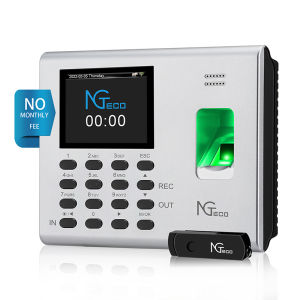
NGTeco Biometrics Fingerprint Time Attendance Machine is a state-of-the-art time recorder designed to help businesses streamline their attendance tracking processes. This ZKTeco compatible device offers a range of features and benefits that make it an ideal choice for organizations looking to improve their workforce management efficiency.
What is NGTeco Biometrics Fingerprint Time Attendance Machine?
The NGTeco Biometrics Fingerprint Time Attendance Machine is a biometric time clock that allows employees to record their attendance using their fingerprints. It is designed to be user-friendly and easy to set up, making it a convenient solution for businesses of all sizes.
Key Features & Benefits
- ZKTeco compatible device
- Biometric fingerprint recognition technology
- Time clock functionality
- Attendance tracking and reporting capabilities
- User-friendly interface
- Compact design
NGTeco Biometrics Fingerprint Time Attendance Machine Components
- 1x K4 Time Clock
- 1x 8G Pendrive
- 1x Quick Start Guide
- 1x User Manual
- 1x Power Adapter (5V/2A)
- 1x Power Cord
- 1x Mounting Hardware
How to Set Up NGTeco Biometrics Fingerprint Time Attendance Machine?
Setting up the NGTeco Biometrics Fingerprint Time Attendance Machine is a straightforward process that can be completed in just a few steps.
Connecting the Device
To connect the device, simply plug the power cord into the K4 Time Clock and the power adapter. Connect the power adapter to a power outlet, and the device will turn on automatically.
Configuring the Device
To configure the device, follow the instructions provided in the Quick Start Guide and User Manual. This includes setting up the time zone, date, and other basic settings.
Setting Up User Accounts
Setting up user accounts involves enrolling employees' fingerprints into the system. Follow the instructions in the User Manual to learn how to enroll fingerprints and set up user accounts.
How to Use NGTeco Biometrics Fingerprint Time Attendance Machine?
Using the NGTeco Biometrics Fingerprint Time Attendance Machine is simple and intuitive.
Taking Attendance
Employees can record their attendance by placing their finger on the fingerprint scanner. The device will automatically recognize the employee and record their attendance.
Viewing Attendance Records
Attendance records can be viewed through the device's interface or exported to a computer using the provided USB drive.
Generating Reports
Reports can be generated to track attendance trends, identify patterns, and make informed decisions about workforce management.
Troubleshooting NGTeco Biometrics Fingerprint Time Attendance Machine
If you encounter any issues with the NGTeco Biometrics Fingerprint Time Attendance Machine, refer to the following troubleshooting tips.
Common Issues & Solutions
- Device not turning on: Check that the power cord is properly connected and the power adapter is plugged into a working outlet.
- Fingerprint not recognized: Ensure that the fingerprint is clean and dry before attempting to enroll or record attendance.
Technical Support & Resources
For further assistance, refer to the User Manual or contact NGTeco's technical support team for help.
With its user-friendly interface, biometric fingerprint recognition technology, and time clock functionality, the NGTeco Biometrics Fingerprint Time Attendance Machine is a valuable tool for businesses looking to streamline their attendance tracking processes. Its compact design and ZKTeco compatibility make it an ideal choice for organizations of all sizes.

ZKTeco Philippines Store
Review
You May Also Like

Douyin Online Influencer New Arrival Oil Drop Liquid Quicksand Bottle Acrylic Oil Filling Decoration Drip Lucky Cat Oil Leakage Small Gift

EOOUT 9pcs Decorative File Folders Letter Size 1/3-Cut Tabs Plastic File Folders for Documents with Colorful Floral Patterns and Erasable Category Labels for Notes Office and School Supplies
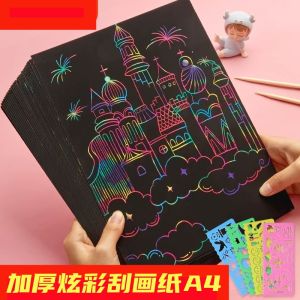
Colorful Scratch Art Paper for Kindergarten Childrens Coloring Drawing Paper Black A4 Size Childrens Painting Materials
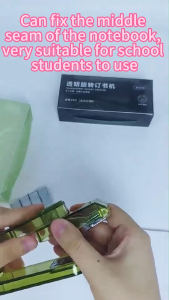
Swivel Stapler with 400 Staples 360 Degree Rotate Desktop Staplers for Booklet or Book Binding 25 Sheet Capacity for Desk Classroom Office Supplies

1Rolls Green Bouquet Floral Tape Self-adhesive Stamen Wrapping Paper Tape DIY Flower Decor for Florist Wedding Party Supplies

4cm Sheer Chiffon Ribbon with Gold Edge Organza Satin Ribbon Wedding Gift Bouquets Wrapping 10 Yard Each Roll

DIY Transparent Stickers Flower Plant Leaf Bookmarks Creative Handmade Elementary School Students Dry Flower Bookmarks

Boys Canvas Pencil Case 2025 New Design Large Capacity Stationery Bag Durable Black Green Simple Style Junior High School Design Sense
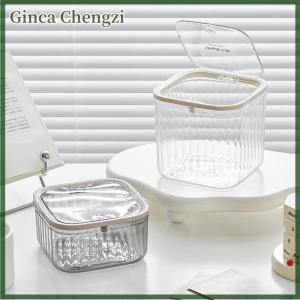
Ginca Press Type Desktop Trash Convenient Plastic Transparent Storage Box Desk Organizer Office Supplies

Portable Mini Red Ink Stamp Quick Drying Handprint Stamp for Business Contracts And Accounting Financials Special Indonesian Seal

Roland Mod English Pearlescent Paper Flower Arrangement Newspaper Floral Gift Wrapping Material Fresh Flowers Bouquet Packaging