Yottamaster 4 Bay RAID Hard Drive: A Comprehensive Guide

Yottamaster 4 Bay RAID Hard Drive: A Comprehensive Guide

Introduction to Yottamaster 4 Bay RAID Hard Drive

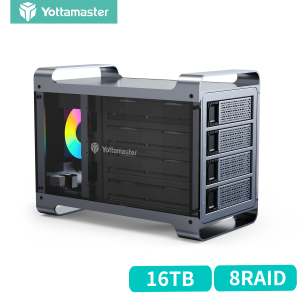
The Yottamaster 4 Bay RAID Hard Drive is a cutting-edge external hard drive storage solution designed to meet the demands of both home users and professionals. This RGB enclosure supports up to 4X18TB storage capacity, providing ample space for storing large files, multimedia content, and backup data. In this comprehensive guide, we will explore the key features, specifications, and setup process of the Yottamaster 4 Bay RAID Hard Drive.

Key Features & Specifications

  • Storage Capacity: Up to 4X18TB (Total capacity: 72TB)
  • RAID Support: Supports RAID 0/1/5/10 configurations, JBOD, Clone mode, and Normal hard drive mode
  • Connectivity: USB 3.0 Type-B port, supporting data transfer rates up to 5Gbps
  • Enclosure: RGB enclosure with SATA support
  • Included Components: 1Yottamaster RGB HDD Enclosure; 1 Data cable; 1Power adapter; 1Manual

Included Components

The Yottamaster 4 Bay RAID Hard Drive comes with a comprehensive set of components, including:

  • 1*Yottamaster RGB HDD Enclosure
  • 1*Data cable
  • 1*Power adapter
  • 1*Manual

These components ensure a seamless setup process and provide users with everything they need to get started with their new external hard drive storage solution.

Understanding RAID Configurations

RAID (Redundant Array of Independent Disks) configurations play a crucial role in determining the performance, reliability, and storage efficiency of the Yottamaster 4 Bay RAID Hard Drive. Let's take a closer look at the supported RAID configurations:

RAID 0/1/5/10

  • RAID 0: Provides increased performance by striping data across multiple drives, but offers no redundancy or fault tolerance.
  • RAID 1: Mirrors data across two drives, offering improved data protection and redundancy.
  • RAID 5: Combines striping and parity, allowing for fault tolerance and improved performance.
  • RAID 10: Combines RAID 0 and RAID 1, offering both performance and redundancy.

JBOD & Clone Mode

  • JBOD (Just a Bunch Of Disks): Allows users to combine multiple drives into a single logical volume, providing increased storage capacity without RAID benefits.
  • Clone Mode: Creates an exact copy of a selected drive, ensuring data redundancy and protection.

Setting Up Your Yottamaster 4 Bay RAID Hard Drive

Setting up the Yottamaster 4 Bay RAID Hard Drive is a straightforward process. Follow these steps to get started:

Connecting to Your Computer

  1. Connect the power adapter to the RGB enclosure and plug it into a power outlet.
  2. Connect the USB 3.0 Type-B data cable to the RGB enclosure and your computer.

Configuring RAID Settings

  1. Power on the RGB enclosure and wait for the LED lights to stabilize.
  2. Press the 'Mode' button on the front panel to cycle through the available RAID configurations.
  3. Select the desired RAID configuration using the 'Mode' button.
  4. Press the 'Enter' button to confirm the selected RAID configuration.

Optimizing Performance & Storage Capacity

To maximize the performance and storage efficiency of your Yottamaster 4 Bay RAID Hard Drive, consider the following tips:

Maximizing Storage Efficiency

  • Choose the appropriate RAID configuration based on your storage needs and performance requirements.
  • Regularly monitor disk usage and free up space when necessary.

Enhancing Data Security

  • Enable RAID 1 or RAID 5 configurations for improved data protection and redundancy.
  • Perform regular backups to ensure data safety.

Conclusion & Next Steps

The Yottamaster 4 Bay RAID Hard Drive is a versatile and powerful external hard drive storage solution that caters to the diverse needs of home users and professionals. By understanding the key features, specifications, and setup process, users can make the most of this advanced storage solution. To learn more about the Yottamaster 4 Bay RAID Hard Drive, refer to the manual included with the product and visit the official website for additional resources.

Yottamaster

Yottamaster

Seller ratings 98%

Review

Oops
This video has no reviews.