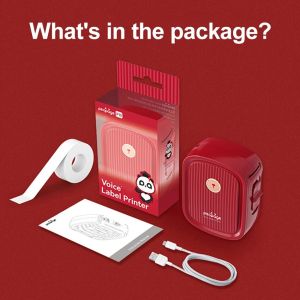
Peripage P10 Red Label Sticker Adhesive Printer: A Comprehensive Guide
Peripage P10 Red Label Sticker Adhesive Printer: A Comprehensive Guide
Introduction to Peripage P10 Red Label Printer
The Peripage P10 Red Label Sticker Adhesive Printer is a compact, versatile, and easy-to-use device designed for home users who require a reliable label printing solution. This thermal printer offers a wide range of applications, including creating date name price tags, portable date name printers, and wireless printing machines.
Key Features & Specifications
- Brand Name: Peripage
- Interface Type: Bluetooth
- Double-sided Printing: No
- Type: Thermal Printer
- Paper Feed Mode: Manual
- Print Speed: 4ppm
- Supports Network Printing: Wired
- Max Paper Size: -
- Origin: Mainland China
- Internal Memory: None
- Black Print Speed: 7mm/s
- Max. Resolution: 203dpi
- After-sale Service: Shop's Three Guarantees
- Color Print Speed: 0
- Size: -
- Voltage: 100-240V
- Application: For Home Use
- Consumable Type: Label Paper
- Dot Matrix Printer Type: Universal ticket printer
- Use: Label Maker
Applications & Usage Scenarios
The Peripage P10 Red Label Printer can be used in various scenarios, such as creating price tags, date labels, name tags, and other types of adhesive stickers. Its compact size and portability make it an ideal choice for home users who need a reliable label printing solution.
How to Set Up Your Peripage P10 Red Label Printer
Setting up your Peripage P10 Red Label Printer is straightforward. Follow these steps to connect your printer via Bluetooth or configure wired network printing.
Connecting via Bluetooth
- Ensure your device is powered on.
- Turn on Bluetooth on your mobile device or computer.
- Search for available devices and select the Peripage P10 Red Label Printer.
- Follow the prompts to complete the pairing process.
Configuring Wired Network Printing
- Connect the printer to your computer using a USB cable.
- Install the printer driver software.
- Configure the printer settings according to your preferences.
- Connect the printer to your network using an Ethernet cable.
Utilizing Peripage P10 Red Label Printer for Label Making
The Peripage P10 Red Label Printer offers several features that make it ideal for creating custom labels.
Printing Single-sided Labels
- Load the label paper into the printer.
- Open the label design software on your computer or mobile device.
- Design your label and preview the layout.
- Print the label by selecting the appropriate print settings.
Customizing Labels & Text
The Peripage P10 Red Label Printer allows you to customize labels and text according to your requirements. You can adjust font size, style, and color, as well as add images and graphics to enhance your labels' visual appeal.
Enhancing Productivity with Peripage P10 Red Label Printer
The Peripage P10 Red Label Printer offers several features that can help you boost productivity.
Print Speed & Resolution
With a print speed of 4 pages per minute (ppm) and a maximum resolution of 203 dots per inch (dpi), the Peripage P10 Red Label Printer ensures fast and accurate label printing.
Paper Feed & Consumable Type
The Peripage P10 Red Label Printer supports manual paper feed and requires label paper as its consumable type. This makes it easy to load and change paper, ensuring smooth and uninterrupted printing.
After-sales Service & Support
Peripage offers excellent after-sales service and support to ensure a hassle-free experience for its customers.
Shop's Three Guarantees
Peripage provides three guarantees to its customers: a 7-day return policy, a 30-day warranty, and a 1-year limited warranty on the printer.
Troubleshooting & Maintenance
Peripage offers a comprehensive troubleshooting guide and maintenance tips to help customers resolve any issues they may encounter during the printer's operation.

GZQIANJI Store
Review

You May Also Like
CF283A 83A Compatible Toner Cartridge for Laser Printer
INKSCRIBED DR2560 DR-2560 Drum Cartridge for Bro HL-L2460DW DCP-L2640DW MFC-L2885DW etc.
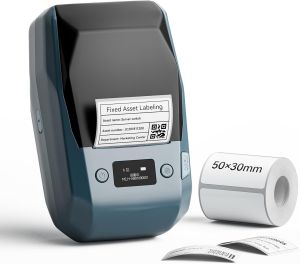
NIIMBOT M2 Thermal Transfer 2Inch Bluetooth Label Maker: A Smart Printing Solution
Lower Pressure Roller MP2550 2851 3350 3351 AF1022 series
eSUN PETG Filament 1kg 1.75mm: A High-Quality 3D Printing Solution
Inks Pipelines Lockers Pipelines Water Stop Valves for Office Printers and Electronic Devices

Mini Portable Thermal Label Printer: A Comprehensive Guide
eTONER Compatible Brother DR450 / DR2255 DR-2255 DR420 DRUMKIT
SaleZone - QUAFF All Desktop Printer Dye Ink 100ML (Cyan Magenta Yellow Black)
AOS Compatible Toner Cartridge for Kyocera TK1124 TK-1124 TK 1124 Black
1000 Pcs Unstrung Marking Price Tags Kraft Paper Price Tags Merchandise Marking Tags Clothing Price Labels Easy to Use