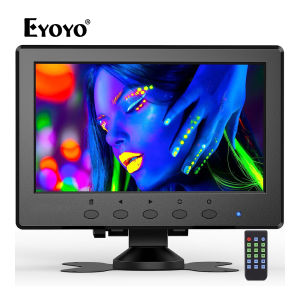
Eyoyo 7 Inch Compact CCTV Monitor: Built-in Dual Speakers & Remote Control
Eyoyo 7 Inch Compact CCTV Monitor: Built-in Dual Speakers & Remote Control
Introduction to Eyoyo 7 Inch Monitor
Eyoyo has recently introduced a compact CCTV monitor that is perfect for both professional and personal use. This 7-inch portable monitor boasts built-in dual speakers, a remote control, and multiple input options, making it a versatile device for various applications. In this article, we will explore the features, specifications, and connectivity options of the Eyoyo 7 inch monitor.
Overview of Eyoyo 7 Inch Portable Monitor
The Eyoyo 7 inch monitor is a compact device designed to provide high-quality visuals and audio output. It supports HDMI, VGA, BNC, USB, and AV input, making it compatible with a wide range of devices such as laptops, PCs, CCTV systems, and DVD players. The built-in dual speakers offer clear audio output, while the remote control allows for easy navigation and operation.
Key Features & Specifications
- Display: 7-inch IPS display with a resolution of 1024 x 600 pixels
- Inputs: HDMI, VGA, BNC, USB, and AV
- Audio: Built-in dual speakers
- Remote Control: Yes
- Portability: Lightweight and compact design
How to Connect Eyoyo Monitor to Your Devices
Connecting the Eyoyo monitor to various devices is straightforward and easy. This section will provide a brief overview of the different input options and how to connect the monitor to your laptop, PC, CCTV system, and DVD player.
HDMI VGA BNC USB AV Input Explained
The Eyoyo monitor supports multiple input options, including HDMI, VGA, BNC, USB, and AV. These inputs allow you to connect the monitor to a wide range of devices, providing flexibility and versatility.
- HDMI: A digital video and audio interface that provides high-quality visuals and sound.
- VGA: An analog video interface that supports up to 1024 x 768 resolution.
- BNC: A coaxial connector commonly used in CCTV systems.
- USB: A versatile interface that supports data transfer and power supply.
- AV: An analog audio and video interface that supports composite and S-video signals.
Connecting Eyoyo Monitor to Laptop, PC, CCTV, DVD
To connect the Eyoyo monitor to your laptop, PC, CCTV system, or DVD player, simply select the appropriate input option and plug in the corresponding cable. For example, if you want to connect the monitor to your laptop, use an HDMI cable to connect the two devices. Similarly, if you want to connect the monitor to a CCTV system, use a BNC cable.
Exploring Eyoyo Monitor's IPS Display & Remote Control
The Eyoyo monitor features a 7-inch IPS display with a resolution of 1024 x 600 pixels, providing clear visuals and accurate color reproduction. Additionally, the built-in remote control allows for easy navigation and operation.
Understanding the 1024 x 600 Resolution IPS Display
The Eyoyo monitor's IPS display offers a resolution of 1024 x 600 pixels, which is ideal for viewing images and videos in high definition. The IPS technology ensures accurate color reproduction and wide viewing angles, making it perfect for both professional and personal use.
Using Eyoyo Monitor's Remote Control Effectively
The Eyoyo monitor comes with a remote control that allows you to navigate through menus, adjust settings, and control playback. The remote control is easy to use and provides quick access to essential functions.
Enhancing Your Viewing Experience with Eyoyo Monitor
The Eyoyo monitor offers several features that enhance your viewing experience, including built-in dual speakers and portability.
Utilizing Built-in Dual Speakers for Audio Output
The Eyoyo monitor features built-in dual speakers that provide clear audio output. This eliminates the need for external speakers, making the monitor more compact and convenient.
Maximizing Eyoyo Monitor's Portability & Convenience
The Eyoyo monitor is lightweight and compact, making it easy to carry around. Its portability and convenience make it perfect for both professional and personal use, whether you're working on a project or watching your favorite movies.
In conclusion, the Eyoyo 7 inch monitor is a versatile device that offers high-quality visuals and audio output, multiple input options, and portability. With its built-in dual speakers, remote control, and compact design, it's perfect for both professional and personal use. Whether you're working on a project or enjoying your favorite movies, the Eyoyo monitor is the ideal choice for your needs.

Eyoyo
You May Also Like
Wireless Sound Card Tuning Headphones Karaoke Headphones Long Lasting Sports Headphones
ESP32-S2 Development Board Suitable for PS4 9.0 Firmware Flashing and Customisation Edition
High Durability PCIE5.0 X16 GPU Risers Cable Ideal for Servers and Customs PC Builds with Plugs and Play Convenience
17.3" Laptop LCD Screen B173RTN01.1 B173RTN01.0 B173RTN01.3 N173FGE-E23 LP173WD1-TPE2 LP173WD1-TPE1 Display Matrix Panel 30 Pins
14" LCD Screen N140HCG-EQ1 B140HAN06.8 NV140FHM-N66 For Lenovo ThinkBook 14s G2 ITL Type 20VA Display Matrix Panel Replacement
Radiator Fan Control Module/Engine Cooling Fan Control Module Unit 1J0919506H Radiator Fan Relays
LG 32LN541B power supply # LGP32-13PL1 / EAX64905001(2.4) /

Newstar Automatic Voltage Regulator Servo Motor Type AVR 500 Watts to 2000 Watts NDVS-Series
4pin Female to 3Pin Male ARGB Adapter Cable For HDLL120 Controller and ARGB Fan Hub Compatibility

LPO Asus TUF Gaming A15 AMD Ryzen 7-7435HS/BGA 8GB DDR5 512GB PCIE G4 SSD NVIDIA GeForce 4GB RDDR6 RTX 2050 15.6\\\" FHD 144Hz
AC 85-265V to DC 12V 24V 36V 48V step down Transformer power supply 1A 2A 4A 6A 8A 9A switching power module for Replace Repair