



Tuya WIFI Temperature Humidity Sensor Indoor Hygrometer Thermometer Detector Smart Life App Support Alexa Google Home
Tuya WIFI Temperature Humidity Sensor Indoor Hygrometer Thermometer Detector Smart Life App Support Alexa Google Home
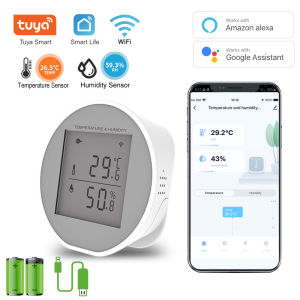
The Tuya WIFI Temperature & Humidity Sensor is a smart indoor hygrometer that helps users monitor their home environment with ease. This device is compatible with the Smart Life app and supports integration with popular voice assistants like Alexa and Google Home. In this article, we will explore the key features and benefits of the Tuya WIFI Temperature & Humidity Sensor, compare it with other indoor thermometer detectors, provide a step-by-step installation guide, and offer tips for optimal performance.
What is the Tuya WIFI Temperature & Humidity Sensor?
The Tuya WIFI Temperature & Humidity Sensor is a compact and user-friendly device designed to measure temperature and humidity levels within your home. It is equipped with advanced sensors that accurately detect changes in the environment, providing real-time data to help you maintain a comfortable living space.
Key Features & Benefits
- Compact Design: The Tuya WIFI Temperature & Humidity Sensor has a sleek and compact design, making it easy to install and blend seamlessly with any home decor.
- High Accuracy: With its advanced sensors, the Tuya WIFI Temperature & Humidity Sensor delivers highly accurate readings, allowing you to trust the data it provides.
- Smart Life App Integration: The device is compatible with the Smart Life app, which allows you to monitor temperature and humidity levels from anywhere using your smartphone.
- Alexa and Google Home Support: The Tuya WIFI Temperature & Humidity Sensor supports integration with popular voice assistants, enabling hands-free control and voice commands.
- Energy Efficient: The device consumes minimal power, making it an eco-friendly choice for monitoring your home environment.
Comparison with Other Indoor Thermometer Detectors
Compared to other indoor thermometer detectors, the Tuya WIFI Temperature & Humidity Sensor offers several advantages. Its compact design makes it easier to install, while its high accuracy ensures reliable data. The Smart Life app integration and support for Alexa and Google Home provide added convenience and control, making it a top choice for smart home enthusiasts.
How to Install & Set Up the Tuya WIFI Temperature & Humidity Sensor
Installing and setting up the Tuya WIFI Temperature & Humidity Sensor is a straightforward process. Follow the step-by-step guide below to get started:
Step-by-Step Installation Guide
- Download and install the Smart Life app on your smartphone.
- Connect your Tuya WIFI Temperature & Humidity Sensor to your Wi-Fi network by following the instructions in the app.
- Place the sensor in a suitable location within your home, away from direct sunlight and sources of heat or cold.
- Once connected, the sensor will begin monitoring temperature and humidity levels in real-time.
Integrating with Smart Life App & Alexa Google Home Support
To integrate the Tuya WIFI Temperature & Humidity Sensor with the Smart Life app and voice assistants like Alexa and Google Home, follow these steps:
- Smart Life App Integration: After connecting the sensor to your Wi-Fi network, open the Smart Life app and select the "Add Device" option. Follow the prompts to add the Tuya WIFI Temperature & Humidity Sensor to your account.
- Alexa and Google Home Support: To enable voice control, connect the Tuya WIFI Temperature & Humidity Sensor to your Alexa or Google Home account through the Smart Life app. Once connected, you can use voice commands to monitor temperature and humidity levels.
Maximizing the Potential of Tuya WIFI Temperature & Humidity Sensor
To get the most out of your Tuya WIFI Temperature & Humidity Sensor, consider the following tips for optimal performance:
- Place the Sensor in a Suitable Location: For accurate readings, place the sensor away from direct sunlight and sources of heat or cold. This will help ensure consistent and reliable data.
- Monitor Temperature and Humidity Levels Regularly: Check the readings in the Smart Life app regularly to stay informed about changes in your home environment.
- Adjust Your Home Environment Accordingly: Based on the data provided by the Tuya WIFI Temperature & Humidity Sensor, make adjustments to your home environment to maintain a comfortable living space.
Troubleshooting Common Issues
If you encounter any issues with your Tuya WIFI Temperature & Humidity Sensor, refer to the troubleshooting guide below:
- Check the Wi-Fi Connection: Ensure that the sensor is connected to your Wi-Fi network and that the connection is stable.
- Restart the Device: If the sensor is not responding, try restarting it by unplugging and replugging it back in.
- Update the Smart Life App: Make sure you have the latest version of the Smart Life app installed on your smartphone.
Conclusion
In conclusion, the Tuya WIFI Temperature & Humidity Sensor is a reliable and convenient device for monitoring temperature and humidity levels within your home. With its compact design, high accuracy, Smart Life app integration, and support for Alexa and Google Home, it offers a wide range of benefits for smart home enthusiasts. By following the installation guide and tips for optimal performance, you can maximize the potential of this device and enjoy a comfortable living space.

BOIOSMART
Review

You May Also Like
High Conductivity Disconnect Switch 250A Top Post Negative Terminals Power Isolator For Marine & Automotive Use
JS SHOP Pipe unblocking brush kitchen cleaning bathroom hair sewer sink cleaning clog removal tool

6ft x 11ft ↔️ landscape Layout / 11ft x 6ft ↕️portrait layout EXACT SIZE LONA (MARUYAMA) w/ PULLEY SET UP / TRAPAL / TOLDA / TARPAULIN / CANVAS SHADING FOR SUN
5 way Extension Outlet Socket Plug with Power Socket Multi-Function Socket Supply Power Board Socket

Mitsushi 20M/15M Masking Tape 3/2"1"1/2"3/4"2"with Embossed Paper Low Viscosity High Quality Adhesive For Painting-White/Yellow

12PCS 1/2 inch Drive Ratchet Wrench CR-V Socket Kits Mechanic Spanner Car Motorcycle Repair Tool

Handheld High Pressure Shower Head with ON/OFF Switch Powerful Wash Spray Gun Mode

6602 Bathroom toilet and Lavatory set / Ceramic Water closet & Wall hung lavatory
INGCO High Leverage Long Nose Pliers | HHLNP28160 | HHLNP28200
Smart Door Lock Fingerprint Lock Bluetooth Door Lock TUYA App Safety Lock Electronic Door Lock

C.N. Non-perforated Glass Door Hinge Wine Display Cabinet Hinge Mounted Hinge Set


















