DMW-BLB13GK USB LCD Display Digital Camera USB Battery Charger For Panasonic DMC-G1 G2 GF1 GH1 G10GK
DMW-BLB13GK USB LCD Display Digital Camera USB Battery Charger For Panasonic DMC-G1 G2 GF1 GH1 G10GK
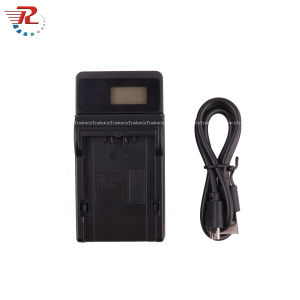
What is the DMW-BLB13GK USB LCD Display Digital Camera Charger
The DMW-BLB13GK USB LCD Display Digital Camera Charger is a high-quality battery charger designed specifically for Panasonic digital cameras, including models DMC-G1, DMC-G2, GF1, GH1, and G10GK. This charger offers a reliable and efficient way to charge your camera's battery while providing real-time charging status via an LCD display. The DMW-BLB13GK charger is compatible with the BLB13 battery, which is commonly used in Panasonic's digital cameras.
Key Features
- LCD Display: Real-time charging status and battery level monitoring
- USB Charging: Convenient charging via USB connection
- Compatibility: Compatible with Panasonic DMC-G1, DMC-G2, GF1, GH1, and G10GK models
- High-Quality Construction: Built to last with durable materials
Compatibility
The DMW-BLB13GK USB LCD Display Digital Camera Charger is compatible with the following Panasonic camera models:
- DMC-G1
- DMC-G2
- GF1
- GH1
- G10GK
Technical Specifications
- Color: Black
- Input: AC 100V-240V 50/60Hz Max 150mA
- Output: DC 8.4V 600mAh
How to Use the DMW-BLB13GK USB LCD Display Digital Camera Charger
Charging Procedure
- Connect the DMW-BLB13GK charger to a power source using the included AC adapter or a USB cable.
- Insert the BLB13 battery into the charger.
- Monitor the LCD display for real-time charging status and battery level updates.
- Once the battery is fully charged, remove it from the charger and use it in your Panasonic digital camera.
Troubleshooting Common Issues
- Battery Not Charging: Ensure the battery is properly inserted and the charger is connected to a power source. If the issue persists, try using a different battery or contact Panasonic customer support.
- LCD Display Not Working: Check if the charger is properly connected to a power source. If the issue persists, contact Panasonic customer support.
Tips for Optimal Performance
- Charge Before First Use: Charge the battery fully before using it in your camera for the first time.
- Store Battery at Room Temperature: Store the battery at room temperature when not in use to maintain its lifespan.
- Avoid Overcharging: Remove the battery from the charger once it is fully charged to prevent overcharging.
Benefits of Using the DMW-BLB13GK USB LCD Display Digital Camera Charger
Improved Battery Life
The DMW-BLB13GK charger provides efficient charging, which helps extend the life of your camera's battery. By monitoring the charging status via the LCD display, you can ensure that your battery is always fully charged and ready for use.
Enhanced Charging Efficiency
The charger's high-quality construction ensures efficient charging, reducing the time required to charge your camera's battery. This allows you to spend less time waiting for your battery to charge and more time capturing memorable moments.
Durability and Reliability
Designed with durable materials, the DMW-BLB13GK charger is built to last. Its reliable performance ensures that you can trust it to charge your camera's battery whenever needed. With proper care and maintenance, this charger will provide years of reliable service.

Larrys Wholesales Market
You May Also Like
Tecno Camon 40 Pro & 30S Pro Phone Cases: 2025 Trends & Creative Fashion

Cartoon Casing OPPO A5i Pro A5X A5 OPPOA5i Pro 5G 4G Hot Cute Trend Creative Fashion Anti-drop Phone Case with 360° Swivel Cat Mirror Stand 2025

BOW G100U/G100D Gaming Mechanical Keyboard: A Comprehensive Guide
22 26mm Nylon Quick Fit Strap for Garmin Fenix 8 7X 7 Pro Fenix 6X 6 5X Tactix 8 7 Forerunner 970 965 Enduro 3 Woven Watch Bands

Oppofindx6 Phone Case: Aesthetic & Protective Design

Oppo Find N2 Flip New Year Girl Cartoon Foldable Screen Phone Case Ultra Thin Snake Year Peace Joy Full Cover Anti-Fall Protection
3 in 1 100W 1.2M Fast Charging Cable Type C Braided Cable Micro USB C Lightning Charger Charging Cable Wire Compatible with iPhone Realme Samsung Huawei 50 pro

kenke ipad case Heavy duty protective mecha flat shell for 2024 pro 13 inch(M4)Air 6th gen pro 12.9 10th gen pro 11(2020/2021/2022)7 8 9 air 4th gen air 5 Air 11 inch-black
Vivo X300Pro Phone Case Full Cover Protection Anti-Fingerprint Leather Shell Camera Lens Protection Durable Cover SIMW Brand

100PCS Anti Fog Wipes for Eye Glasses Lens Cleaner Eyeglass Cleaner Wipes Long-lasting Anti-fog for 24h Antifogging Anti Fog Wipes
Unlocked Motherboard & iPhone 14 Pro Max: A Comprehensive Guide