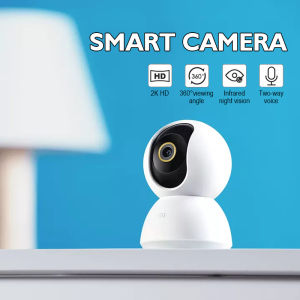
Xiaomi Mijia IP Camera 360° CCTV Security Wifi Cam 2K 1296P AI Humanoid Detection Pan-Tilt Baby Monitor Night Video Webcam For MI Smart Home
Xiaomi Mijia IP Camera 360° CCTV Security Wifi Cam 2K 1296P AI Humanoid Detection Pan-Tilt Baby Monitor Night Video Webcam For MI Smart Home
What is the Xiaomi Mijia IP Camera?
The Xiaomi Mijia IP Camera is a versatile security camera designed for home surveillance. It offers a wide range of features, including a 360° rotating camera, 2K AI humanoid detection, pan-tilt functionality, and night vision capabilities. This camera is compatible with the Mi Home app, allowing users to monitor their homes remotely and integrate it with other smart devices within the MI Smart Home ecosystem.
Key Features & Specifications
- Resolution: 2K (1296P)
- Field of View: 360°
- Night Vision: Up to 30 feet
- WiFi Connectivity: 802.11 b/g/n
- Audio: Two-way audio communication
- Storage: Supports local storage via MicroSD card (up to 128GB)
Package Contents
- 1 x Xiaomi 360 Camera 2K
- 1 x Power Supply Cable
- 1 x Wall Mounting Kit
- 1 x User Manual
How to Install & Set Up Your Xiaomi Mijia IP Camera
Setting up your Xiaomi Mijia IP Camera is a straightforward process that involves connecting to WiFi, mounting the camera, and setting up the Mi Home app.
Connecting to WiFi
- Plug in the power supply cable and connect it to the camera.
- Download and install the Mi Home app on your smartphone.
- Open the app and tap the '+' icon to add a new device.
- Follow the on-screen instructions to connect the camera to your WiFi network.
Mounting the Camera
- Locate a suitable spot for your camera, ideally near the center of the room you want to monitor.
- Attach the wall mounting kit to the back of the camera.
- Secure the camera to the wall using the provided screws.
Setting Up the Mi Home App
- Once the camera is connected to WiFi, open the Mi Home app.
- Tap the camera icon to access its settings.
- Customize the camera's settings, such as motion detection sensitivity, recording schedule, and notification preferences.
How to Use the Xiaomi Mijia IP Camera
Now that your camera is set up, let's explore how to use its features effectively.
Monitoring Your Home with Live Streaming
- Access live streaming by tapping the camera icon in the Mi Home app.
- Adjust the camera's position using the pan-tilt controls.
- Enable two-way audio communication to talk to people within the camera's range.
Using Pan-Tilt Functionality
- Adjust the camera's position by swiping left or right on the screen.
- Use the zoom feature to get a closer look at specific areas.
Enabling 2K AI Humanoid Detection
- In the camera settings, enable AI humanoid detection.
- Set up motion detection zones to focus on specific areas.
Benefits of the Xiaomi Mijia IP Camera
The Xiaomi Mijia IP Camera offers numerous benefits for homeowners looking to enhance their home security.
Enhancing Home Security
- Monitor your home remotely using live streaming and two-way audio communication.
- Receive real-time notifications when motion is detected.
Ensuring Peace of Mind with Night Video Webcam
- Enjoy clear night vision up to 30 feet thanks to the camera's infrared LEDs.
- Record footage in low-light conditions without compromising image quality.
Integrating with MI Smart Home Ecosystem
- Connect your camera to other smart devices within the MI Smart Home ecosystem.
- Automate tasks and control multiple devices using the Mi Home app.
In conclusion, the Xiaomi Mijia IP Camera is an excellent choice for homeowners seeking a reliable and feature-rich security camera. With its 360° rotating camera, 2K AI humanoid detection, and seamless integration with the MI Smart Home ecosystem, it offers peace of mind and enhanced security for your home.

Mi Homer

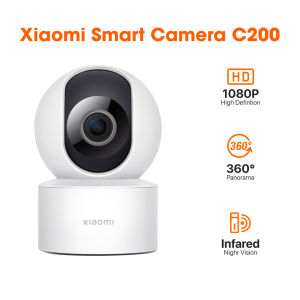
Review
You May Also Like
TP-Link Tapo C410 Smart Wire-Free Indoor/Outdoor Security Camera | CCTV Camera | Home Camera

TTArtisan 35mm F0.95 APS-C Large Aperture Prime Manual Focus Lens for Mirrorless Camera

SJCAM C100 Mini Thumb 1080P/60fps 15MP Full HD WiFi & App Control Streaming Action Camera with 30M Waterproof Dive Case

BKmall RG100 Brushless drone original and branded drone Front 8K HD dual camera WiFi fpv drone camera for vlogging Obstacle avoidance high-altitude video 20 minutes flight drones
![Kodak GC/UltraMax 400 35mm Film (36 Shots) [GRAB/COD]](https://img.lazcdn.com/collect/social-img/9b7b7bc533aa435ba91b08b338b96fb8_46bcc0ab57df4b9894f063f8b738846c.png_300x300q80.png)
Kodak GC/UltraMax 400 35mm Film (36 Shots) [GRAB/COD]
Mini Red Spot Sight Red Dot Sight for JH05 Red Film Mini 20MM Red Spot Sight
6.2mm/8.5mm Articulating Borescope 1080P 2-Way 180° Steering Hand-held Industrial Endoscope Inspection Camera for iOS/Type C

CCTV Warning Sign 3m Sticker 6x6 / 6x7 Security Camera Signage Waterproof (Buy 1 Get 1) High Quality

EZVIZ H8C 3MP/2K Outdoor waterproof Wifi CCTV Camera connect to phone with voice 360°Pan/Tilt IP CAM
Xiaomi Mi Home Security Camera 360° 1296P IP Cam Mi Smart Camera PTZ 2K Infrared Night Vision AI Humen Detection
ORIA Dual Lens Security Camera Plug in Smart WiFi Indoor Camera Home Surveillance Camera with Dual View Two-way Intercom Motion Detection HD night view in color Pet Camera