Soonpos High-Quality Handfree Barcode Scanner: A Comprehensive Guide
Soonpos High-Quality Handfree Barcode Scanner: A Comprehensive Guide
What is the Soonpos High-Quality Handfree Barcode Scanner?
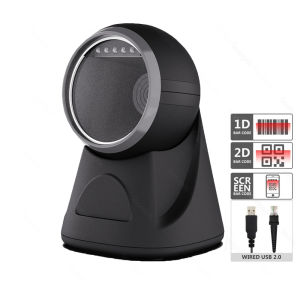
The Soonpos High-Quality Handfree Barcode Scanner is a versatile device designed for businesses seeking to streamline their operations and boost productivity. This innovative scanner offers automatic exposure, omnidirectional QR reading capabilities, and support for both 1D and 2D barcodes. Ideal for cashiers and desktop applications, this scanner is built to meet the needs of American businesses.
Key Features & Benefits
- Automatic Exposure: The Soonpos scanner automatically adjusts its exposure settings to capture clear images of barcodes, even in low-light conditions.
- Omnidirectional QR Reader: With its ability to read QR codes from any angle, the scanner ensures fast and accurate data capture.
- Handfree Operation: The scanner's hands-free design enables users to focus on other tasks while the device performs barcode scanning.
- Support for 1D and 2D Barcodes: The scanner is compatible with both linear (1D) and matrix (2D) barcodes, making it suitable for a wide range of applications.
How it Compares to Other Models
Compared to other barcode scanners on the market, the Soonpos scanner stands out due to its automatic exposure feature, omnidirectional QR reading capabilities, and support for both 1D and 2D barcodes. These features make it a more versatile and efficient choice for businesses looking to streamline their operations.
How to Use the Soonpos Handfree Barcode Scanner
To get the most out of your Soonpos scanner, follow these steps:
Setting Up the Scanner
- Connect the scanner to your computer using the provided USB cable.
- Install the driver software included with the scanner.
- Configure the scanner settings according to your needs.
Scanning Barcodes & QR Codes
To scan barcodes and QR codes, simply position the scanner near the code and press the trigger button. The scanner will automatically capture the image and transmit the data to your computer.
Troubleshooting Common Issues
If you encounter issues with your scanner, try the following solutions:
- Ensure the scanner is properly connected to your computer.
- Update the driver software to the latest version.
- Adjust the scanner settings to optimize performance.
Integrating the Scanner into Your Business
To maximize efficiency and productivity, consider implementing the Soonpos scanner into your business operations:
Maximizing Efficiency & Productivity
By automating barcode scanning tasks, the Soonpos scanner can help reduce errors, save time, and improve overall efficiency. This allows employees to focus on other tasks while the scanner performs its duties.
Best Practices for Using the Scanner
To get the most out of your Soonpos scanner, follow these best practices:
- Keep the scanner clean and free of debris.
- Store the scanner in a safe location when not in use.
- Regularly update the driver software to ensure optimal performance.
Conclusion
The Soonpos High-Quality Handfree Barcode Scanner is an excellent choice for businesses seeking to streamline their operations and boost productivity. With its automatic exposure, omnidirectional QR reading capabilities, and support for both 1D and 2D barcodes, this scanner is built to meet the needs of American businesses. By following the guidelines provided in this guide, you can ensure optimal performance and maximum efficiency from your Soonpos scanner.

Soonpos Store
Review

You May Also Like
Black Wax-Based Carbon Ribbon 110mm*300m for Barcode Printing Compatible with TSC Zebra Printers Enhanced Performance Office Supplies
3D-Printer Resin Funnel 304 Stainless-Steel Kitchen Funnel Strainer for SLA/DLP/LCD UV Resin Cup
264x276mm PEI Magnetic Build Plate PEI Spring Steel for S1 3D Printers Spring Steel Plate Print Bed Sheet

NPG67 Toner Cartridge Compatible with Canon IR C3320 C3325 C3330 C3520 C3525i C3530i C3020
40/32/30 Colors PLA Filament for 3D Pen Printing Diameter 1.75mm 200M Odorless Safe Plastic Refill for 3D children Printing Pen

InkBright CL 57 Tri-Color Refillable (CL-57 CL57)

OPC Drum for Use and Compatible with Ecosys P2235 M2040 M2540 FS1150
Original B57C050-2 Brother Printer Head PCB Board Flex DCP T300 T500 T700 T800. Preloved.
TK1175 Toner Chip for Kyocera Printers: A Comprehensive Guide
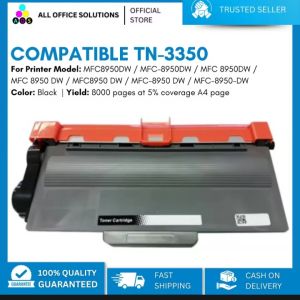
AOS Compatible TN3350 Toner Cartridge for Brother MFC-8910DW Brother MFC8950DW / MFC-8950DW / MFC 8950DW / MFC 8950 DW / MFC8950 DW / MFC-8950 DW / MFC-8950-DW
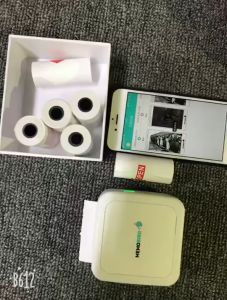
5roll Mini Photo Pocket Printer Portable Ink-free Thermal 57mm Sticker Trans Paper Wireless BT 200dpi Android IOS Printing Machine