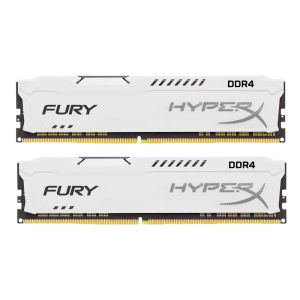
Kingston FURY HyperX DDR4 RAM: High-Performance Gaming Memory
Kingston FURY HyperX DDR4 RAM: High-Performance Gaming Memory
What is Kingston FURY DDR4 RAM?
Kingston FURY DDR4 RAM is a high-performance gaming memory designed specifically for PC gamers who demand top-tier performance and reliability. With its advanced specifications, Kingston FURY DDR4 RAM provides exceptional speed, stability, and compatibility with modern desktop systems. This article will guide you through the key specifications, benefits, and installation process of Kingston FURY DDR4 RAM.
Key Specifications
The Kingston FURY DDR4 RAM is available in different configurations, including memory capacity (4GB, 8GB, and 16GB), frequency (2400MHz, 2666MHz, and 3200MHz), and timings (CL16 1.2V DIMM for PC). These specifications cater to various gaming needs and system requirements, ensuring optimal performance for both casual and hardcore gamers.
Benefits of Kingston FURY DDR4 RAM
Kingston FURY DDR4 RAM offers numerous benefits for PC gamers, including:
- High Performance: With frequencies up to 3200MHz, Kingston FURY DDR4 RAM delivers lightning-fast data transfer rates, enabling smooth gameplay and reduced lag.
- Stability: The CL16 1.2V DIMM for PC ensures stable operation under demanding gaming scenarios, minimizing crashes and system instability.
- Compatibility: Kingston FURY DDR4 RAM is compatible with a wide range of desktop systems, ensuring seamless integration with existing hardware configurations.
How to Choose the Right Kingston FURY DDR4 RAM
Selecting the right Kingston FURY DDR4 RAM depends on your gaming needs and system specifications. Here are some factors to consider:
Memory Capacity: 4GB, 8GB, & 16GB
Memory capacity determines how much data your system can store temporarily, affecting performance and multitasking capabilities. For casual gaming, 8GB may suffice, while hardcore gamers may benefit from 16GB or more.
Frequency: 2400MHz, 2666MHz, & 3200MHz
Frequency directly impacts data transfer rates and system performance. Higher frequencies provide faster data access, resulting in smoother gameplay and reduced lag. Choose a frequency that matches your system's capabilities and gaming requirements.
Kingston FURY DDR4 RAM Installation Guide
Installing Kingston FURY DDR4 RAM is a straightforward process that requires minimal technical expertise. Follow these steps to ensure a smooth installation:
Preparation Before Installation
Before installing Kingston FURY DDR4 RAM, make sure to:
- Power off your system: Turn off your computer and unplug it from the power source.
- Ground yourself: Touch a grounded metal object or wear an anti-static wrist strap to discharge static electricity.
Step-by-Step Installation Process
- Open your computer case by removing the side panel.
- Locate the memory slots on your motherboard.
- Align the Kingston FURY DDR4 RAM with the memory slot, ensuring the notch on the module matches the slot.
- Gently press down on the module until it clicks into place.
- Secure the memory module by pushing down on the retention clips located at each end of the slot.
- Close the computer case and reconnect the power source.
Conclusion: Kingston FURY HyperX DDR4 RAM for PC Gamers
Kingston FURY DDR4 RAM is a top-tier gaming memory solution that offers exceptional performance, stability, and compatibility. By choosing the right configuration and following the installation guide, you can ensure optimal gaming performance and reliability. Upgrade your PC today with Kingston FURY DDR4 RAM and experience the difference in your gaming experience.

Best RAM Mall
Review
You May Also Like
10.5-inch FHD 1920X1280 100% Color Gamut Coverage 60Hz IPS HDMI Portable Monitor: Compatible with PS4, PS5, Xbox & More

USB Type C to 3.5mm Female Headphone Adapter: USB C to Sound Cable Cord Headphone Amplifiers for Phone Accessories
Easy To Install QY60083 Print Head For QY60083 MG6380 MG7180 iP8780 Compatible Printer Components Extend Lifespans

Mean Well LRS-50 Series Switching Power Supply Meanwell 50W PSU LRS-50-5V/12V/15V/24V/36V/48V
Eyoyo 10inch Security CCTV Portable Monitor Small Mini IPS Display Screen LCD HDMI Monitor HD 1024x768 4:3 with BNC HDMI VGA AV Input for PC Raspberry Pi Gaming Eyoyo 10 Inch Monitor - Lazada
USB3.0 Front Panel Extension Cable 25cm 90 Degree Elbow 19Pin 20Pin Compatible Motherboard Adapter For Desktop PC Case
14" 120Hz Laptop LCD Screen TL140ADXP20 TL140ADXP20-00 For XIAOMI RedmiBook14 J7265 Display Matrix Panel 2880x1800 eDP 40 Pins

Upgraded Digital Sound Amplifiers ALC5686 Chip Type C to 3.5mm/2.5mm/4.4mm Adapter 32Bit/384kHz Headphone Adapter
ESP32 Development Board Type-C CP2102 WIFI Bluetooth Module Dual Core Wireless Module ESP-32 ESP-WROOM-32 Expansion Board 30 Pin
Great Wall Power Supply 850W650W700W750W Gold Medal GX Whole module V7 Desktop Computer Host Mute Power Supply

1PC High Frequency Power Supply SR12W2-WDM For Sany Excavator