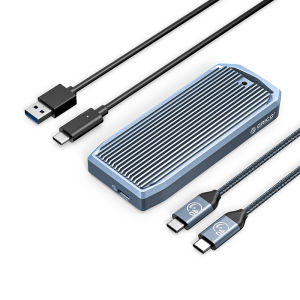
ORICO M.2 NVMe SSD Enclosure: A Comprehensive Guide
ORICO M.2 NVMe SSD Enclosure: A Comprehensive Guide
What is an M.2 NVMe SSD Enclosure?
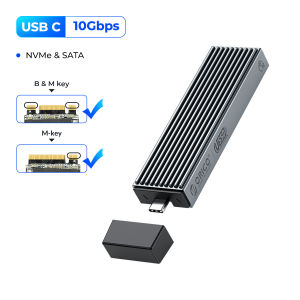
An M.2 NVMe SSD enclosure is a portable storage device that allows users to easily transfer data between their computers and external M.2 NVMe solid-state drives (SSDs). The ORICO M.2 NVMe SSD Enclosure is a wireless tool-free USB C external NVMe SSD enclosure that supports M and B&M keys and sizes 2230/2242/2260/2280 SSDs. This device offers a fast, compact, and portable solution for storing and transferring data.
Key Features of the ORICO M.2 NVMe SSD Enclosure
- Tool-Free Installation: The ORICO M.2 NVMe SSD Enclosure is designed for easy installation, requiring no tools or complicated steps.
- Compact and Portable: The enclosure is small and lightweight, making it easy to carry around.
- Multiple Heat Dissipation: The aluminum alloy material used in the enclosure provides excellent heat dissipation and high thermal conductivity.
- USB 3.2 Interface: The external USB 3.0/USB 3.1 Gen2 Type-C output interface supports up to 10Gbps transmission rate, offering fast data transfer speeds.
- Intelligent Dormancy Technology: The enclosure supports intelligent dormancy technology, which enters a low-power state after 10 minutes of inactivity, saving energy and extending the lifespan of the hard drive.
- Hot Swap Support: The enclosure supports hot swapping, allowing users to plug and play their M.2 NVMe SSDs without restarting their computer.
Benefits of Using an M.2 NVMe SSD Enclosure
Using an M.2 NVMe SSD enclosure offers several benefits, including:
- Fast Data Transfer: The high-speed USB 3.2 interface allows for quick data transfer between the SSD and computer.
- Portability: The compact design makes it easy to transport the enclosure and SSD.
- Compatibility: The enclosure is compatible with multiple operating systems, including Windows, Mac, and Linux.
- Energy Efficiency: The intelligent dormancy technology helps save energy and prolong the lifespan of the hard drive.
How to Install & Use the ORICO M.2 NVMe SSD Enclosure
Step-by-Step Installation Guide
- Prepare Your M.2 NVMe SSD: Ensure that your M.2 NVMe SSD is compatible with the ORICO M.2 NVMe SSD Enclosure.
- Open the Enclosure: Remove the cover from the enclosure by pressing the release button.
- Insert the SSD: Carefully insert the M.2 NVMe SSD into the enclosure, aligning it with the appropriate key slots.
- Secure the SSD: Press the cover back onto the enclosure to secure the SSD in place.
- Connect the Enclosure: Connect the USB C cable to the enclosure and plug it into your computer's USB port.
Compatibility with Different Devices
The ORICO M.2 NVMe SSD Enclosure is compatible with various devices, including:
- PCs: Windows, Mac, and Linux operating systems.
- Laptops: Windows, Mac, and Linux operating systems.
- Smart TVs: Compatible with smart TVs that support USB connections.
- Smart Routers: Compatible with smart routers that support USB connections.
Troubleshooting Common Issues
Some common issues users may encounter when using the ORICO M.2 NVMe SSD Enclosure include:
- Slow Data Transfer: If data transfer speeds are slow, try updating your computer's drivers or using a different USB port.
- Incompatible Operating System: Ensure that your operating system is compatible with the enclosure.
- SSD Not Detected: If the SSD is not detected, try restarting your computer or checking the connection between the enclosure and computer.
ORICO M.2 NVMe SSD Enclosure: Performance & Reliability
High-Speed Data Transfer with USB 3.2 Interface
The ORICO M.2 NVMe SSD Enclosure features a USB 3.2 interface, which supports up to 10Gbps transmission rate. This high-speed data transfer rate ensures quick and efficient data transfer between the SSD and computer.
Intelligent Dormancy Technology for Energy Savings
The enclosure supports intelligent dormancy technology, which enters a low-power state after 10 minutes of inactivity. This energy-saving feature helps prolong the lifespan of the hard drive.
Heat Dissipation & Durability
The ORICO M.2 NVMe SSD Enclosure is made from high thermal conductivity aluminum alloy material, providing excellent heat dissipation. This helps maintain optimal operating temperatures and extends the lifespan of the SSD.
Conclusion
The ORICO M.2 NVMe SSD Enclosure is a fast, compact, and portable solution for storing and transferring data. With its high-speed USB 3.2 interface, intelligent dormancy technology, and excellent heat dissipation, the enclosure offers reliable performance and durability. Whether you're a professional or casual user, the ORICO M.2 NVMe SSD Enclosure is an ideal choice for your data storage needs.

OricoCN
You May Also Like

ORICO 7000MB/S M.2 NVME Enclosure: A Comprehensive Guide
USB3.0 to IDE Cable for 2.5/3.5Inch Hard Drives with Multiple Device Compatibility Effortless Setups

Do It Home Kingston KFD-64GB Flash Drive: Portable Data Storage Solution

Lenovo Micro SD Card 100Mb/s 128GB 32GB 64GB SD/TF Flash Memory Card Grade Class 10
ORICO 2.5 3.5 5 bay USB3.0 to SATA HDD Docking Station USB3.0 Hard Drive Enclosure Support 10TB 5 Bay Offline Clone HDD Case(6558US3)
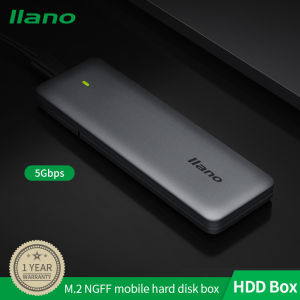
Llano Aluminum Alloy 5Gbps M.2 NGFF Portable Hard Drive Disk Enclosure Cover Case USB3.1 High-speed SSD Base with Type-C-C Data Cable

(Free Custom LOGO) Metal flash drive 2.0 128gb flash drive 64gb 32gb flash drive 16gb usb flash drive 8gb usb flash drive 4gb
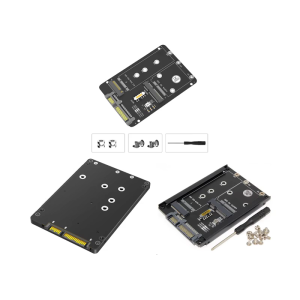
2.5inch Solid Disk Enclosure Adapter Double Slots Support For M.2 And mSATA SATA3 6Gbps Fast Speed Transfer

Voltes V Animated Mecha Robot Complete Video File Collection With Subtitles and With Bonus Files In 32GB Flash Drive With Free Surprise Gift & OTG Connector
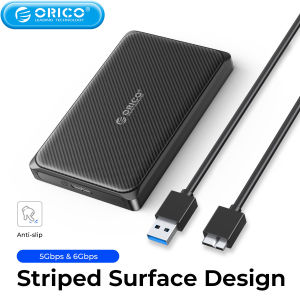
ORICO Mrico-B 2.5 Inch Hard Drive Case SATA to USB3.0 5Gbps & 6Gbps External HDD Enclosure for PC Computer PS5

1 pcs Free Customer LOGO Wooden USB 3.0 Flash Drive + Box Pen Drive U Disk Memory Thumb Sticks 8GB16GB32GB64GB Gift