THRONMAX Flex S5 Mic Stand: A Comprehensive Guide
THRONMAX Flex S5 Mic Stand: A Comprehensive Guide
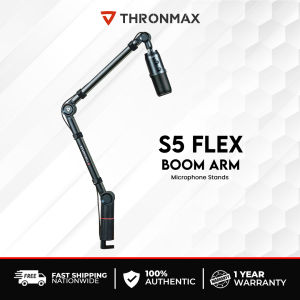
What is the THRONMAX Flex S5 Mic Stand?
The THRONMAX Flex S5 Mic Stand is a professional boom arm stand that provides a sturdy stainless steel base and a flexible boom arm for optimal microphone placement. This mic stand is specifically designed for game streaming and broadcasting, ensuring high-quality audio capture. The stand comes with a C-clamp for desktop mount, Grommet mount adapter, thread/screws, stickers, and 4 pieces of binding tape for added convenience and customization.
Key Features
- Sturdy stainless steel construction
- Flexible boom arm for precise microphone positioning
- C-clamp for secure attachment to desktops
- Grommet mount adapter for alternative mounting options
- Thread/screws for easy assembly
- 4 pieces of binding tape for securing the microphone
Target Audience
The THRONMAX Flex S5 Mic Stand is primarily targeted towards American game streamers and broadcasters who require a reliable and adjustable mic stand to enhance their audio quality. This product caters to both beginners and experienced users, providing a versatile solution for various streaming and broadcasting needs.
Benefits
- Enhanced audio quality due to precise microphone placement
- Sturdy construction ensures stability during use
- Easy-to-assemble design for quick setup
- Multiple mounting options for flexible installation
- Durable components for long-lasting performance
How to Set Up Your THRONMAX Flex S5 Mic Stand
Setting up your THRONMAX Flex S5 Mic Stand is a straightforward process that can be completed in just a few steps. Follow the instructions below to ensure proper assembly and installation.
Assembling the Mic Stand
- Unpack all components included in the package.
- Attach the base of the mic stand to the boom arm using the provided screws.
- Tighten the screws securely to prevent any wobbling or loose connections.
Mounting the C-clamp
- Position the C-clamp onto the desired surface (e.g., desk or table).
- Align the mic stand base with the C-clamp opening.
- Secure the C-clamp by tightening the screw until the mic stand is firmly attached.
Attaching the Grommet Mount Adapter
- If using the grommet mount adapter, slide it onto the base of the mic stand.
- Position the adapter over the desired mounting point.
- Tighten the screw to secure the adapter in place.
Tips for Optimal Performance
To achieve the best audio quality and ensure the longevity of your THRONMAX Flex S5 Mic Stand, follow these tips for optimal performance.
Adjusting the Boom Arm
- Extend or retract the boom arm to position the microphone at the desired height and angle.
- Use the locking mechanism to secure the boom arm in place once the desired position is achieved.
Using the Hidden Cable Management
- Route the microphone cable through the hidden cable management system.
- Ensure the cable is neatly organized to avoid tangling or damage.
Securing the Mic with Binding Tape
- Use the provided binding tape to secure the microphone to the boom arm.
- Wrap the tape around the microphone and boom arm, ensuring a snug fit.
Troubleshooting Common Issues
If you encounter any issues with your THRONMAX Flex S5 Mic Stand, refer to the troubleshooting tips below for solutions.
Loose Connections
- Check that all screws are tightened securely.
- Inspect the connections for any signs of wear or damage.
Wobbly Mic Stand
- Verify that the C-clamp or grommet mount adapter is properly secured.
- Adjust the mic stand base to ensure stability.
Microphone Placement
- Experiment with different boom arm positions to find the optimal microphone placement.
- Adjust the microphone angle to capture the desired sound quality.

Thronmax Flagship Store
Review
You May Also Like

Customized Mouse Pad
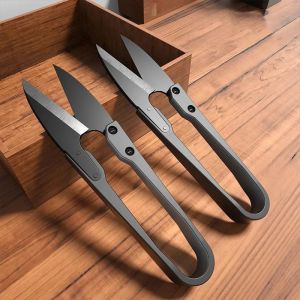
Stainless Steel U-shaped Elastic Scissor Black Carbon Steel Clothing Needle Thread Sewing U Thread Scissors for Fabric
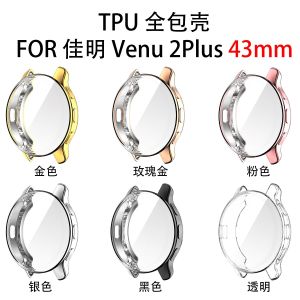
For Garmin Venu2 Plus Screen Protector Plating TPU Protective Cover For Garmin Venu 2 Plus Case Full Coverage Protection Shell
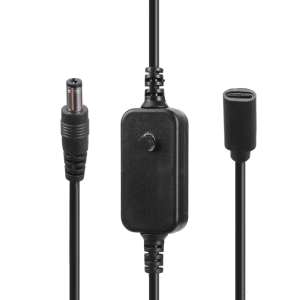
Type C Female to 5.5x2.1mm 5V 9V 12V Power Plug Charging Cable Connector for Monitoring Cameras LED Light Router Printer
2-IN-1 Stereo Bluetooth 5.4 Receiver Transmitter 300mAh 3.5mm AUX With LCD Battery Volume Display for Car Music/Hands-Free Call
Smart AI Camera Key Phone Case Polka Dot Anti-Fall New iPhone 17 pro Max Cover for Apple 16 Full Wrap Cute Female Style 17 Soft Shell

Ultimate Guide to Gundam Phone Cases for iPhone 14 Plus, Huawei Nova 13, Samsung S23 & More

Magic Blacklight Bluetooth Keyboard Case for Xiaomi Mi Pad 6 / 6 Pro 11 Inch 2023
![PRESTIZ AIRCON Remote Replacement MODEL BS-09IAY4G & BS-12IAY4D [**Mag Basa B4 Umorder**] Ready to USE Universal for PRESTIZ AIR CONDITIONER Remote PRESTIZ AIRCON REMOTE](https://img.lazcdn.com/g/ff/kf/S7192eb948e484f79890f1dca6574e4a7c.png_300x300q80.png)
PRESTIZ AIRCON Remote Replacement MODEL BS-09IAY4G & BS-12IAY4D [**Mag Basa B4 Umorder**] Ready to USE Universal for PRESTIZ AIR CONDITIONER Remote PRESTIZ AIRCON REMOTE
Cute Silicone Protective Case for AirPods 1/2/3 Wireless Bluetooth Earphone Cover Police Woman Design Soft Shell Apple Compatible

VIVO V50 5G Full Glue Tempered Glass Curved Screen Protector