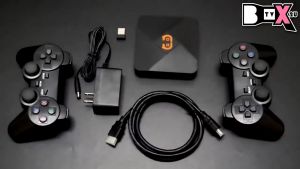
KKCOBVR i2 IR Illuminator: Enhancing Night Vision & Tracking for Pico 4 & PSVR 2
KKCOBVR i2 IR Illuminator: Enhancing Night Vision & Tracking for Pico 4 & PSVR 2
Introduction to KKCOBVR i2 IR Illuminator
Overview of the Device
The KKCOBVR i2 IR Illuminator is a cutting-edge accessory designed to enhance the night vision capabilities and tracking performance of VR headsets such as the Pico 4 and PSVR 2. This infrared light device allows users to experience immersive gaming in low-light conditions while improving overall accuracy and responsiveness.
Key Features and Benefits
-
Enhanced Night Vision: The IR illuminator provides a clear view of the surroundings even in dark environments, allowing users to play their favorite games without being hindered by poor visibility.
-
Improved Tracking Performance: With the IR illuminator, users can expect better tracking accuracy, reducing latency and lag during gameplay.
-
Compatibility: The device is compatible with various VR headsets, including the Quest Series, Pico 4, and PSVR 2.
How to Install & Set Up the IR Illuminator
Step-by-Step Installation Process
-
Unbox the KKCOBVR i2 IR Illuminator and familiarize yourself with its components.
-
Connect the device to your VR headset using the provided cable.
-
Power on the IR illuminator and ensure it is properly aligned with your headset's sensors.
Connecting the IR Illuminator to Your VR Headset
-
For Pico 4 and PSVR 2 users, simply plug the IR illuminator into the headset's USB port.
-
For Quest Series users, connect the device to the headset's USB-C port.
Troubleshooting Common Issues
-
Issue: The IR illuminator is not working properly.
-
Solution: Ensure that the device is securely connected to the headset and powered on.
Enhancing Tracking Performance with IR Illuminator
Understanding Enhanced Tracking for VR
Enhanced tracking refers to the improved accuracy and responsiveness of a VR headset's sensors, which allows users to experience smoother gameplay and reduced latency.
How the IR Illuminator Improves Tracking Accuracy
The IR illuminator enhances tracking performance by providing additional light sources for the headset's sensors to detect, resulting in more accurate and responsive gameplay.
Tips for Optimal Tracking Performance
-
Place the IR illuminator in a stable position, such as on a table or stand.
-
Ensure the device is aligned with the headset's sensors.
-
Keep the area around the IR illuminator free of obstructions.
Night Vision & Gaming Experience with IR Illuminator
Exploring Night Vision Capabilities
The KKCOBVR i2 IR Illuminator allows users to experience immersive gaming in low-light conditions by providing a clear view of the surroundings through infrared light.
Best Practices for Gaming in Low-Light Conditions
-
Adjust the brightness settings on your VR headset to optimize visibility.
-
Place the IR illuminator in a strategic position to maximize its effectiveness.
-
Ensure the area around the IR illuminator is free of obstructions.
Comparing Night Vision Performance Across VR Headsets
While the KKCOBVR i2 IR Illuminator enhances night vision capabilities for all compatible VR headsets, users may notice slight differences in performance depending on the specific model and its built-in sensors.

KKCOBVR
You May Also Like
IPASON Vision Q10 Game Console: High-Performance Gaming with HDMI 1920*1080 & 256M DDR III RAM
K10 Handheld Game Console FC500 Classic Games LCD Portable Retro Video Mini Game Console Rechargeable Great Gift for Kids ECILY

Just Cause 2 - Xbox 360
AR Glasses Full Light Blockers Silicone for RayNeo Air3/Air2/Air3s Xreal one/pro/Air2 Air2 Pro AccessoriesUniversal

PlayStation 5 Towa & The Child of the Sacred Tree (ASI)

EZ-FLASH Omega Definitive Edition Game Cartridge Card for Gameboy Advance GBA/GBASP Support Micro-SD Card Real Time Clock

Original Grand Theft Auto The Trilogy The Definitive Edition GTA Nintendo Switch Game Deals Adventure Genre for Switch Game
Enhanceds Grip Silicone Shell for Quest3S Controllers Offering Superior Protections and Comfort for VR Gamers
Gamepad Parts Conductive Rubber Pads Repair Gamecube Silicone Conductive Button Pad Replace for NGC Console
New 2.45inch GBC IPS LCD Screen Kits for Gameboy Color IPS High Brightness Original LCD Screen for GBC IPS Game Screen no need cut
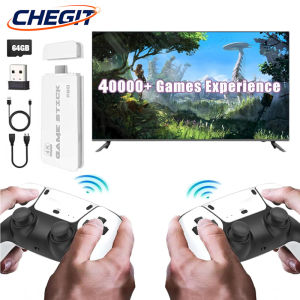
NEW M15 4K TV Game Stick 64GB Built-in 3/40000+ Retro Games Console with Wireless Gamepads 23+ Simulators for HD TV Gaming