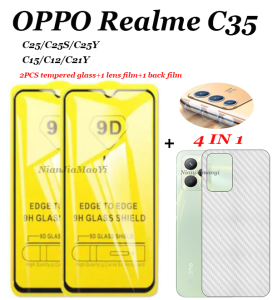
4in1 Realme C35 C25 C25S C25Y C21Y C11 2021 C15 C12 9D HD tempered glass 2pcs screen protector+lens protector+back film
4in1 Realme C35 C25 C25S C25Y C21Y C11 2021 C15 C12 9D HD tempered glass 2pcs screen protector+lens protector+back film
Understanding the 4in1 Realme Screen Protection Package
Realme devices have become increasingly popular among smartphone users, and protecting your device is essential to ensure its longevity. The 4in1 Realme screen protection package offers comprehensive coverage with 2pcs screen protector, lens protector, and HD back film. This article will guide you through the process of selecting the right protection package for your Realme device and provide step-by-step installation instructions.
What is Included in the Package?
The 4in1 Realme screen protection package includes:
- 2pcs tempered glass screen protector
- Lens protector
- HD back film
These components work together to provide all-around protection for your Realme device.
Compatibility with Realme C Series Devices
The 4in1 Realme screen protection package is compatible with various Realme C series devices, including the C35, C25, C25S, C25Y, C21Y, C11, C15, and C12 models released in 2021. This compatibility ensures that you can find the perfect protection package for your specific device.
How to Choose the Right Screen Protection for Your Device
To select the correct screen protection package for your Realme device, you must first identify your device model.
Identifying Your Realme Device Model
Your Realme device model can usually be found on the back of the phone or in the settings menu under 'About Phone.' Once you have identified your device model, proceed to select the appropriate screen protection package.
Selecting the Correct Screen Protection Package
When purchasing the 4in1 Realme screen protection package, ensure that you select the correct model to match your device. This will guarantee a perfect fit and optimal protection.
Installation Guide for 2pcs Screen Protector & Lens Protector & Back Film
To install the 4in1 Realme screen protection package, follow these step-by-step instructions:
Step-by-Step Installation Process
- Clean your device's screen, lens, and back thoroughly using a microfiber cloth and alcohol wipes.
- Carefully remove the protective film from the tempered glass screen protector.
- Align the screen protector with your device's screen and press gently to secure it in place.
- Repeat steps 2 and 3 for the second screen protector.
- Carefully remove the protective film from the lens protector and align it with your device's camera lens.
- Press gently to secure the lens protector in place.
- Finally, carefully remove the protective film from the HD back film and align it with your device's back.
- Press gently to secure the back film in place.
Tips for Successful Installation
- Work in a clean, dust-free environment to avoid trapping particles under the screen protector.
- Use a microfiber cloth and alcohol wipes to clean your device before installation.
- Take your time and work carefully to avoid damaging your device or the screen protection package.
Conclusion & Final Thoughts
In conclusion, the 4in1 Realme screen protection package offers comprehensive coverage for your Realme device, including 2pcs screen protector, lens protector, and HD back film. By selecting the correct package for your device model and following the step-by-step installation instructions, you can enjoy peace of mind knowing that your device is protected. Happy shopping!

FLYE STORE
You May Also Like

Insta360 X3 Expansion Frame & Metal Rabbit Cage Accessories
Ultra-Thin Hard Magnetic Attraction Ring Skin-Like Huawei Mate70 Case Full Protection for Men And Women Anti-Fingerprint Magic7
IBYWIND Screen Protector For Samsung Galaxy A52 & A52s: A Comprehensive Guide
KEBETEME Portable USB2.0 Audio Video Capture Card Adapter VHS To DVD Video Capture Converter For Win7/8/XP/Vista
high quality Vertical Battery Grip Holder for SONY A9II A7R4 A7M4 A7R5 A1 Cameras Battery storage
Xiange Li Honor 20 Youth Edition Silicone Case Black Frosted Anti-Fall Protection Cover Simple Design Suitable for Honor 20 pro Lite I
YIZHI FFG Fit For 25W Samsung charger USB-C Adapter Super Fast Charger Type C US Wall Charger for Android S20 S21 S22 Ultra S10

Handcrafted Adjustable Anti-Theft Phone Strap Daisy Flower Crochet Woolen Backpack Lanyard Pearl Strap Replacement Crossbody Womens Digital Accessories

Rivel 2 In 1 Clear Candy Color Wavy Border Phone Case For iPhone 15 14 13 12 11 Pro Max Plus XS XR X XS Max Transparent Fashion Phone Casing Simple Gentle Phone Cover Shell Hot Sale
KUKU Mini car charger charging head usb super fast charging car charger car charging CAMUDY
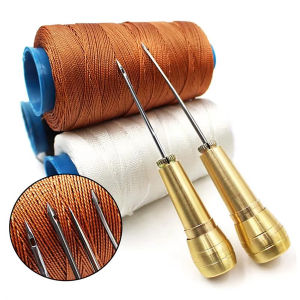
Leather Sewing Kit DIY Leather Sewing Awl Needle With Copper Handle Set Leather Canvas Tent Shoes Repairing Tool W/Nylon Thread