Raspberry Pi ES9038Q2m DAC audio decoder board HIFI coaxial fiber I2S analog 3B+4B 768K 32Bit DSD512
Raspberry Pi ES9038Q2m DAC audio decoder board HIFI coaxial fiber I2S analog 3B+4B 768K 32Bit DSD512
Introduction to Raspberry Pi ES9038Q2m DAC Board
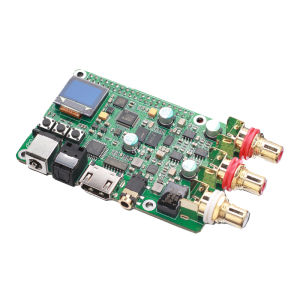
The Raspberry Pi ES9038Q2m DAC board is a high-quality audio decoding solution designed to enhance the sound quality of your Raspberry Pi projects. This board is equipped with the ES9038Q2M audio decoder chip, which supports high-resolution audio formats like 768K 32Bit DSD512. It offers both HIFI coaxial fiber and I2S analog outputs, making it compatible with a wide range of audio devices and applications.
Key Features & Specifications
- ES9038Q2m Audio Decoder: The heart of this DAC board is the ES9038Q2m audio decoder chip, which delivers exceptional sound quality by decoding high-resolution audio formats.
- HIFI Coaxial Fiber Output: This output supports digital audio transmission via coaxial cable, ensuring minimal signal loss and optimal sound quality.
- I2S Analog Output: The I2S analog output allows for direct connection to audio devices, providing a clean and clear audio signal.
- 3B+4B I2S Analog Support: The board supports both 3B and 4B I2S configurations, offering flexibility for different audio devices and applications.
- 768K 32Bit DSD512 Support: With support for high-resolution audio formats, the Raspberry Pi ES9038Q2m DAC board ensures that your audio projects sound their best.
Setting Up Your Raspberry Pi ES9038Q2m DAC Board
To get the most out of your Raspberry Pi ES9038Q2m DAC board, follow these steps to set up your audio outputs and configure the board for optimal performance.
Connecting HIFI Coaxial Fiber & I2S Analog Outputs
- HIFI Coaxial Fiber Output: Connect a coaxial cable from the DAC board to your audio device or amplifier. This output supports digital audio transmission, providing a clean and clear signal.
- I2S Analog Output: Connect the DAC board to your audio device using the appropriate I2S interface. This output provides a direct analog signal, which can be connected to speakers or headphones for optimal sound quality.
Configuring 3B+4B I2S Analog & 768K 32Bit DSD512
To configure the Raspberry Pi ES9038Q2m DAC board for optimal performance, follow these steps:
- Select the appropriate I2S configuration: Depending on your audio device or application, select either 3B or 4B I2S configuration.
- Configure the audio settings: Adjust the audio settings on your Raspberry Pi to match the selected I2S configuration and desired audio format (e.g., 768K 32Bit DSD512).
- Test the audio output: Play some audio files to ensure that the board is working correctly and producing high-quality sound.
Maximizing Audio Performance with ES9038Q2m Audio Decoder
To achieve the best possible sound quality with your Raspberry Pi ES9038Q2m DAC board, follow these tips:
Optimizing Audio Settings for Best Sound Quality
- Adjust the audio settings: Fine-tune the audio settings on your Raspberry Pi to match the capabilities of the ES9038Q2m audio decoder chip.
- Use high-quality audio files: To fully appreciate the capabilities of the ES9038Q2m audio decoder, use high-resolution audio files in formats like 768K 32Bit DSD512.
Troubleshooting Common Audio Issues
If you encounter audio issues with your Raspberry Pi ES9038Q2m DAC board, try these troubleshooting steps:
- Check the connections: Ensure that all cables and connections are secure and properly connected.
- Verify the audio settings: Double-check the audio settings on your Raspberry Pi to ensure they match the capabilities of the ES9038Q2m audio decoder chip.
- Restart the system: Sometimes, simply restarting your Raspberry Pi can resolve audio issues.

Yisunder.sun
Review

You May Also Like
Makita Three-String Wood Model 12V Lithium Electric Drill & Rechargeable Drill Case: A Comprehensive Guide

Color Change Tile Paint Coating Epoxy Colored Sand Floor Paint Waterproof Wear Resistant Floor Tile Renovation
Mini Table Saw Spindle Bearing Seat DIY Woodworking Cutting Spindle Table Saw Spindle Assembly Ball Bearing Spindle 895 Motor

Portable 5L Plug-in Electric Sprayer: A Comprehensive Guide
SAIVXIAN Box Optical Fiber End Face Cleaning Box FTTH Fiber Wiping Tool Pigtail Cleaner Cassette Fiber Tools
High-precision fiber optic cleaver kit tungsten steel blade 3-in-1 fixture suitable for 0.25/0.9mm fiber optic cold splicing/hot-melt fiber optic cutting tool

50/30 Sets Stainless Steel Corner Brace / L-Shape Joint Bracket with Screws / 90 Degree Right Angle Bracket / for Furniture Cabinet Drawer Shelves

Safety Jogger DESERT S1P Safety Shoes High Cut Steel Toecap Puncture Resistant Slip Resistant Antistatic Shoe (Khaki)

Focus Wide Switch 2-way Set: Home Automation Control Simplified

Stainless Steel 304 Hex Bolt Screw Nut Set: A Comprehensive Guide
Mini Drill Cordless Rotary Tool 3.7V USB Handheld Electric Drill Electric Carving Pen for Sharpening Nails Jade Wood Engraving